
When browsing through Amazon, you might wonder which product to click on. Consider two products: the Morento Air Purifier and the Alfoia Air Purifier. The Alfoia Air Purifier has only 621 ratings and no other attributes, while the Morento Air Purifier boasts a Limited Time Deal badge and 4,338 ratings. Naturally, the Morento Air Purifier appears more attractive to potential buyers. But how can sellers earn these valuable Amazon badges?
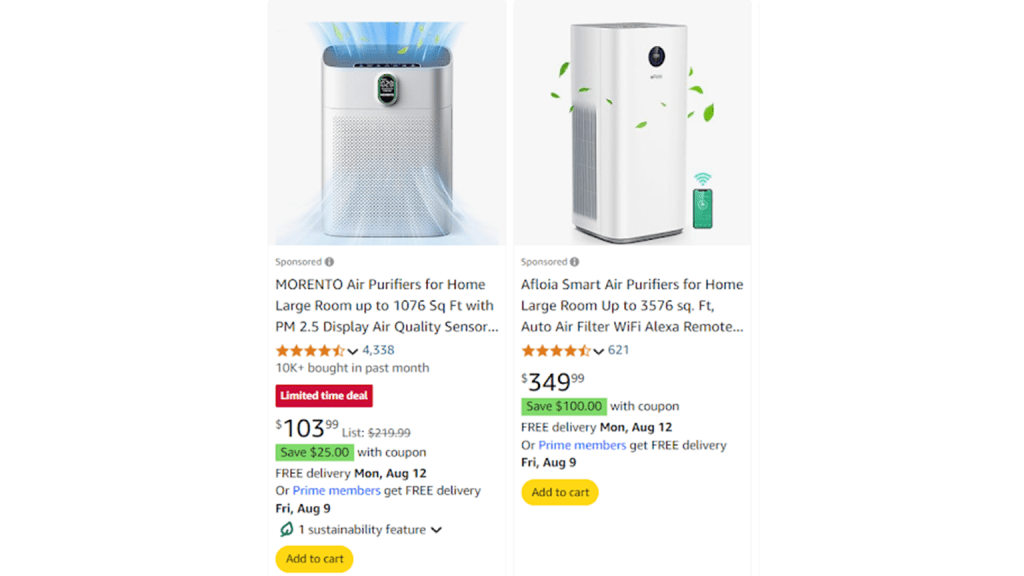
Naturally, the Morento Air Purifier appears more attractive to potential buyers. But how can sellers earn these valuable Amazon badges?
The answer lies in a combination of factors such as optimized content, an effective Amazon advertising strategy, and achieving high sales volume.
Let’s dive into the different Amazon badges available for sellers and the criteria to earn them.
- Amazon Best-Seller Badge
- Amazon Choice Badge
- Amazon New Release Badge
- Amazon Climate Pledge Friendly Badge
- Amazon Prime Badge
- Limited-Time Deal or Deal of the Day Badge
- Extra Savings, Coupons, and Discounts
Let’s have a look at them now.
Amazon Best-Seller Badge
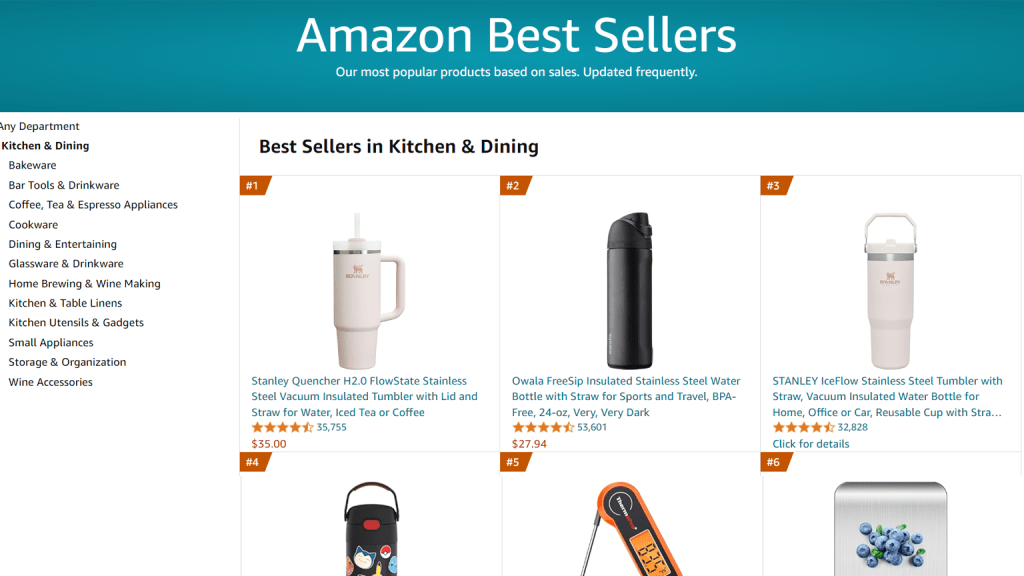
The Amazon Best-Seller Badge is a prestigious and well-recognized orange badge awarded to the top 100 best-selling products in any given category or subcategory. This badge serves as a powerful visual indicator that can significantly enhance customer trust in your product on both category pages and product detail pages.
Understanding the Best-Seller Badge
The criteria for the Best-Seller Badge vary across Amazon’s different marketplaces. For instance, the best-selling toys on Amazon US might not be the same as those on Amazon UK. The list of best-sellers is updated hourly based purely on sales data, meaning you have 24 chances each day to earn or lose the badge. Interestingly, your eligibility for the badge is unaffected by product and seller reviews, making it possible to obtain it even without realizing it.
How to earn the Amazon Best Seller Badge?
Securing the Amazon Best-Seller Badge involves several strategic actions aimed at boosting your organic sales and optimizing your product listings. Here are key steps to help you earn this coveted badge:
Optimize Your Product Listing:
- SEO: Ensure your product titles, descriptions, and bullet points are optimized with relevant keywords.
- Product Category Relevance: Place your product in the most accurate category to reach the right audience.
- Product Details: Provide clear, detailed, and accurate information about your product.
- Images and Videos: Use high-quality images and videos to showcase your product effectively.
Pricing Strategy:
- Regularly review and adjust your pricing to remain competitive while maintaining profitability.
Leverage Tools for Optimization:
- Consider using tools like SellerApp’s Amazon Listing Quality tool to enhance the quality and relevance of your listings.
Effective Marketing Efforts:
- PPC Campaigns: Run targeted Pay-Per-Click campaigns to increase visibility and drive sales.
- Conversion Rate: Focus on improving your product’s conversion rate by enhancing the customer experience and providing compelling offers.
Maintain Consistent Sales:
- Build a strong sales history by continually promoting your product and ensuring steady sales. This consistency is crucial for maintaining the Best-Seller Badge.
Amazon Choice Badge
The Amazon Choice Badge is a badge that is given to Amazon products that shows the best match for the keywords that the customers are using. The badge has prominent recognition on category pages and product detail pages. This badge is keyword-specific, thus your listing can display the Amazon’s Choice badge simultaneously for several keywords.
Understanding the Amazon Climate Pledge Friendly Badge
For instance, if you search for a “lotion” and for “vegan lotion” The Amazon Choice badge is given to these two keywords because those are the keywords that customers frequently use. This product also needs to have a strong BSR and include relevant yet popular keywords in the listing.
When the company released Alexa in 2015, more customers began using the voice shopping capability to look for product recommendations on Amazon’s platform. However, the problem was that voice search made it difficult to scan through the product lists and discover the best option.
Later that year, the Choice Badge was made available to customers as a means to simplify voice search and assist them in finding what they’re looking for. It’s a much quicker and more practical method to shop, improving the user experience and increasing profitability for Amazon.
This Amazon Choice Badge can be seen in the upper left corner of the product’s feature image and is also visible just below the product’s title, on the listing page.
How to earn the Amazon Choice Badge
Earning the Amazon Choice Badge is a goal for many sellers, as it enhances product credibility, increases sales, and boosts profitability. Here are the key factors to focus on:
High Customer Ratings:
- Ensure your product maintains a high average rating from customers. Excellent reviews are crucial for earning this badge.
Keyword Optimization:
- Optimize your product listing for frequently searched keywords. Include relevant and popular keywords in your titles, descriptions, and bullet points.
High Conversion Rate:
- Aim for a high conversion rate by providing a compelling product page, attractive offers, and exceptional customer service.
Amazon Prime Eligibility:
- Make sure your product qualifies for Amazon Prime, ensuring quick and reliable delivery for customers.
Amazon New Release Badge
The Amazon New Release Badge is awarded to newly listed products that achieve a high sales velocity in the initial days of their launch. This badge is available for the first 90 days after the product is listed, highlighting it as a trending and noteworthy item for potential buyers.
Understanding the Amazon Climate Pledge Friendly Badge
The New Release Badge helps new products gain visibility and credibility by showcasing their popularity right from the start. To leverage this badge, it’s essential to ensure that your product stands out and captures significant attention quickly.
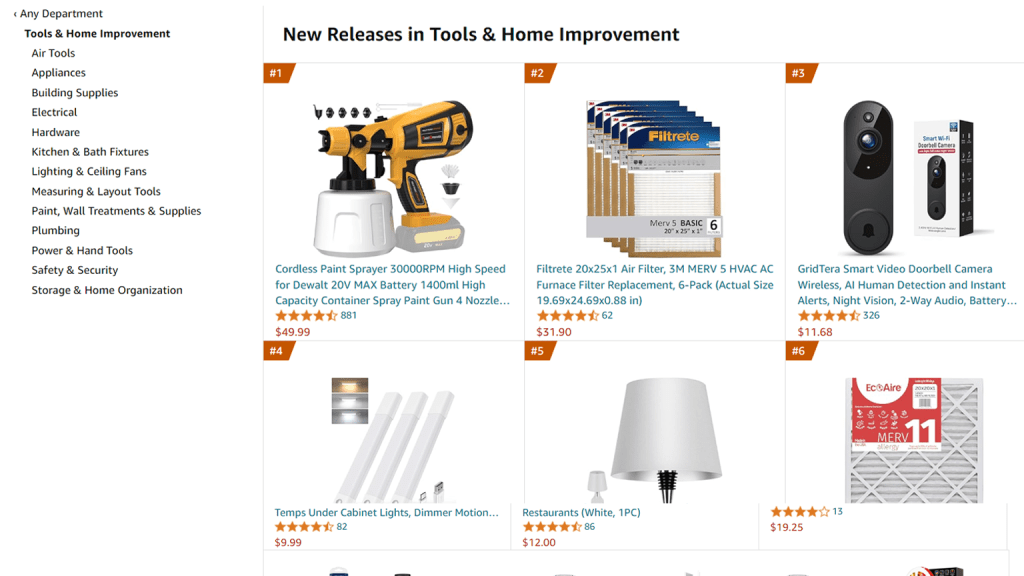
How to earn the New Release Badge on Amazon
To secure the Amazon New Release Badge, follow these strategies:
Optimize Your Product Listing:
- Detailed Product Information: Ensure that your new product listing includes comprehensive and accurate details. Look at any of your existing listings that have achieved Best Seller status and replicate the level of detail in your new listing.
- Primary Keyword Ranking: Aim to rank on the first page for your primary keyword. This increases visibility and helps attract more potential buyers.
Increase Organic Sales:
- Optimize your product listing to attract organic traffic. This includes using relevant keywords, high-quality images, and compelling product descriptions.
Build Momentum with Marketing:
- PPC Advertisements: Run targeted pay-per-click (PPC) campaigns to boost visibility and drive sales.
- Social Media Promotion: Leverage your social media channels to create buzz around your new product.
- Email Marketing: Use email campaigns to inform your customer base about the new release.
- Other Marketing Techniques: Utilize various marketing strategies to increase traffic to your product listing and boost sales.
Achieve High Sales Velocity:
- Your primary goal is to outsell competitors and generate rapid sales. Effective marketing and an optimized listing are key to building the necessary sales momentum.
Maintain Front-Page Visibility:
- After launching, strive to keep your product on the first page of search results. This sustained visibility helps in continuously attracting visitors and potential buyers.
Amazon Climate Pledge Friendly Badge
The Amazon Climate Pledge Friendly Badge is a mark of environmental sustainability, awarded to products that meet specific eco-friendly standards. This badge reflects Amazon’s commitment to promoting environmentally responsible products and connects eco-conscious customers with businesses that share these values.
Understanding the Amazon Climate Pledge Friendly Badge
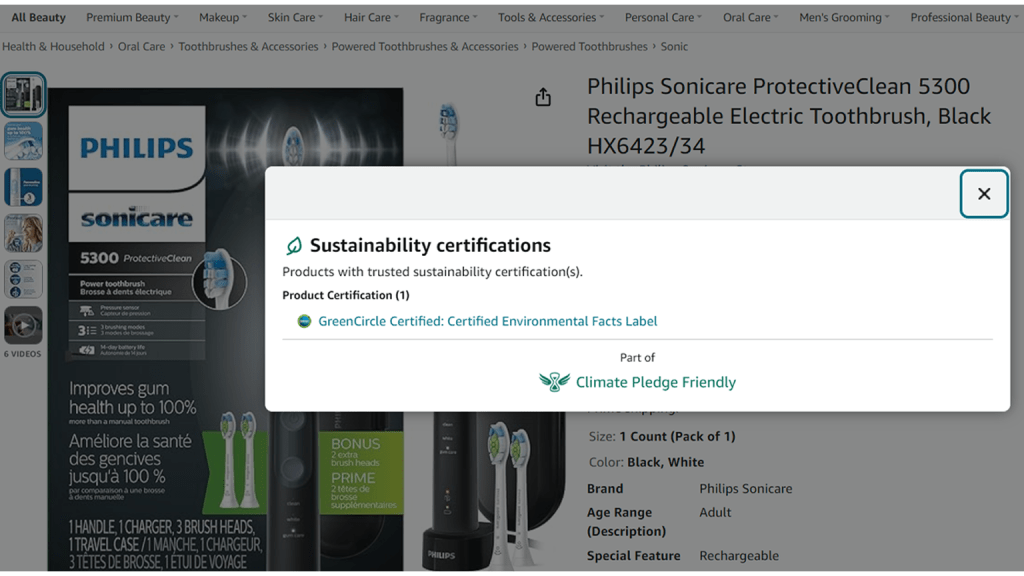
The Climate Pledge Friendly Badge signifies that a product has been certified to meet rigorous sustainability standards. Customers can click on the badge to view the certifications and learn how the product contributes to environmental preservation. Additionally, these products are featured in a separate list and can be filtered by shoppers specifically looking for Climate Pledge Friendly items.

How to earn the Amazon Climate Pledge Friendly Badge
To earn the Amazon Climate Pledge Friendly Badge, follow these steps:
Obtain Sustainability Certifications:
- Products must be certified by one or more of Amazon’s 18 sustainability certification partners. These partners include well-known organizations like Energy Star, Fair Trade, and the Forest Stewardship Council (FSC).
- Once your product is certified by any of these partners, Amazon will automatically display the Climate Pledge Friendly Badge on the product listing.
Apply for the Badge (if necessary):
- If your product meets the certification criteria but does not display the badge, you can request its addition by opening a case in Seller Central or Vendor Central.
Amazon’s “Compact by Design” Certification:
- In addition to third-party certifications, Amazon offers its own “Compact by Design” certification. This certification focuses on unit efficiency and promotes environmentally friendly and compact packaging.
- Products that achieve this certification are also eligible for the Climate Pledge Friendly Badge.
Ensure Compliance and Visibility:
- Make sure your product listings are updated with all necessary certification details to ensure compliance and visibility of the badge.
Amazon Prime Badge
The Amazon Prime badge is a highly recognizable icon indicating a product’s eligibility for Amazon Prime’s fast and free two-day shipping. This exclusive service has transformed online shopping, offering unparalleled convenience and speed. With over 150 million Prime members worldwide, the Prime badge is a powerful tool for sellers to attract and retain customers.
Understanding the Amazon Prime Badge
When a product displays the Prime badge, it assures customers that their purchase will be delivered quickly and efficiently. In today’s fast-paced world, consumers highly value convenience and instant gratification. The Prime badge not only enhances the product’s appeal but also taps into the vast customer base of Prime members, significantly increasing the chances of making sales.
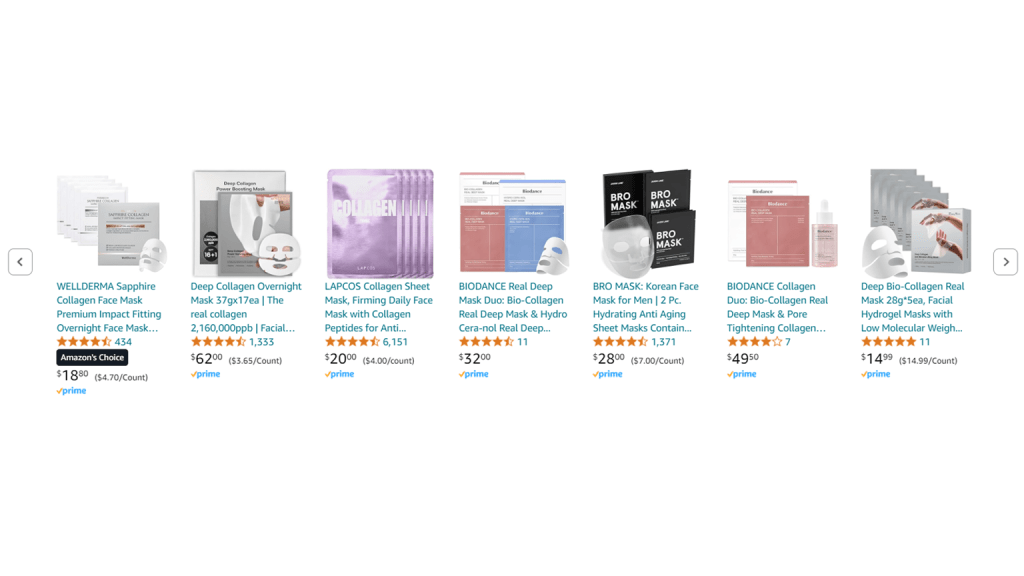
How to earn the Amazon Prime Badge
To earn the Amazon Prime Badge, follow these steps:
Qualify for Seller Fulfilled Prime (SFP):
- Apply for the Seller Fulfilled Prime program, which allows sellers to fulfill orders directly from their warehouses while still offering the benefits of Prime shipping.
Complete the Trial Period:
- Successfully complete a trial period during which you must demonstrate your ability to meet Amazon’s stringent Prime fulfillment requirements, including fast shipping, reliable delivery, and excellent customer service.
- During this trial period, your performance will be closely monitored to ensure you can consistently meet the high standards expected of Prime sellers.
Maintain Prime Fulfillment Excellence:
- After completing the trial period, you will be automatically registered in Seller Fulfilled Prime.
- Your registered ASINs (Amazon Standard Identification Numbers) will then display the Prime badge to customers, signifying that your products are eligible for Prime benefits.
Limited-Time Deal or Deal of the Day Badge
The Limited-Time Deal and Deal of the Day badges are special indicators that highlight exclusive offers available for a short period. These deals are prominently featured on Amazon’s highly trafficked Today’s Deals page, attracting significant customer attention.
Understanding the Badges
- Limited-Time Deal Badge: This badge appears as a red banner with the text “Limited Time Deal” between the product’s star rating and price. It is typically associated with limited-stock deals that run for up to 7 days.
- Deal of the Day Badge: Displayed as an orange badge above the item’s price, this badge is reserved for the best daily offers. Products with this badge are featured on Amazon’s Today’s Deals page, making them highly visible to shoppers.

How to earn a Limited-Time Deal or Deal of the Day Badge
To secure either the Limited-Time Deal or Deal of the Day badge, follow these steps:
Ensure Eligibility for Deals Campaigns:
- Verify that your products meet the criteria for participating in a Deals campaign. Key requirements include:
- The product must be Prime eligible.
- It must have a minimum of a three-star rating.
- The product should be in brand-new condition.
Create a 7-Day Deal:
- A 7-day deal activates the Limited-Time Deal ribbon on your product listing, making it stand out to potential buyers. This deal typically runs for up to 7 days, allowing you to attract customers over a longer period.
Consider Amazon Lightning Deals:
- An Amazon Lightning Deal is a flash sale that usually lasts for four to six hours. These deals are also featured on the Amazon Deals page and can be an effective way to boost sales quickly.
Achieve Deal of the Day Status:
- The Deal of the Day badge is awarded to the best offers of the day. To earn this badge, ensure that your deal is compelling and offers significant value to customers. Amazon selects the Deal of the Day based on what it considers the best offer for its customers.
Set Up Deals in Seller Central:
- Log in to Amazon Seller Central and navigate to the Advertising section. Here, you can create and manage your deals. Remember, you can schedule both a 7-day deal and a Lightning Deal for the same product, as long as they are planned for different days.
Extra Savings, Coupons, and Discounts
Amazon offers a variety of badges to highlight discounted products, making them more attractive to potential buyers. When you offer a discount on your product, it will display with a special badge—typically an orange ribbon that reads “Discount” or, if the customer is a Prime member, a green ribbon.
Understanding Extra Savings, Coupons, and Discounts Badges
These badges are designed to catch the eye of shoppers looking for deals. They signal that a product is available at a reduced price, encouraging customers to take advantage of the offer.
- Extra Savings Badge: Appears when you offer additional savings on a product, such as through a sale or special promotion.
- Coupons Badge: Displays when you provide a coupon that customers can apply at checkout for a percentage-off or money-off discount.
- Discount Badge: Highlights general discounts or price reductions on your products.
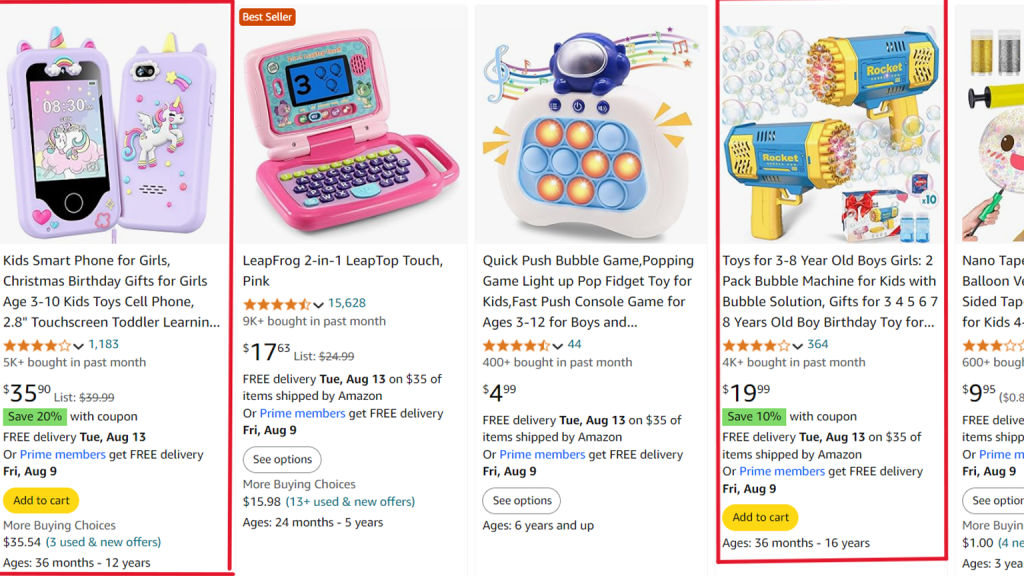
How to Earn Extra Savings, Coupons, and Discounts Badges
To add these badges to your product listings, follow these steps:
Set Up Coupons and Discounts in Seller Central:
- Log in to Amazon Seller Central, and under the Advertising section, you can create and manage coupons and discounts.
- You can choose to offer either a percentage-off or a money-off discount. While money-off coupons are often easier for customers to understand, percentage-off coupons can sometimes seem to offer better value.
Manage Fees:
- Keep in mind that coupons are a paid advertising feature. Amazon will charge a fee each time a customer redeems your coupon. Plan your discount strategy accordingly to ensure it aligns with your overall marketing budget.
Combine Multiple Savings Opportunities:
- To maximize appeal, you can stack savings by offering multiple discounts simultaneously. For example, you can add a Coupon Badge, Extra Savings Badge, and Deals Badge to your listing at the same time. This encourages customers to combine savings, making your product even more enticing.
Monitor and Optimize:
- Regularly monitor the performance of your coupons and discounts through Seller Central. Adjust your offers as needed to ensure they remain competitive and effective in driving sales.
Understanding and leveraging Amazon badges is essential for any eCommerce business looking to succeed on the platform. These badges not only enhance your product’s visibility but also build trust and credibility with potential buyers. From the coveted Amazon Best-Seller Badge to the eco-conscious Climate Pledge Friendly Badge, each badge serves as a powerful tool to differentiate your products and drive sales. By optimizing your listings, meeting the necessary criteria, and strategically using badges like Limited-Time Deals, Prime, and Coupons, you can significantly boost your brand’s presence on Amazon.
We at u-commerce specialize in Amazon-related services and help businesses navigate these complexities, ensuring your products are well-positioned to earn these valuable badges. Whether it’s optimizing your product listings, managing promotions, or enhancing customer satisfaction, we are here to guide you through every step of the process. By partnering with us, you can unlock the full potential of Amazon badges, driving greater success and profitability for your business.

Very good información!.