

Amazon’s generative AI tool is a groundbreaking innovation, providing sellers with a powerful way to create product listings. This tool leverages large language models to generate high-quality content based on brief descriptions or just a few keywords from the seller.
Using Amazon’s generative AI tool, sellers can produce accurate, engaging, and optimized Amazon listings, leading to better visibility, increased sales, and enhanced customer experiences. This tool is designed to streamline the listing creation process, reducing the need for sellers to input specific product details manually. As a result, customers are presented with more complete, consistent, and engaging product information.
This comprehensive guide will walk you through Amazon’s generative AI tool, showing you how to create high-quality product pages with less effort. This will ultimately increase visibility, sales, and customer satisfaction.
Amazon Generative AI for Product Listings
Amazon continues to enhance its suite of tools, refining features for product creation and listing optimization. In theory, sellers can now provide Amazon with just a few words to describe their product, and the generative AI within Seller Central will generate compelling product titles, descriptions, and other key details. Users can also create new listings using external website links, images, and more as starting points.
While maintaining a product catalog and listing new items has become more efficient compared to five years ago, the quality of generative AI outputs can vary. Amazon does not disclose the workings of its AI. Is it drawing on high-converting ad \terms from top products? Or from frequently used words in competitors’ listings? Is it enhancing search visibility, or simply pulling from a random pool of phrases? These are questions that remain unanswered.
Common Issues with Generative AI on Amazon
While generative AI offers numerous benefits, there are also pitfalls to be aware of:
- Accuracy: As with any AI tool, it’s essential to double-check for accuracy. While the AI can provide a good starting point or structure, the content it generates is not guaranteed to be usable as-is. The AI might introduce features, colors, or sizes that don’t exist, and if it’s used to generate images, the results can be even more peculiar. For example, a tennis gear product might end up with golf balls in the image or a basketball court in the background due to the AI pulling generic sports-related imagery. AI-generated human features can also appear unrealistic, so caution is advised.
- Policy Compliance: Ironically, Amazon’s AI doesn’t always adhere to Amazon’s policies. Don’t assume that AI-generated text or images will be fully compliant. For instance, some text might include competitor brand names, which, if trademarked, could get your products flagged or suspended. Pay close attention to category-specific guidelines and ensure your listings meet all requirements.
- SEO Concerns: Amazon doesn’t share the methodology behind its generative AI. Therefore, don’t assume that AI-generated content is optimized for search engines or appeals to potential buyers. Sellers should use external keyword software, Amazon Advertising data, and customer insights to create rich, SEO-optimized product pages.
- Tone and Style Inconsistencies: Unlike a human, generative AI may struggle to fully grasp your brand’s tone and style guidelines. It’s unlikely to capture your unique selling points or deliver the specific vibe that your well-branded business has established.
Benefits of Using Amazon’s Generative AI for Creating Listings
Despite some drawbacks, Amazon’s generative AI offers several key benefits:
- Efficiency: Amazon’s generative AI tool can quickly generate product listings by analyzing a seller’s existing direct-to-consumer website. This saves time and effort, allowing sellers to focus on other business aspects, such as product sourcing and marketing.
- Consistency: AI-generated descriptions ensure consistency across a seller’s product catalog, helping maintain a professional image and making it easier for customers to navigate.
- Professional Appearance: AI-generated content often has a polished and professional look, boosting the credibility of sellers, especially small businesses, and enhancing the perception of their products.
- Enhanced Product Details: AI can analyze vast amounts of data and customer reviews to include relevant and detailed information, helping customers make more informed purchase decisions.
- SEO Optimization: Amazon’s AI considers SEO principles when generating product titles, descriptions, or bullet points, making the content more likely to rank well in Amazon’s search results and increasing visibility to potential buyers.
- Improved Accuracy: AI-generated content is typically clearer, more accurate, and more detailed, aiding in product visibility and saving sellers time.
Amazon’s AI-driven product title, description, bullet points, and image generation offer sellers the opportunity to save time, enhance the quality of their listings, improve the customer shopping experience, and ultimately boost sales.
How Amazon’s Generative AI Can Assist in Creating Amazon Product Listings
Amazon’s generative AI tool is a powerful resource for sellers, offering capabilities that streamline the creation of product listings. One of the key features is its ability to generate product titles, descriptions, and bullet points based on just a few words provided by the seller.
This technology utilizes large language models to craft detailed and accurate product information, helping sellers create listings more quickly and precisely, ultimately making it easier for customers to find products.
Step-by-Step Guide to Creating Product Titles, Descriptions, and Bullet Points with Amazon’s Generative AI:
1. Log in to Amazon Seller Central:
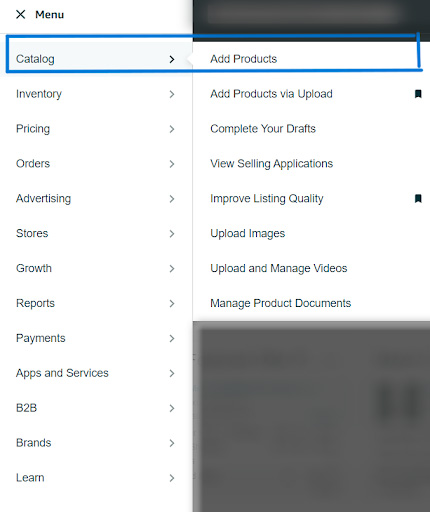
- Begin by logging in to your Amazon Seller Central account. Navigate to the Catalog section and select Add Products.
2. Choose Your Method:
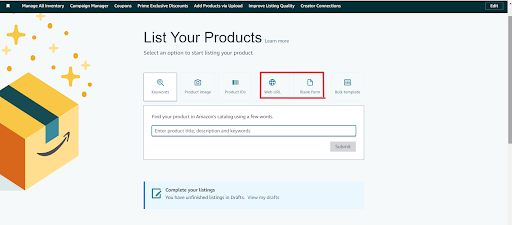
- On the next page, you’ll see options like Keywords, Product IDs, Web URLs, Blank Forms, and Bulk Templates.
- The Web URLs and Blank Forms options are AI-powered tools for generating product titles, descriptions, and bullet points.
3. Using Web URLs:
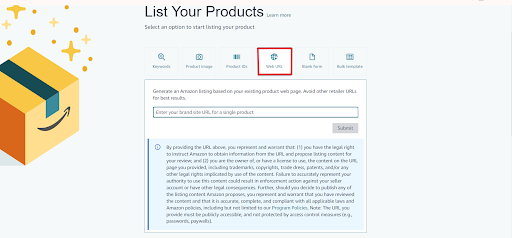
- If you choose the Web URLs option, you’ll need to provide the URL of your existing direct-to-consumer website.
- Amazon’s Generative AI will analyze the content on your website to produce product titles, descriptions, and bullet points.
- You’ll also need to fill out forms like Description, Product Details, Offer, and Safety & Compliance.
- Once you’re satisfied with the AI-generated content, click Submit to list your product on Amazon.
4. Using Blank Forms:
- If you prefer the Blank Forms option, you’ll enter a brief description or a few keywords about the product in the provided input field.

- The AI tool will then generate high-quality, detailed product titles, descriptions, and bullet points based on the information you provided.
- Review the content to ensure it accurately represents your product and meets Amazon’s listing guidelines.
- If necessary, make edits to the product title, description, and bullet points to ensure clarity, conciseness, and appeal.
- Once satisfied, submit the content to Amazon for publication.
Using these AI tools can help you save time, create consistent listings, and enhance the overall customer shopping experience on Amazon.
Image Generation with Amazon’s Generative AI
In addition to text, Amazon’s generative AI can also assist with image creation, particularly within Sponsored brand campaigns.
Step-by-Step Guide to Creating Images with Amazon’s Generative AI Image Generator:
1. Log in to Amazon Seller Central:
- Start by logging in to your Amazon Seller Central account. Navigate to the Advertising section and select Campaign Manager.

2. Create a Sponsored Brands Campaign:
- Within Campaign Manager, click Create Campaign and select the Sponsored Brands campaign option.

3. Access the Creative Section:
- In the creative section of the campaign setup, click on Custom Images.
4. Generate an AI Image:
- Select Add Image, and you will see three different options. Choose an AI-generated image.
- Add the product for which you want to generate an image.
- Click the Generate button, and the tool will use generative AI to create a set of lifestyle and brand-themed images based on the product details.
- You can also enter short text prompts to refine the image further. Additionally, you can choose multiple versions to optimize performance.
- Once you’re satisfied with the image, save it and add it to your Sponsored Brands campaign creative assets.
Note: The image generation feature is currently in beta and available to select advertisers for their Sponsored Brands campaigns. Amazon Ads continuously improves the experience based on customer feedback and will expand availability over time.
Final Thoughts on Amazon’s Generative AI for Sellers
At u-commerce, we understand the challenges sellers face in optimizing their Amazon listings. Amazon’s generative AI tool offers a powerful solution, helping you create compelling titles, descriptions, bullet points, and images with greater efficiency and consistency. By integrating this cutting-edge technology into your e-commerce strategy, you can streamline your Amazon listing creation process, enhance visibility, and improve the customer experience—all crucial factors in driving sales. With our expertise at u-commerce, we’re here to help you harness the full potential of Amazon’s AI, ensuring your products stand out in the competitive marketplace. Together, we can take your Amazon business to new heights.