

The Ultimate Guide To Reselling Returned Items on Amazon
In the fast-paced world of e-commerce, maximizing profits and diversifying inventory is key to success. One often overlooked strategy is selling returned goods on Amazon. While some may view returns as a challenge, savvy sellers recognize these items’ untapped potential. By reselling returned goods, you can reduce costs, expand your product offerings, and appeal to a broader customer base—all while contributing to a more sustainable business model. Embracing this approach allows you to turn potential losses into profitable opportunities on one of the world’s largest online marketplaces.
The Benefits of Selling Amazon Returns
When it comes to selling on Amazon, one often overlooked strategy is incorporating returned items into your inventory. Yes, Amazon resells returned items, which can offer several significant advantages for your business.
Cost Reduction
Acquiring returned items at a fraction of their original retail price enables you to offer competitive pricing while preserving healthy profit margins. This is particularly beneficial for products with high demand but low profit margins when sold as new. Integrating returned items into your inventory allows you to expand your product range without compromising profitability.
Diversified Inventory
Returned goods provide an opportunity to diversify your inventory, potentially attracting new customers. A broader product selection can help you establish a strong presence in a particular niche or appeal to a wider audience. Offering a variety of products increases your chances of capturing customers who are searching for specific items that may be hard to find elsewhere.
Minimized Environmental Impact
By giving returned items a second life, you’re not only boosting your business but also contributing to more sustainable practices. This approach helps reduce overall waste and minimizes the environmental impact of disposed items. According to the Environmental Protection Agency (EPA), millions of tons of electronics and other goods are discarded in landfills each year, wasting valuable resources. By reselling returns, you play a part in reducing this waste.
Analyzing Returned Products

Amazon regularly holds liquidation sales, offering bulk quantities of returned items at significantly reduced prices. These sales are an excellent way to quickly acquire a large inventory. However, because these items are sold in bulk, it’s essential to carefully evaluate their condition and potential resale value.
Several third-party companies specialize in acquiring and reselling liquidated merchandise, including Amazon returns. These companies typically offer a more curated selection of returned items, often categorized by product type or condition. While the prices from these companies may be slightly higher than those at Amazon Liquidations, the benefit lies in the convenience of dealing with a more manageable selection.
Another strategy involves using online tools and resources to identify returned items listed by other sellers on Amazon at competitive prices. You can generate a profit by purchasing these items and reselling them at a higher price point. However, effective retail arbitrage requires a solid understanding of market trends, pricing strategies, and fulfillment logistics.
Inspecting Returned Items
Once you’ve acquired returned goods, conducting a meticulous inspection is crucial.
Verify Completeness: Ensure that all original components and accessories are present. Missing items can significantly decrease an item’s resale value. Consider creating a checklist tailored to the specific product category to avoid overlooking essential components. For example, a checklist for cameras might include lenses, chargers, battery packs, and memory cards.
Test Product Functionality: Thoroughly test the item to ensure it operates as intended. This includes checking for any defects or damage. Pay close attention to common issues associated with the specific product type.
Check for Cosmetic Damage: Inspect the item for cosmetic blemishes, such as scratches or dents. These factors will influence your pricing strategy and listing details. Take high-resolution photographs of any imperfections to accurately represent the item’s condition in your product listing.
Look Into Replacement Parts Availability: For some items, the availability of replacement parts can be the deciding factor between a profitable and unprofitable resale. Identify any commonly missing or damaged parts beforehand to determine whether sourcing replacements is feasible. Consider the cost, availability, and ease of installation when making this decision.
How To Resell Returned Items on Amazon
Once your returned items have been thoroughly inspected and prepared for resale, it’s time to create compelling listings on the Amazon platform.
Engaging Product Titles and Descriptions
Craft informative, keyword-rich titles that accurately reflect the product’s brand, model, and key features. Be transparent about the item’s condition in the product description, including any imperfections or limitations. Honesty builds trust with potential buyers and reduces the likelihood of returns.
Professional Product Photography
Invest in professional product photography to showcase the item’s condition from various angles. Use a well-lit background and ensure the product is in sharp focus. Including lifestyle photos that demonstrate how the product can be used in real-world settings can also be beneficial. High-quality visuals are crucial for capturing attention and accurately representing the product.
Strategic Pricing Approach
Conduct thorough market research to determine the current selling price for similar items in comparable conditions. Use Amazon’s pricing tools and competitor listings to identify a competitive price point that allows you to generate a profit while remaining attractive to buyers. Consider implementing dynamic pricing strategies to adjust prices based on market fluctuations and competitor activity.
Shipping And Fulfillment Plan
Decide whether you will handle order fulfillment yourself (Seller Fulfilled Prime or Merchant Fulfilled) or utilize Amazon’s Fulfillment by Amazon (FBA) service. FBA offers storage, packaging, shipping, and customer service, potentially streamlining your fulfillment process and increasing your visibility to Prime members. However, FBA does incur additional fees. Weigh the pros and cons of each approach based on your inventory volume, storage space, budget, and desired level of control over fulfillment.
Excellent Customer Support

Providing excellent customer service is essential for building trust and encouraging repeat business. Respond promptly to customer inquiries, address concerns professionally, and strive to resolve issues efficiently. Consider offering a clear return policy to mitigate buyer hesitation.
Final Thoughts
Incorporating returned goods into your Amazon selling strategy can be a gamechanger for your e-commerce business. We at u-commerce understand the importance of maximizing profitability while offering diverse and sustainable product options. By carefully sourcing, inspecting, and reselling returned items, you can not only expand your inventory and attract a broader customer base but also contribute to more eco-friendly business practices. Our expertise in Amazon SEO and strategic Amazon listing optimization ensures that your products reach the right audience, driving sales and fostering long-term growth. Embracing this approach allows your business to thrive in a competitive marketplace, turning challenges into profitable opportunities.

Amazon Product Launching Ideas in 2025: Tap into Amazon Best Sellers Lists
Are you a new Amazon FBA seller in the year 2025? Or a regular regular, but looking for new Amazon product launch
ideas? You have landed at the right place. In this blog, you will discover the best Amazon product categories to sell online with some tools and strategies.
The continuous journey of selling online can be profitable, hence you need to make sure your selling channel continues and stays throughout the year to get a good amount of annual sales and annual profits in the end.
However, how do you decide what to offer on Amazon? It can be difficult to determine which products could be profitable with so many available. We’ll walk you through the process of looking through Amazon Best Sellers lists to identify best-selling products and come up with ideas for new products in this post.
Let’s talk about some methods and resources for identifying the best products to provide and driving internet sales in 2025.
Four methods for generating product concepts

1. Add your unique touch to popular items
Consider whether you could make a better product than what is already selling well if you have a particular interest in a particular Amazon product category or type. You can get original product ideas and decide what to sell in the Amazon store by answering this question. Try these tactics:
- Seek products with higher demand and less competition: You may come across products with strong demand, but how fierce is the competition? An idea may be obtained from the number of reviews. Products that are in great demand but have fewer reviews typically mean there is less competition and more room for you to enter the market.
- Utilize customer feedback to direct product enhancements: Look through Amazon product reviews to see what people have to say. Jot down the benefits and drawbacks, then search for opportunities to offer something unique that will surpass the expectations of your customers.
- Be imaginative: Is there a way you could differentiate a popular product? Can you sell the goods year-round? Could you introduce a higher-quality product?
If you have trouble obtaining the products, putting them online, or shipping them to customers, then even the best product ideas won’t make a profit on the internet.
When you first begin your e-commerce journey, make sure to:
- Examine consumer demand and affordability.
- Select goods that are simpler to ship and package.
- Think about goods that have a lengthy shelf life.
- Consider your branding options.
- Items on the prohibited items list should be avoided if you wish to sell on Amazon.com.
2. Keep an eye on KPIs like sales
If you’ve selected the best products to sell online, how can you tell? There’s always space for improvement, so keep an eye on store performance and keep searching for ways to increase product sales on the Amazon store.
You may get the infrastructure and insights you need to understand what’s selling with the help of the correct e-commerce solution. You may use Seller Central as an Amazon seller to keep an eye on sales, the health of your brand, customer reviews, and more:
- View associated stats and the health of your account.
- The Amazon Seller Health Guide can be downloaded.
- With Brand Analytics dashboards, you can monitor performance metrics, receive sales statistics, and track analytics.
- To preserve favorable ratings and comments, keep an eye on client feedback and adhere to best practices.
3. Draw inspiration from successful company cases.
Whatever your interests are, whether it’s handcrafted art, fitness gear, or clothing, you can probably convert it into a successful business by identifying the top products to sell on Amazon.com.
View these internet venture concepts from prosperous business owners who leveraged their experience to create profitable ventures.
4. Carry out product analysis
There are numerous products available. Which ones could be most beneficial to your online store? Give yourself enough time to experiment and try other approaches. Find the greatest products to sell online by conducting product research. One may:
- Investigate and verify your company concept.
- Speak with prospective clients.
- Use e-commerce resources to look through available items.
Amazon search is one free resource. Look through Amazon product categories to find emerging brands, recognize business opportunities, and examine trends in specialized markets that pique your interest. Subcategories can then be further examined to find products on which you can make money. For instance, you may start with the category of Kitchen & Dining, then focus on storage and organizing products, and finally, you could focus even more on travel and to-go containers.
See this e-commerce Amazon brand guide for additional Amazon product research consultants. Additionally, there are e-commerce solutions available to assist you to focus on top-selling items.
Five Amazon tools for locating top-selling products
1. Examine listings of best sellers
Amazon Based on sales, the most well-liked items in the Amazon store are ranked in best sellers’ lists. Make use of them to come up with new Amazon product launch ideas and identify the greatest products to offer online. Examine the divisions and Amazon product categories that are important to your company to test the viability of your idea. To help guide your purchase strategy, check out the Best Sellers rankings periodically as the lists are updated.
2. Verify the Best Sellers List
See the Best seller rank (BSR) of each product to determine the level of demand for a particular item. Enter product terms in the Amazon search window to obtain page-one results while conducting manual research across all departments.
Finding the product’s BSR and making thorough notes can be a smart place to start when looking through the “Product Information” portion of the product detail page. If a product appears in more than one category, it may have more than one BSR.
3. Examine Movers & Shakers listings for patterns
The Amazon Movers & Shakers lists, which are updated hourly, display the top gainers in sales rank during the previous day.
To find out more, click on any category in the list.
- The top 100 trending items based on functionality
- The extent of the sales rank’s rise
- Prior Amazon product rankings
- Stars and the number of reviews
- Range of prices
4. Take a Look at Hot New Releases
Do you have a fresh concept for a product? Examine the hourly updates on Amazon Hot New Releases to see how comparable goods are doing and to get an idea of the kind of market that might exist for your idea.
5. Make use of Opportunity Explorer for Products.
With Product Opportunity Explorer, you may examine comprehensive analytics reports for popular items in a range of niches, including:
- Purchase habits of customers
- Reviews and ratings from customers
- Product’s seasonality
- Volume and increase of Amazon product searches
- The average quantity of units sold, Average cost of the item
- The number of sellers in a certain niche
- Date of the Amazon product launch in that market segment
You can click on a product to find out more information once you’ve found one you like.
Which goods are the greatest to provide on the Amazon store?
Your business model, objectives, and a host of other considerations will determine which products are the best to offer on the Amazon store page. Think about your target market and the kinds of things they are interested in purchasing. After that, you can investigate popular products from a variety of product categories. Here are some samples of well-liked products and categories from the Amazon storefront that are based on lists of the best sellers to get you started:
Beauty & Personal Care: cotton swabs, cosmetics, skin exfoliants, anti-aging creams, artificial eyelash mascara, hair growth oils, and acne products
Kitchen & Dining: Rice cookers, vegetable slicers, oil sprayers, food scales, travel tumblers, collapsible microwave covers, dishcloths, meat thermometers, manual smoothie blenders, can openers, and rice cookers
Automotive: headlight restoration kits, car vacuums, portable air compressors, leather conditioners, phone screen protectors, windshield wiper blades, cup coasters, seat headrest hooks, phone mounts, trash cans, bumper retainer clips, scanner code readers, jump starters, and interior cleaners.
Clothing, Shoes, and Jewelry: Vacuum storage bags, sweatpants, sweatshirts, compression, and packing organizers, adult clogs, shapewear, running shoes, slippers, hoodies, moisture control sticks, yoga pants, loafers, leggings, boxer briefs, bikini brief underwear
Electronics: Roku remote replacements, 4K smart TVs, Amazon Fire HD tablets, Roku streaming devices, surge protectors, kids’ Amazon Fire tablets, monitor wall mounts, Fire TV sticks, Apple AirTags, Apple AirPods with lightning connector, 4-pack Apple AirTags, USB wall chargers, Apple lightning adapters, fitness trackers, iPads, Kindles, and Roku streaming devices
Appliances: refrigerator locks, mini fridges, mini freezers, compact portable washing machines, compact portable burner cooktops, ductless range hoods, countertop ice makers, ice filters, and ice makers.
The best-selling items on Amazon are constantly shifting. Something popular one week might not be the next. To get the greatest outcomes and ensure long-term success, incorporate continual product research into your business plan.
How To Get Started with Your Product
Even if you have the best product idea yourself, you need to always make sure that you don’t get into issues procuring your products, etc.
Before selecting the goods to sell, think about how you’ll:
- Where to find the goods
- Deliver the goods to the clients
- Distribute merchandise to clients via the Internet.
- List the products to drive traffic
- Market the products to boost sales
Let’s examine each of these and how your business plan might benefit from using them.
1. Source Your Product
After finalizing which product, you want to sell, the next step would be to figure out how you will source that product.
As an e-commerce seller, you have multiple options. Options such as reselling the existing products, creating or building products on your own, or working with a manufacturer to build products according to your specifications or to produce branded products.
Various procurement methods come with their considerations. Hence, you need to choose wisely as per your needs.
2. Consider Your Shipping Technique

There are multiple shipping methods to choose from. There is main 3 options to choose i.e. Fulfillment by Amazon, Fulfillment by Merchant, and Seller-Fulfilled Prime. You can also mix and match these shipping methods as per your fulfillment needs.
Let us take a look at those 3 shipping methods in detail:
Fulfillment By Amazon: In this method, send products to the Amazon network, where they pick, pack, and ship to customers with the benefits of customer service. You can also take advantage of the specialized services given by Amazon Fulfillment, such as FBA Export, Multi-Channel Fulfillment, and PAN-European FBA etc.
Fulfillment By Merchant: In this method, you can use a suite of solutions for saving time and money when to choose to fulfill customer orders by yourself. For this, you can use tools and automation to sync your inventory and streamline the orders you receive from Amazon as well as other sales channels. You can get great shipping rates by offering fast and reliable delivery to customers with increased protection for delivery claims.
Seller-Fulfilled Prime: In this method, Amazon sellers are allowed to deliver directly to domestic prime customers. For this, you can use your warehouse while earning a prime badge for increasing your product visibility. Seller-Fulfilled Prime offers guaranteed delivery-date messaging with more perks for both customers and sellers.
3. Adding Products Online
The style of listings you create will depend on the products you offer, and such small details can make a big difference between the listings that perform well and the listings that don’t perform well.
Continue reading for the fundamentals and for a step-by-step tutorial on enhancing Amazon product listings.
Use Seller Central, your go-to resource for selling on Amazon, to match or create an Amazon product listing to begin selling goods.
You will automatically be able to access Seller Central as soon as you register for an Amazon selling account.
Use your registered email address and password to log in if you already have an Amazon selling account.
If the product isn’t currently in the Amazon catalog, you can start listing it by matching an offer to an already-existing listing or by creating a new one. Find out more about listing creation.
Many products can be listed online; however, certain dangerous materials require certain handling procedures. You might need to review your company plan or start again with new product ideas if you wish to sell but anticipate problems with displaying the products online.
4. Establish contact with clients
Consider the things you wish to sell, then consider how you may make them easier for customers to find.
An Amazon e-commerce storefront may help expose your products, promote your brand name, and facilitate consumer connections—all with a plethora of free tools at your disposal.
You can construct an Amazon storefront that uses personalized rich media, such as product features-related texts, infographic images, and video material, to introduce customers to your Amazon brand story and complete the Amazon product catalog after you register for an Amazon Brand Registry account and create a selling account.
Provide clients with an engaging, multi-page experience. Find out more about creating an Amazon website that showcases your brand.
5. Customize your promotion and make the necessary changes
To stand out in the growing e-commerce industry, one must be intentional. With the correct e-commerce marketing plan, you can increase online conversions, draw in more customers, and encourage repeat business.
Product marketing is a continuous process that requires ongoing effort. Review and tweak your marketing plan frequently. Our e-commerce marketing guide contains 15 of the best e-commerce marketing methods along with eight phases for creating a marketing plan.
Look for product concepts and maintain your inspiration
Regardless of the stage at which your e-commerce firm is operating, finding the ideal balance between continuing to sell well-liked products and trying something new that might be even more successful can be difficult.
Don’t forget to use the Product Opportunity Explorer, Amazon Best Sellers lists, and other resources as you consider your possibilities. These resources will help you increase online sales, whether you want to compare lucrative categories or expand your product offerings.
Discover ways to sell by utilizing a range of Amazon initiatives
Utilize a range of programs designed to complement your business model to play to your strengths and improve your selling strategy:
- With Brand Registry, safeguard your brand and get access to some tools for developing it.
- Use Amazon Handmade to market handmade products.
- Use Amazon Custom to offer items that can be customized.
- Get royalties on artwork when you use Merch by Amazon.
- Sell used goods by using Amazon Renewed.
Discover more about these as you identify your niche. Additionally, you can combine different programs to increase sales and reach a wider audience.

Negative Amazon Reviews: Take Advantage of Them
Usually, negative reviews are unpleasant & upsetting for private Amazon sellers or any seller. Customer reviews are a crucial part of the establishment procedure for starting your selling business.
Amazon is designed to make shoppers happy, so the products with the highest customer ratings are preferred more and have the upper hand in overall competitive selling. The conversions of such Amazon listings are higher, too, making it easily available for adding to a cart and buying them over other competitors.
In this article, we will talk about how we can convert negative Amazon reviews into an asset for the business.
Understand Your Customer

According to Amazon, Customer Reviews are for helping customers to learn more about the seller’s product to decide if the product is right for them or not. Customer reviews should help the other fellow shoppers to shop well, by giving genuine feedback regarding their purchase.
It’s interesting to observe that Amazon makes no mention of the seller in this definition. Instead, it highlights how crucial the needs and voice of the client are. That tactic has been successful, as seen by the astounding volume of purchases made on Amazon every day.
Despite being a vendor, you most likely shop online too. Before making a purchase, would you like to see reviews that have been altered to eliminate any negative feedback, or would you prefer to see the true benefits and drawbacks?
Amazon has been under investigation in recent years for illegal product review manipulation tactics by both vendors and the authorities. Black-hat vendors employ strategies like buying evaluations from consumers to post favorable comments on their listings or unfavorable reviews on those of their rivals. But Amazon has also taken legal action against organizations that employ these strategies, making it very evident that its primary objective remains to offer customers frank, truthful feedback.
And occasionally, sincere, unfavorable evaluations are left by actual customers. Therefore, despite how annoying it may be when a bad review appears on your listing, take a big breath and evaluate if the buyer may have a point.
Supplier Accountability
Reviews on Amazon might help hold providers responsible. Assume for the moment that you are selling jewelry that you import from India under your private label. You’ve noticed that customers have been making remarks like this lately:
“Cheap material – this was supposed to be silver, but it’s not.”
“The clasp broke a few days after I started wearing it.”
“Not bad for the price, but it’s not silver.”
You have a grudge against your source. Either a misunderstanding needs to be cleared up, or you’re being sold a false impression. In any case, it’s preferable to take care of it right away rather than having to fulfill and refund hundreds or thousands of orders. Put differently, it is possible to develop a more feasible long-term sourcing strategy by failing quickly.
More Astute Product and Marketing Selections
You’ll also find it easier to make more informed selections about products and marketing by keeping a careful eye on reviews for concerns about suppliers and changing client preferences.
To be honest, not every concept you have for a private-label product will become a best-seller. In a crowded market with better, more affordable options, some will struggle to draw customers, and some may simply not be what they want. A few unfavorable customer evaluations could be a warning sign that the product, at least in its current form, would have trouble finding product-market fit and succeeding in the marketplace.
Prioritizing your company endeavors will be easier if you are aware of this early on. Perhaps it’s time to work on version 2.0 of the product or concentrate on other, better-performing items in your inventory rather than stockpiling more of the same one.
How to Use Unfavorable Reviews to Your Advantage

That’s the theory, but how can you apply all these lessons that you’ve learned from your unfavorable reviews? Three steps are involved:
- Keep an eye on your Amazon listings to find out when a bad review has been left for you.
- As much as possible, a short-term settlement with each reviewer individually.
- Long-term agreement on your product, supplier, or business plan.
Let us discuss each of these in turn.
Keeping an eye out for unfavorable reviews
Go to Brands > Customer Reviews in Seller Central to check your most recent reviews if you have an Amazon Brand Registry. (You cannot be brand registered if you are unable to see Brands.) To find out whether any unfavorable reviews require your attention, you must, nevertheless, regularly monitor this reviews dashboard.
As an alternative, you can register for a software program (like FeedbackFive by eComEngine) that will track reviews and even notify you via email or text when a new review is received, regardless of whether you have a Brand Registry or not.
In the near run, especially, being aware of a new bad review as soon as possible improves your chances of using it to your benefit.
Short-term Fix: Getting in touch with the client
The customer review dashboard also gives brand-registered sellers the option to get in touch with customers who have left bad reviews by sending a pre-written letter that offers a refund or a replacement item.
Sending these templated offers is an excellent practice, even though you are not allowed by Amazon regulations to encourage a buyer to remove or alter a product review. Consider yourself the customer: you would be more inclined to update your review to reflect the good experience if you had submitted a poor review complaining that your item came damaged, and you received an email offering to replace the item for free within a few hours of your review.
Long-term Fix: Enhancing Your Listing or Product
It could be time to make more significant adjustments if you see trends in the criticism remarks. Here are a handful of instances:
Amazon listing optimization: Negative evaluations may occasionally stem from a badly designed product detail page. You may be able to mitigate future negative ratings by making a few minor changes to the information and graphics on your page to set more reasonable expectations. For instance, include a picture that more clearly illustrates the product’s dimensions if buyers frequently comment that the item is smaller than they anticipated.
Enhancing current products: Analyze the negative feedback you get and look for trends. Is there a way you could improve the product’s material or design to give your customers greater value? How many of the unfavorable evaluations would have been favorable if that were the case? A revised and enhanced version of your product is something to think about, particularly if it would enable you to outsell your rivals in terms of sales. (Just make sure you know if the modifications require a new ASIN, UPC, or GTIN.)
Finding ideas for new products: Customers may bring up a significant improvement they’d like to see in the product, a different issue they’d want to see resolved, or a complementary item they bought, which may inspire you to develop your line of offerings.
Control Your Unfavorable Amazon Reviews

Your Amazon store page will greatly benefit from positive evaluations. You can’t satisfy everyone all the time, so the odd poor rating is to be expected. However, you should keep an eye on your unfavorable Amazon reviews to see any worrying patterns.
All of your reviews, along with the ability to filter them by star rating and duration (reviews are kept for a maximum of 30 days), are visible on the Amazon Seller Central Customer Reviews page if your brand is registered. For further information and a more extensive historical perspective, take a look at Feedback Five’s robust review analytics functionalities.
You can import 90 days of past review data for each ASIN you want to keep an eye on with Feedback Five. To provide you with a more comprehensive perspective of your review patterns and to help you generate ideas, fresh reviews are added to the first ninety days of review data as they are received. Look through the one-star ratings; you might unearth the next big product idea!

Demystifying Last-Mile Delivery- A Deep Dive into the Final Step of E-Commerce
Introduction To Last-Mile Delivery
Last-mile delivery refers to the final stage of the delivery process, where an order reaches its intended recipient, typically at their doorstep. This phase presents the most significant logistical challenges for e-commerce businesses, as it involves transporting individual packages to diverse, often remote, locations. The complexity of the last mile stems from its unpredictability, whether due to rural distances, congested city traffic, or even adverse weather conditions, making it costly and difficult for vendors.
Challenges Of Last-Mile Delivery
Moving products from a manufacturer to a distribution center is relatively straightforward, as bulk shipments can be coordinated efficiently. However, when orders need to be delivered to unique customer addresses, complications arise. Factors such as inefficient routing, failed delivery attempts, and environmental conditions further intensify the challenge, driving up costs and complicating operations.
How Amazon Optimizes Last-Mile Delivery
Amazon has built a reputation for providing fast and reliable delivery experiences, which is largely due to its innovations in last-mile logistics. To maintain its efficiency and meet customer expectations, Amazon has introduced several groundbreaking strategies.
Advanced Routing with AWS Dynamic Delivery Planner
Amazon’s AWS Dynamic Delivery Planner (DDP) is an intelligent routing system that utilizes machine learning to determine the most efficient routes and delivery time windows. It adapts in real-time to external factors such as traffic and weather, ensuring smooth last-mile deliveries. This system helps Amazon optimize its logistics and is available to other companies through AWS.
Amazon Delivery Van
Unlike many e-commerce retailers who rely on third-party carriers, Amazon has developed its fleet of delivery vans, including over 13,000 electric vehicles in the U.S. These vehicles are equipped with advanced features to improve delivery efficiency while helping the company achieve its sustainability goals.
Local Partnerships through Amazon Hub Delivery
To further streamline last-mile deliveries, Amazon has introduced its Hub Delivery program. By partnering with local businesses, Amazon simplifies the delivery process by dropping off multiple packages at a central location. In turn, local businesses benefit by using their staff and vehicles to complete deliveries, creating a new revenue stream for them.
Future Innovations in Amazon’s Last-Mile Delivery

Amazon continues to push the boundaries of logistics by investing in emerging technologies aimed at improving last-mile delivery efficiency. These advancements are designed to further reduce delivery times, enhance customer satisfaction, and streamline operations.
Prime Air (Drone-Powered Deliveries)
Amazon’s Prime Air initiative is exploring the use of drones for package delivery. By reducing reliance on human drivers, drone deliveries promise to significantly speed up order fulfillment. While still in its early stages, Prime Air has already launched in select areas, and with recent FAA approval, Amazon plans to expand this service, bringing faster deliveries to more regions.
Amazon Scout (Ground-Based Robotic Delivery)

In addition to aerial drones, Amazon is testing ground-based robotic solutions for last-mile delivery. Launched in 2019, Amazon Scout is a small, autonomous, electric-powered delivery robot. Although Amazon scaled back its investment in this program in 2022, it hasn’t abandoned the project entirely, signaling that robotic delivery could still play a role in solving last-mile challenges.
How Amazon’s Last-Mile Innovations Benefit Sellers

Amazon’s efforts to tackle last-mile delivery challenges offer significant advantages to sellers, particularly those enrolled in Fulfillment by Amazon (FBA). By leveraging Amazon’s cutting-edge logistics technology, sellers can provide customers with fast and cost-effective delivery options without investing in these innovations themselves. u-commerce handles Amazon account management, optimizes Amazon listings, optimizes Amazon search, and more.
For sellers, Amazon’s data-driven and highly efficient last-mile solutions meet and often exceed customer expectations, making it an attractive fulfillment option for businesses of all sizes.

Creative ways to get more brand attention – Number 8 will surprise you!
One thing that is found common between each American doorstep is the Amazon packages that arrive in lobbies. As per the reports, E-commerce is likely to surpass $1 trillion in the United States as consumer spending after the pandemic shifts to online shopping.
If you are an online seller, then there are millions of opportunities to create your brand and make it renowned. In today’s world of Facebook and Instagram, we see many things online but the reality is something is different it is not always as rosy as with online marketing opportunities there comes into the picture the various competitors of your brand.
Check below smart moves to create your brand awareness and exceed your sales volume just like that. But before moving further you have completed working on brand promise, tagline, visual identity, brand voice, brand narrative, brand values, and other metrics of strategic branding.

Now, let’s get started with those 19 creative ways to get more brand attention.
1. User-Generated Content (UGC)
According to Stackla’s report, 86% of consumers stated that authenticity is more vital when it comes to deciding what brands they want to support and shop for. Also, user-generated content is more influential than professional or celebrity content. For this, you can use customer infographic images, and their reviews, or post video testimonials on your Amazon storefront or website.
2. Turn Your Strategy into Stories
Humans do love stories. So, to indulge your customer’s interest, you need to create a brand that tells a story. You can use your Amazon Store to narrate a story on the About Us page to connect more efficiently with your customers. If you want, then you can also publish your story on the Amazon Store Homepage to grab more attention.
3. Brand Voice Building
You need to build a brand voice to make your customers feel special. It is up to you how you want to make your customers feel, such as smile, laugh, or feel motivated when they use your Amazon listing or visit the Amazon Store to purchase more.
4. Try To Become an Authority in Your Category
By default, some of the best-selling products on Amazon get the number 1 spot because of an authoritative article. Try to do Amazon ranking optimization for how to rank well on Amazon. This is because of a well-known published article written by them or featured in a well-known publication. If you are capable of polished press releases, then you can have them distributed to grab customers’ attention.
5. Always Guide Your Customers
You need to make sure you become an Amazon brand guide for your customers, because thinking that everyone will figure out how to use your product is just an illusion. You need to educate your customers regarding how to use your product correctly. For this, you can either add those details on your Amazon detail page, infographics content, or product card in the packaging.

6. Sharing Your Customer Success Stories
It doesn’t matter whether your product is a journal, a baby product, or any fitness product. What matters is to build trust and connection with your new buyers. For building that, having success stories and reviews from real-time buyers and users of your product builds a great success story for your product and brand.
7. Gift Your Guides
Everyone loves a good guide, if you can get an article published regarding the same or get your product featured in the gift guide it will grab more attention like how Oprah became popular.
8. Creating A Brand Playlist
This may sound a little weird, but some brands have created a Spotify Playlist to guide their customers about their products. A great example regarding the same is – Barilla i.e. a pasta brand, that dropped a playlist timed to cook pasta to perfection.
9. Video Contents
Video Content is something that customers want to see more and more. Customers love to watch videos that are creative, informative, and inspirational. So, if you are a registered brand on Amazon then you should always publish a video for your Amazon listings. You can also create videos on YouTube and link them to your Amazon listing or your website.
10. Posts for Amazon
Amazon Posts is a tool that keeps your customers engaged with the new updates regarding your Amazon Store. You can share your creative content there similarly as you do for other social media feeds. Amazon Posts allow customers to scroll through their brand seller’s feed and directly click on their products linked via posts to buy.
11. Social Media Strategy
Social media strategy is the most effective way to get all the attention from Millennials, Gen Z, etc. And they act best for social media managers if you need one. Choose a social media platform where you think your customers are likely to see your content. Plan a social media strategy and keep posting product-related posts consistently.
12. Shopping on Pinterest
Pinterest can come in handy to sell products directly. You can set up buyable pins to sell your products via Pins on Pinterest. Though for buyable pins, you will need to get approval first. But you can still use Pinterest to drive more awareness. Keep a note to add descriptive copy in pins, boards, and your bio.
13. Enhanced Brand Content
Beautiful images aren’t the only thing that makes Amazon enhance branded content. This is your chance to bring your items to life and communicate your brand narrative through lifestyle photos combined with impactful text. Additionally, don’t undervalue the text material you can add beneath each module. A little extra wording here and there will go a long way toward persuading your buyer. Finally, limit your message to a few key points and avoid giving the buyer too much information. This is the yardstick: if your product isn’t clear enough for grandma to understand, it’s time to start over from scratch.
14. Brand Story
The brand story section will usually appear above your A+ content, but sometimes it will appear just before the reviews section. Don’t be afraid to change up the boilerplate questions module and customize them. Use the About Us module for some brand storytelling, it’s a great way for customers to learn what your brand is all about!
15. Product Page = Landing Page
You already have a Shopify site, which is great! However, instead of just using a plain layout or copying and pasting your Amazon listings into your store, why not make your product pages into landing pages that feature video content, customer testimonials, infographics, and storytelling? You can experiment with page layouts using third-party plugins to see what creates that jaw-dropping effect that will make people stop scrolling!
16. Creative Packaging
Use messaging inserts or micro-copy on your package to surprise and delight your customers. Customers can be greatly impacted by even the simplest things, and if you get really inventive, they will begin to spread your content on social media on their own initiative. Write a sweet rhyme, print a note that will be revealed when the consumer opens the box, or amuse them with a hilarious thought. There are countless options.

17. Engage With Your Customers
Relationships are a two-way street, as they say! Consider how to increase consumer engagement. Using your hashtag, create challenges that customers may publish online. Send out emails requesting comments from clients. Or directly respond to evaluations or letters you receive from clients. Tailored responses will be highly valued.
18. On-site Personalization
You can lower bounce rates and boost revenue by personalizing things. Use technology, for instance, to make quizzes that allow you to customize the product recommendations. Put in a pop-up to inquire whether buyers are seeking a specific item, or make pop-ups that say, “We love your style” or “Great choice,” once they add something to the cart.
19. Work on Retention Strategies
Generally speaking, it costs less to keep consumers than it does to get new ones. Try to re-engage customers who have previously made purchases from your store by seeing whether you can make use of customer data. Retaining customers and establishing enduring relationships that will increase the value of your brand can be achieved through excellent customer service or by developing an engaging loyalty program.

A Comprehensive Guide to Amazon Keyword Research for Maximizing Sales and Product Visibility
Understanding Amazon Branded Terms
Amazon-branded terms refer to keywords that include your brand name, whether used alone or combined with other descriptive words for your product. These terms are essential for building brand recognition and attracting customers directly to your products.
When Amazon consulting with clients about the use of branded terms, the strategy can become quite nuanced. Many new sellers assume that if a customer is searching specifically for their brand, the sale is guaranteed. However, this belief is often misguided. The reality is that other brands are willing to invest significant resources to target competitor terms, knowing that even loyal customers can be tempted by alternatives. Competitors might not target your brand name directly, but they can still capture your audience through broad match terms. Ads from competing brands can appear when customers search for your brand, potentially leading them to explore other options.
What is Amazon Keyword Research?
Amazon keyword research is the process of identifying the specific words and phrases that potential customers use when searching for products. These keywords are crucial for optimizing your product listings to ensure they appear higher in Amazon’s search results, which can significantly boost visibility and sales.
When it comes to finding products on Amazon, customers have two primary options:
- By Category: This method involves navigating through various categories and subcategories until the desired product is found.
- By Keyword(s): This is a more direct approach, where users enter specific keywords into the search bar, and Amazon presents a list of products that match the search terms.
Since keyword searches are quicker and more commonly used, having a robust keyword strategy is vital. It’s important to align your product detail page keywords with your advertising keywords to maximize their effectiveness.
How to Conduct Amazon Keyword Research as a Seller
- Utilize Amazon’s Search Bar: Begin your keyword research by typing a relevant keyword into Amazon’s search bar. Amazon will automatically suggest related search terms, giving you insights into trending keywords. Additionally, explore the “Related Searches” section at the bottom of the search results page for further keyword ideas.
- Leverage Amazon Keyword Research Tools: Various tools, such as Google Keyword Planner, Moz Keyword Explorer, and SEMrush, can help you analyze popular keywords and their search volumes. These tools provide valuable insights into keyword popularity, competition levels, and potential search traffic.
- Analyze Competitors: Examining the product listings of your competitors can reveal valuable keywords that you might not have considered. Identify the keywords they are targeting and incorporate them into your own listings. Tools like Helium 10 or Merchant Words can also help you discover keywords your competitors might be overlooking.
- Study Customer Reviews: Customer reviews can provide a wealth of information for keyword research. Look for recurring themes and specific phrases used by customers when describing products similar to yours. Incorporating these keywords into your Amazon listings can help you connect with potential buyers more effectively.
- Experiment and Refine: Keep in mind that Amazon keyword research is an ongoing process. Continuously test different keywords, monitor their performance, and refine your listings to improve your search rankings and attract more customers over time.
Why Is Amazon Keyword Research Important for Sellers?
Increased Visibility
One of the primary benefits of Amazon keyword research is the significant improvement in your product’s visibility on the platform. By identifying the specific keywords potential customers use to search for products like yours, you can optimize your product listings to appear higher in search results. Increased visibility means your products are more likely to be seen by potential customers, leading to more clicks and, ultimately, more sales. Effective Amazon keyword research is the foundation of this enhanced visibility.

Better Targeting
Amazon keyword research allows you to target your ideal customers more effectively. By understanding the language and phrases your target market uses when searching for products, you can tailor your Amazon listing optimization to resonate with them. For example, if you sell fitness-related products, including keywords related to exercise and fitness in your listings will attract customers who are specifically interested in those areas. This precise targeting increases the likelihood that your product will reach the right audience, leading to higher engagement and sales.

Improved Conversion Rates
Another significant advantage of Amazon keyword research is the potential for improved conversion rates. When your product listings are optimized with the right keywords, they attract customers who are already interested in what you’re offering. These customers are more likely to make a purchase, leading to higher conversion rates. As your conversion rates increase, so do your sales and revenue, making keyword optimization a crucial aspect of your overall Amazon strategy.

Competitive Advantage
Amazon keyword research can provide a competitive edge over other sellers on the platform. By analyzing your competitors’ keywords, you can optimize your product listing to rank higher in search results. This not only helps you stand out from the competition but also attracts more customers. Additionally, by identifying and targeting keywords that your competitors have overlooked, you can reach a unique audience and gain an even greater advantage in the marketplace.

Cost-Effective Marketing
Amazon keyword research is a cost-effective marketing strategy for sellers. Unlike traditional advertising methods, which can be expensive, optimizing your product listings with relevant keywords is relatively low-cost. By investing time and resources into keyword research, you can enhance your Amazon SEO, increase visibility, and drive more sales without the need for a large marketing budget. This makes keyword optimization an efficient and economical way to grow your business on Amazon.

Discover Untapped Markets
Keyword research, Amazon can also help you discover untapped markets and new growth opportunities. By identifying keywords that other sellers are not targeting, you can attract a unique audience and carve out a niche in the marketplace. This strategy is particularly beneficial for businesses looking to diversify their product offerings or expand into new markets. Finding and capitalizing on these untapped keywords can lead to increased sales and a stronger market position.

Enhance Product Development
Finally, Amazon keyword research can be a valuable tool for product development. By analyzing the keywords customers use to search for products similar to yours, you gain insights into their needs and preferences. This information can inform your product development process, ensuring that you create products that align with the desires of your target audience. By aligning your product offerings with customer demand, you increase the likelihood of success in the marketplace.

In conclusion, effective Amazon keyword research is vital for sellers looking to succeed in the competitive online marketplace. By increasing visibility, improving targeting, boosting conversion rates, and uncovering untapped markets, keyword research plays a pivotal role in driving sales and growth. At U-commerce, we help sellers optimize their Amazon listings through strategic keyword research and SEO techniques. Our Amazon Experts ensure that your products are not only seen by the right audience but also positioned to outperform the competition, leading to sustained success on Amazon.

Boost Profits with Seasonal Amazon Listing Optimization Keywords
Optimizing Amazon listings is never a one-time thing. The most crucial part of Amazon product listing optimization is Amazon keyword research. Amazon Keywords helps sellers increase traffic to their Amazon product listings.
Those keywords are selected as per the product category and the customer’s search intent to rank it as high among the Amazon search traffic so customers can buy their products more easily than the other competitors.
One solution to maximize relevant Amazon traffic to your detail pages is to optimize your keywords as per the season. Amazon keyword optimization involves the identification of seasonal trends, seasonal keywords, holidays, and events that can periodically impact customer’s search intent for a specific time of the year.
To stay ahead of your competition, you must know how to proactively prepare for seasonal peaks and adapt your product content accordingly.
Seasonal Amazon Keyword Optimization

First, the thing you need to do is optimize your Amazon listings with seasonal keywords. For this, you need to strategize well as per the increased demand for certain products during specific duration of the year.
The very obvious seasonal peaks noticed on Amazon are for events such as Cyber Monday, Black Friday, Christmas, and more. Other seasonal trends can be observed such as Back to School in August & September, The New Year, New You in January, etc.
So, to maximize your listing audience in these seasons, you need to add seasonal keywords that could hike up your product detail page on Amazon. You can use those seasonal keywords in your title, product description, bullet points, etc.
Understanding Seasonal Trends

Sellers need to understand the customer purchase patterns and product selling patterns such as when and why certain products face heightened demand.
Once you start recognizing all these seasonal patterns you will get an idea of which products are needed during which duration then you can align your products and work on seasonal keyword optimization accordingly.
For the same, you can use a keyword research tool for Amazon, analyze historical purchase data, monitor new keyword trends, etc., and then strategize with the help of those results.
This process is not limited to just searching those relevant seasonal keywords. But you also need to recognize the fat-head keywords not hyper-specifically but those can be incredibly useful as per their search volume and customer’s search intent.
Backend Keywords
Backend search terms are often overlooked. However, backend search terms can play a very crucial role in product detail page optimization.
Ensure the index you use is for seasonal backend keywords. It is necessary to capitalize keywords such as “Christmas gifts”, “New Year cards” etc.
How To Use Seasonal Keywords
Using seasonal keywords is not just the copy-pasting keyword directly in the title or bullet point. You need to make sure that the keywords you selected are relevant to your product.
To increase traffic on your Amazon product listing, try to use fat-head keywords that will attract a wide range of consumers. But be selective regarding the keywords as per your product relevance.
Moving further, if you decide to add those keywords in bullet points as a seasonal gift then ensure that you avoid keyword stuffing and instead use it wisely.
Get an Advantage Over Others
By routinely assessing and refining your keyword strategy, you can obtain a competitive advantage, optimize visibility at busy times, and eventually increase sales.
Our full-service Amazon FBA agency, which is made up of former Amazon consulting experts and Amazon specialists, is prepared to assist in preparing your brand for retail if your listings are feeling a little off-peak. Reach out to u-commerce.

Are Editorial Product Recommendations Right for You?
These days, driving external traffic to Amazon is very popular.
By offering businesses an average of 10% of the revenue generated by their Amazon Attribution tag, Amazon encourages brands to increase external traffic through a program known as the Brand Referral Bonus.
Amazon takes this action to offset its biggest expense, which is advertising. Amazon invested $20.3 billion in advertising in 2023!
To put it mildly, selling on Amazon is likewise becoming more difficult. Brands are searching for methods to be found outside of Amazon.com to compete with escalating CPC prices and differentiate themselves from rivals.
Getting editors at relevant magazines to evaluate and recommend your products is a good method to increase external traffic to your Amazon listing. This guide will assist you in understanding the selection process used by publishers and whether your products are suitable for editorial product recommendations.
Methods for Assessing Product Fit for Editorial Product Suggestions
Search “Best (your product type)” on Google. This indicates that you are looking for the “best bed sheets” if you sell bed linens. You should read reviews such as Good Housekeeping’s Tested & Reviewed by Good Housekeeping and the 16 Best Bed Sheets of 2024, among others. There are more suggestions for certain search phrases than for others.
What is the number of review articles? Do reputable magazines like Byrdie, InStyle, CNET, Insider, PC Mag, Better Homes & Gardens, Wirecutter, The Spruce, and Good Housekeeping write them? From smaller review sites, are the articles?
Big and small names are mixed in the majority of categories. Competition is fierce for large names and fierce for minor brands.
A narrow niche or a category that consumers do not investigate before making a purchase is typically indicated by the presence of few or no review articles. It might also indicate that you have the first article and that this is a green field of opportunity.
Because some products, like “Red the Crab Silicone Utensil Rest,” are so unusual, they may not always be suitable for “Best ____” articles. These goods are excellent for Buzzfeed-style stories that feature a variety of distinctive and captivating goods. Examine the articles. What is the difference between your product and the ones that are now highlighted?

Examining Featured Items
As an example, we’ve been searching very broadly for “bed sheets” because this is a very competitive category. The top 10 items in Amazon’s Best Sellers for Sheet & Pillowcase Sets have an average of more than 150k reviews!
The following products are highlighted in the GH article:
- $189 for Brooklinen, with a link to the company’s website
- Mellani $33 (355k reviews) with an Amazon link
- The California Design Den – $34 (84k reviews) Connecting to Amazon
- The Business Store is $284 with a link to the company’s website
- LL Bean is $169 with a link to the company’s website
- Elm West $139 with a link to the company’s website
- Cloud of Sleep is $234 with a link to the company’s website
- Amazon Basics, which naturally links to Amazon, has 488k reviews.
- €252 for Cuddledown, which connects to the brand’s.
Links to the Website of a Brand
This indicates that they have a direct connection to the brand, which can cost anything from $5 to over $50,000, depending on the publication, and usually leads to a specialized piece with no rivals. Or they purchased the item via an affiliate marketing website like Share-A-Sale, where companies list their goods and pay affiliates commissions.
To maximize their revenue stream, publishers will optimize their product selection and content to collect affiliate commissions. Generally speaking, publishers and affiliates will always choose well-known companies and those that pay a big commission. For a $100 good, a 10% commission is preferable to a 30% commission for a $30 product. A costly product will not sell as many units.

Connections to Amazon
Earning income through Amazon Associates is quite simple. A publisher and the brands they feature don’t have to be related. They click their link to Amazon Associates, and presto! When customers click on their link and make purchases, they immediately receive commissions from Amazon.
This is true for the majority of Amazon links.
The product at number 10 on the GH list is intriguing; it has four ratings, is expensive, and uses an affiliate tracking URL to drive traffic to Amazon. The GH team appears to have created an exception for a recently released product because of its high price point and the likelihood that they will receive substantial commissions from each sale.
It appears that the GH team selected well-known direct-to-consumer goods with a high price point (larger commissions) and lower-priced Amazon product listings that are leading their category in ratings, based on the products suggested and the locations of the links.
Every publisher has a unique way of working. Some could merely provide links to Amazon websites for brands. Some people might just use their Amazon Associates link or an affiliate link to link to Amazon. They might also contain different mixtures of link kinds and different versions of the same article.
How Do Publishers Locate the Items They Highlight?
Platform for Affiliate Marketing
The way they select items, depending on their price range and commission is comparable to a baby registry. If a lot many brands in a category use the platform, visibility can be a problem. Since brands establish commissions, they risk being overlooked if they have a conservative commission offer. There are several platforms available, and using each one has a different cost.
Finding success might be challenging with all these factors, but we have seen amazing outcomes from companies that have their affiliate program figured out.
Choose from the Category’s Top Sellers on Amazon
An extremely typical shortcut for a publisher is to select from the Amazon best sellers in the category they are writing about. It is safe for a publisher to recommend products that are at the top of their category and have a large number of reviews.
A large number of reviews indicate that consumers are satisfied with the product, thus it is unlikely that someone will be dissatisfied and send a nasty tweet about the publisher’s suggestions. Additionally, they only need to write the material and use their Amazon Associates link; they are not required to communicate with the business. For brands that are highlighted for the first time, this may result in an unexpected increase in sales.
Recommendations from PR and affiliate marketing firms
Generally speaking, a solid affiliate/PR firm will have staff members with connections to the publishing industry.
They have personal connections with editors and authors who assist place products, and they are aware of the specifics that a publisher is interested in. For publishers to concentrate on creating excellent content, these companies also assist in relieving them of brand interaction.
Although we resemble an affiliate marketing platform, this is where U-commerce is located. We offer higher fees, allow authors to write the content whatever they choose, and pitch items that complement their content.
Brand Outreach
Brands wishing to be featured are always reaching out to publishers. We’ve heard that the majority of publishers don’t reply to emails; this can be because there are so many companies vying for placement, or it might be because of the messaging or methods used by the businesses.
To promote a brand or product, large publishers usually offer a media kit with a variety of packages. These packages may include newsletter placements, social media postings, native or social media advertisements, “best” lists, or articles on the brand or a particular product that has no competitors.
As the coverage becomes more specialized, costs increase, and well-known publishers may charge more to promote your brand to their readership.
One publisher’s fee for product recommendations is shown here. It costs $50,000 to get featured in an editor’s selection post and a specialized email. The minimum cost for social media features is $10k for a post; however, for a more successful campaign that includes social boosting, the cost is closer to $20k.
Ways for Publishers to Feature Your Products
If the opportunity cost isn’t taken into account, wait around for publishers to find your offering for free. You will probably experience this at some point if you are a top seller in your category.
Speak with editors and authors directly; this requires effort and time. Don’t lose hope!
Affiliate marketing platform: Although platforms typically don’t support you, they can help your product stand out from the competition by offering a higher commission.
Good public relations firms will charge hefty retainers, but they can provide you with incredible coverage that highlights the distinctive qualities that make your business stand out from the competitors. I recommend very distinctive items to public relations firms.
Dealing directly with a publisher is a highly costly approach.
Use u-commerce to Enhance Your Product Visibility
You have to concentrate on a lot of things every day to run an Amazon business. u-commerce has been developing software for Amazon sellers. From Amazon FBA inventory management to Amazon product optimization, our platform simplifies everything so you can concentrate on identifying new company growth prospects.

A Comprehensive Guide to Unlock the Potential of Amazon Storefronts
In today’s digital age, Amazon is a dominant force in e-commerce, attracting millions of buyers and sellers worldwide. As consumer behavior shifts towards online shopping, having a strong presence on Amazon is more crucial than ever. One powerful tool that Amazon offers to sellers is the Amazon Storefront. But what exactly is an Amazon Storefront, and how can it help your business thrive? Let’s dive in.
What is an Amazon Storefront?
An Amazon Storefront is like having your own mini website within Amazon’s vast marketplace. It allows you to create a customized space where you can showcase your brand, tell your story, and display your entire product lineup without the distraction of competitor ads. Think of it as a digital storefront where customers can exclusively explore your brand and offerings, enhance their shopping experience and driving brand loyalty.
Why Should You Create an Amazon Storefront?
Create an Amazon Storefront, which is more than just a branding opportunity; it’s a strategic move that can significantly impact your business. Here’s why:
- Strengthening Brand Identity: With a dedicated storefront, you can fully immerse customers in your brand’s world. From your logo to your color scheme, every detail reinforces your brand identity, leaving a lasting impression on potential buyers.
- Boosting Organic Rankings: An Amazon Storefront isn’t just for show. It can also improve your product listing on Amazon, making your products more discoverable to shoppers. This increased visibility can lead to higher traffic and, ultimately, more sales.
- Eliminating Competitor Ads: Unlike regular product pages where competitor ads might steal your customers’ attention, your Amazon Storefront is a distraction-free zone. This focus can lead to higher conversion rates as customers engage solely with your brand.
- Increasing Sales: By curating your product selection and guiding customers through your offerings, you can effectively cross-sell and upsell, leading to increased sales. The seamless shopping experience keeps customers engaged, encouraging them to explore more of what you have to offer.
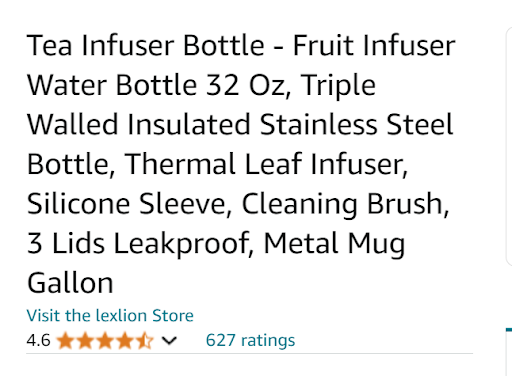
- Optimizing Your Marketing Strategy: Your Amazon Storefront serves as the perfect landing page for your marketing campaigns. Whether you’re running paid ads or leveraging organic traffic, directing customers to a well-designed storefront can maximize your marketing efforts.
Is Your Business Eligible for an Amazon Storefront?
Not every seller can create an Amazon Storefront. To be eligible, you must:
– Have a Professional Seller Account on Amazon.
– Be enrolled in Amazon’s Brand Registry, which requires owning a registered trademark.
Steps to Create Your Amazon Storefront
-
- Creating an Amazon Storefront is a straightforward process, especially if your brand is already registered. Here’s a step-by-step guide:
- Step 1: Set Up Your Store
-
- To get started, log in to Seller Central and navigate to the “Stores” tab. Click on “Manage Stores”

Select “Create Store.”
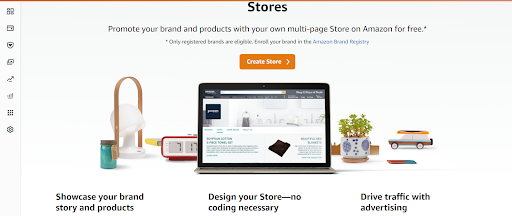
Choose your brand from the list—note that your brand will only appear if it’s already enrolled in Amazon’s Brand Registry. Once selected, you’ll enter the Store Builder. Here, input your brand’s display name and upload your brand logo, then click “Next” to proceed.
Step 2: Create a Homepage
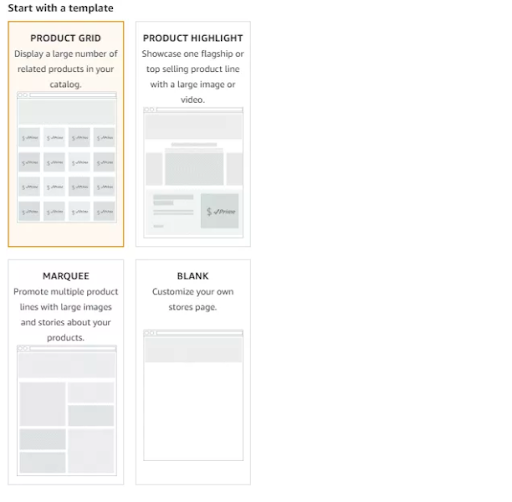
- Your homepage is the first thing customers will see when they visit your Amazon Store, so it’s important to make a strong impression. Amazon offers several templates to choose from, such as a brand story, a best-selling product highlight, or a product grid. You can also start with a blank page and design from scratch.
- Additionally, you’ll need to write a meta description for your homepage. This short snippet helps search engines understand your page, which can improve your Amazon Store’s ranking in Google searches. Make sure your meta description is both informative and engaging to capture the interest of potential customers.
Step 3: Build Your Store
- Now it’s time to build out your Store. Amazon provides various templates to help you create pages, page sections, images, and product thumbnails. When adding a new page, you’ll have options like product collection, product highlight, marquee, or blank page.
- To create a new subcategory page, go to the left-hand side of the Store Builder and click “Add Page.” Enter a title and description for the subcategory and choose an appropriate template. For example, if you’re creating a subcategory for “Bottle,” you might select the “Product Collection” template to showcase these items. Once created, the new subpage will appear as a tab on your homepage.
- You can also add more subcategories, like “Bottle with Infuser,” which will populate as additional tabs. If your subcategory contains multiple product variations, you can create a drop-down menu from the subpage tab to help customers filter by specific options, such as size or color. To add a drop-down menu, click on the tab you want to customize and then select “Add Page” to add the drop-down options.
Adding a Header
- Your Store’s header is crucial for branding. It should feature your logo or a branded image that clearly identifies your Store. Before uploading your banner, be sure to check Amazon’s creative guidelines for the correct image dimensions. To add a header image, click on the header section at the top of your homepage and follow the upload instructions.
Step 4: Customize Your Store
- With your basic structure in place, you can now customize your homepage and subpages by adding new sections. Use a variety of content tiles to display your products in a visually appealing way. Customers can click on a thumbnail to view the full product listing.
- It’s also helpful to look at competitors’ Stores for inspiration. Analyze how they present their products and tell their brand story, then use those insights to make your Store stand out.
Step 5: Submit Your Storefront for Review
- Once you’ve finished building your Amazon Storefront, the final step is to submit it for review. Click on “Submit for Publishing,” and Amazon will review your Store within 24 hours. If approved, your Storefront will go live and be visible to customers.
How Can Customers Find Your Storefront?
Customers can discover your Amazon Storefront in two primary ways:
- Organically: Through brand mentions on your product listings, customers can click to explore your storefront.
- Paid Brand Ads: Investing in Sponsored Brands or Display Ads can drive traffic directly to your storefront, increasing visibility and sales.
Conclusion
An Amazon Storefront is a powerful tool that can elevate your brand on Amazon, drive more traffic, and increase sales. Creating a personalized shopping experience for your customers can build brand loyalty and stand out in a crowded marketplace.
At u-commerce, Amazon experts craft visually stunning and highly effective Amazon Storefronts tailored to your brand’s unique needs. Whether you’re just starting or looking to optimize your existing storefront, our experts are here to help you succeed. Contact us today to take your Amazon business to the next level.

Amazon SEO Vs. Amazon PPC: A Comprehensive Comparison
In the competitive landscape of Amazon marketing, two prominent strategies stand out: Amazon SEO and Amazon PPC. Both are designed to enhance product visibility and drive sales, but they differ significantly in their approach and outcomes.
Amazon SEO is a cost-free, long-term strategy focused on optimizing product listings to improve organic rankings. It involves refining various elements of your product page to ensure better visibility in search results. Conversely, Amazon PPC is a paid advertising method that promotes products to a targeted audience, delivering quick results and increased sales.
Understanding the distinctions between Amazon SEO and Amazon PPC is essential for sellers aiming to succeed in the Amazon marketplace. While both strategies work towards increasing visibility and sales, they cater to different objectives. Amazon SEO targets organic ranking, providing sustained growth over time, while Amazon PPC offers immediate results and precise audience targeting.
Relying solely on either Amazon SEO or PPC is not advisable. In this comparison of Amazon PPC and Amazon SEO, we’ll explore how each strategy functions, their key differences, and how to combine them for maximum impact.
What is Amazon SEO?

Amazon SEO involves optimizing various elements of your product listing to enhance its visibility in organic search results.
- Title: Your product title should be concise, informative, and keyword-rich. Include essential details such as brand, product type, key features, and size or quantity.
- Bullet Points: Highlight your product’s key features and benefits using bullet points. Focus on informative content optimized with relevant keywords.
- Product Description: This section allows you to provide a detailed explanation of your product, elaborating on its benefits, uses, and unique selling points.
- Backend Search Terms: These hidden keywords are used by Amazon’s algorithm to match your product with relevant searches, even though they are not visible on the product page.
- Images: High-quality images can significantly enhance the customer experience and improve conversion rates. Include multiple photos showing different angles and uses of the product.
- Price: Competitive pricing can influence your product’s appeal and boost conversion rates.
The Role of Keywords in Amazon SEO
Keywords are fundamental to Amazon SEO. Conducting thorough keyword research helps position your products effectively to meet potential customers’ needs.
- Primary Keywords: These are the main keywords that define your product. For instance, “sports shoes” would be a primary keyword if you’re selling sports shoes.
- Long-Tail Keywords: These are specific phrases with lower search volumes but higher conversion rates, such as “women’s lightweight running shoes size 8.”
- Backend Keywords: These keywords, included in the backend of your Amazon listing, help Amazon’s algorithm better understand your product, aiding in its discoverability.
Advantages and Disadvantages of Amazon SEO
The primary advantage of Amazon SEO is its cost-effectiveness and its ability to provide a lasting impact on your product’s visibility in search results. Once optimized, your product can maintain its organic ranking over time. However, Amazon SEO does have a downside: it can take considerable time for your product listing to climb the rankings and consistently generate sales.
It’s important to recognize that Amazon SEO is crucial for long-term success, potentially more so than Amazon PPC. Relying solely on paid advertising without investing in organic optimization is a short-sighted approach.
What is Amazon PPC?
Amazon PPC, or Pay-Per-Click advertising, is a powerful tool that allows businesses to promote their products directly to a targeted audience. Unlike organic methods, PPC delivers rapid results, making it an essential component of many Amazon marketing strategies.

The Power of PPC on Amazon
Imagine millions of potential customers searching for products on Amazon. Without strategic marketing, your offerings might get lost among the competition. Amazon PPC provides several key advantages:
- Prime Positioning: PPC ads appear prominently on Amazon search results pages (SERPs) and product detail pages, ensuring that your products are visible to high-intent shoppers.
- Targeted Audience Reach: PPC allows you to target specific demographics, interests, and shopping behaviors, ensuring that your ads reach the most relevant customers.
- Keyword Leverage: PPC campaigns thrive on relevant keywords. By incorporating well-researched keywords into your campaigns, you ensure that your ads appear when customers search for products like yours.
- Sales Generation: Targeted ads with compelling calls to action can convert window shoppers into paying customers, driving sales and business growth.
- Enhanced Product Discovery: PPC campaigns can introduce your products to new customer segments, expanding your market reach.
- Improved Organic Ranking: While PPC is a paid strategy, it can indirectly boost your organic ranking by increasing your product’s click-through rates (CTR) and conversions, sending positive signals to Amazon’s algorithm.
- Data-Driven Insights: PPC campaigns provide valuable data on customer behavior, keyword performance, and campaign effectiveness, allowing you to refine your strategies for better results.
Advantages and Disadvantages of Amazon PPC
The primary benefits of Amazon PPC include increased product visibility, immediate sales, and the ability to reach a large and targeted audience. This model operates on a pay-per-click basis, meaning you only pay when a shopper clicks on your ad, making it a cost-effective method to drive traffic.
However, PPC does come with some drawbacks. For instance, once you stop funding your PPC campaigns, your ads disappear, potentially leading to a drop in sales momentum. Additionally, running ads can be costly due to high competition, with the cost per click (CPC) ranging from $0.05 to $10 or more, depending on factors like keyword competitiveness and bidding strategies..
How Do SEO and PPC Work on Amazon Listings?
Amazon SEO focuses on optimizing your product listing with keywords that potential customers are likely to search for. By optimizing your product listing for relevant keywords, you increase the likelihood of appearing higher in Amazon’s search results. To optimize your Amazon listing for SEO, you should include relevant keywords in your title, bullet points, product descriptions, and backend search terms. Additionally, ensure that your images are optimized with appropriate keywords.
Amazon PPC (Pay-Per-Click) advertising is a method of marketing your product listings by bidding on specific keywords. When someone searches for a keyword you’ve bid on, your listing appears in the sponsored results section at the top of the page. When a user clicks on your listing, you are charged a fee. Amazon PPC is an effective way to target potential customers and boost sales, as you only pay when someone clicks on your listing.
Both Amazon SEO and PPC are powerful tools for marketing your products on Amazon. Using them together can maximize visibility and increase sales. Depending on your budget and goals, either or both of these strategies can significantly boost your sales on Amazon.
What Are the Costs of Amazon SEO and PPC?
The costs associated with Amazon SEO and PPC can vary considerably.
Amazon SEO primarily involves the time and resources required to optimize your listing and ensure it ranks well for relevant search terms. This includes activities such as keyword research, creating optimized content, and building backlinks. You might also incur costs if you choose to hire a third-party company or consultant to assist with the process.
Amazon PPC costs are primarily driven by the bids you place for sponsored ad placement. The higher your bid, the more likely your ads are to appear in front of potential customers. It’s important to make informed decisions about your bidding strategy to maximize your return on investment (ROI). There may also be fees associated with setting up and monitoring a PPC campaign.
How Does Amazon SEO Impact Amazon PPC?
Amazon SEO positively influences your PPC campaigns’ effectiveness. By optimizing your listing with relevant, high-volume keywords, you ensure that your Amazon Automatic PPC campaigns are more effective. When you run an automatic PPC campaign, Amazon’s algorithm uses the keywords in your listings to target the most relevant audience.
If your listing isn’t optimized, your automatic campaigns might not perform as well, potentially leading to your ads being shown to the wrong audience. This can result in wasted ad spend and hinder your business’s growth.
How Does Amazon PPC Impact Amazon SEO?
While Amazon SEO is crucial for automatic campaigns, Amazon PPC also enhances your organic ranking. Although Amazon’s ranking factors are not publicly disclosed, it is known that sales, reviews, and ratings contribute to organic ranking.
Running PPC ads can increase your sales, which in turn generates more reviews and ratings, creating a positive feedback loop. Importantly, Amazon does not differentiate between sales generated through paid traffic and organic sales—what matters is that the product is well-received by customers, which can help improve its organic ranking.
This method of boosting organic sales is particularly important when launching a new product.
Ultimately, combining both SEO and PPC strategies can yield significant benefits. Using a hybrid approach of Amazon PPC and SEO can help maximize your impact on the platform.
In conclusion, combining Amazon SEO and PPC strategies is essential for maximizing your product’s visibility and sales on the Amazon platform. SEO offers long-term organic growth by optimizing your product listings with relevant keywords, while PPC provides immediate visibility and drives targeted traffic to your listings. Both strategies complement each other, creating a powerful synergy that can boost your overall performance on Amazon.
At u-commerce, we are Amazon experts helping sellers optimize their Amazon listings and implement effective SEO and PPC strategies. By leveraging our expertise, you can enhance your product’s visibility, increase sales, and achieve long-term success in the competitive Amazon marketplace. Let us guide you in crafting a tailored approach that aligns with your goals and budget, ensuring maximum impact for your Amazon business.