

As crucial as your product images, adding product videos to your Amazon listings can vastly improve customer experience. With millions of products vying for consumer attention, how do you ensure your product gets noticed? The answer lies in the power of visual storytelling. Welcome to our Amazon Product Video Service, where we transform your product listings into captivating visual experiences that drive engagement and boost sales. 92% of the marketers have already stated that video forms a major part of their current marketing strategy.
Why use Amazon Product Videos?
In short, they will help you sell more products.
Here’s why product videos matter on Amazon and how they can make a significant impact on your sales and brand presence.
1. Enhanced Customer Engagement
Visual Appeal:
Videos capture attention more effectively than static images or text. They can engage potential buyers quickly and hold their interest, making them more likely to stay on your product page longer.
Interactive Experience:
Product videos offer an interactive experience, allowing customers to see the product in action. This dynamic presentation helps viewers understand the product better and makes the shopping experience more enjoyable.
2. Improved Conversion Rates
Detailed Product Understanding:
A video can convey the functionality, features, and benefits of a product in a way that text and images cannot. This comprehensive understanding can lead to higher conversion rates as customers feel more confident in their purchasing decisions.
Emotional Connection:
Videos can evoke emotions and create a narrative around your product, helping customers connect with your brand on a deeper level. This emotional engagement can be a powerful motivator for purchases.
3. Higher Search Rankings
Amazon’s Algorithm:
Amazon’s search algorithm tends to favor listings with rich media content. Including videos can improve your product’s search ranking, making it more visible to potential buyers. Higher visibility often translates to increased traffic and sales.
Enhanced SEO:
Product videos can improve the overall SEO of your listing. The more engaging and informative your content, the better Amazon’s algorithm will rank your product page.
4. Building Trust & Credibility
Professionalism:
High-quality videos convey a sense of professionalism and credibility. They show that you are serious about your product and committed to providing the best possible information to your customers.
Transparency:
Videos offer transparency, allowing customers to see exactly what they are buying. This reduces uncertainty and builds trust, making customers more likely to complete their purchase and less likely to return the product.
Guidelines for Amazon Product Video
1. Video length and content-
- The recommended duration of the video is between 30 seconds and 2 minutes.
- Content Focus: Your video should focus on highlighting the key features, benefits, and unique selling points of the product. Show it in action and demonstrate how it can solve a customer’s problem.
2. Quality of the video
- Resolution: Amazon recommends a minimum resolution of 1280 x 720 pixels (HD). Ensure your video is clear and sharp.
- Aspect ratio: The video should either be in its usual YouTube orientation or with a 16:9 aspect ratio for optimal viewing on various devices.
- Sound: Include clear audio narration or background music that enhances the video without overpowering it. Ensure any spoken content is in the language relevant to your target audience.
- Format: it should be in MP4, MOV, FLV, AAC, AVI, 3GP, or MPEG-2.
3. Logos and branding-
- Videos should not contain several brand logos.
- Format: Videos should be uploaded with a high-quality thumbnail, and they should be in .png or .jpeg.
4. Compliance with Amazon Policies-
- No defamatory statements, inaccurate product reviews, or health claims.
- Amazon product videos must not contain prices, promotion information, discounts, or time-sensitive information.
- No Contact Information is added in the video.
- You can’t modify the manufacturer’s warranty or offer your own.
- Do not direct viewers away from Amazon’s page.
- Do not infringe on others’ intellectual property rights.
- Celebrity endorsements: not permitted unless officially endorsed.
- No alcoholic products in the videos.
5. Mobile Optimization-
- Most customers shop on Amazon using mobile devices, so make sure your video is mobile-friendly and looks great on small screens.
6. Publishing the video
- The person uploading the video must be the brand owner.
- The creator of the video should support claims and any mentioned awards with evidence.
Amazon keeps updating its Amazon Product Video guidelines; thus, make sure you review them and make any changes if needed.
Types of Amazon Product Video-
The type of video you want to post depends on the type of product you are selling.
1. Product Demonstration Videos
Purpose:
To show how the product works, its features, and its benefits in real-life scenarios.
Best For:
Tech gadgets, kitchen appliances, fitness equipment, and any product that has multiple features or requires some explanation.
Example:
A video demonstrating how a multi-function blender can make smoothies, soups, and sauces, showcasing its ease of use and cleaning process.
2. Unboxing Videos
Purpose:
Create excitement and anticipation by showing customers what they can expect when they receive the product.
Best For:
Electronics, subscription boxes, toys, and products with attractive packaging.
Example:
An unboxing video of a new smartphone, highlighting the packaging, accessories included, and first impressions of the device
3. How-To Videos
Purpose:
Provide step-by-step instructions on how to use the product effectively.
Best For:
DIY kits, beauty products, home improvement tools, and any product that benefits from detailed usage instructions.
Example:
A how-to video demonstrating different hairstyles that can be achieved with a hair styling tool, explaining each step in detail.
4. Customer Testimonial Videos
Purpose:
Build trust and credibility by showcasing real customers sharing their positive experiences with the product.
Best For:
Health and wellness products, skincare, fitness gear, and any product where customer satisfaction is crucial.
Example:
A testimonial video featuring customers talking about how a fitness tracker helped them achieve their fitness goals, including before-and-after results.
5. Comparison Videos
Purpose:
Compare your product with similar products to highlight its advantages and unique features.
Best For:
Competitive markets where differentiation is key, such as electronics, appliances, and beauty products.
Example:
A comparison video showing how your brand’s vacuum cleaner performs better than competitors in terms of suction power, battery life, and ease of use.
6. Lifestyle Videos
Purpose:
Show the product being used in a real-life context, highlighting its place in the customer’s daily life.
Best For:
Fashion, home decor, outdoor gear, and any product that integrates into a specific lifestyle.
Example:
A lifestyle video featuring a family using a camping tent on a weekend getaway, showcasing the tent’s spaciousness, durability, and ease of setup.
7. Animated Explainer Videos
Purpose:
Use animations to explain complex products or concepts in an easy-to-understand way.
Best For:
Software, apps, technical products, and products with complex features.
Example:
An animated explainer video demonstrating how a new project management app can help teams collaborate more efficiently, highlighting key features with engaging animations.
8. FAQ Videos
Purpose:
Address common questions and concerns about the product, providing clear and concise answers.
Best For:
Products that generate frequent customer inquiries, such as electronics, health supplements, and home appliances.
Example:
An FAQ video for a dietary supplement, answering questions about dosage, ingredients, and potential benefits.
9. Storytelling Videos
Purpose:
Tell a compelling story about your product or brand to create an emotional connection with the audience.
Best For:
Products with a strong brand narrative or unique origin story, such as artisanal goods, eco-friendly products, and luxury items.
Example:
A storytelling video about a sustainable fashion brand, highlighting the journey from ethical sourcing to the final product, and the positive impact on communities and the environment.
10. Behind-the-Scenes Videos
Purpose:
Give customers an inside look at how the product is made or what goes into the business.
Best For:
Handcrafted goods, artisanal products, food and beverages, and any product where the production process is a selling point.
Example:
A behind-the-scenes video showing the craftsmanship involved in creating handmade leather bags, from selecting the leather to the final stitching.
Do’s and Don’ts:
Do’s-
- Try to hook the viewer in the first few seconds of the video
- Keep the video short and on point
- Make sure you have excellent audio quality
- Ensure your shots are stable, smooth, and professional
- Focus on the main features and benefits
Don’ts-
- Don’t include any promotional information
- Do not violate health claims
- Don’t include any defamatory statements about competitors
How to Upload Product Video in Amazon Seller Central?
Uploading a product video on Amazon can significantly enhance your Amazon product listings, making them more engaging and helping to increase conversion rates. If you’re ready to add a video to your product page, follow these simple steps:
Step 1: Access the Video Upload Section
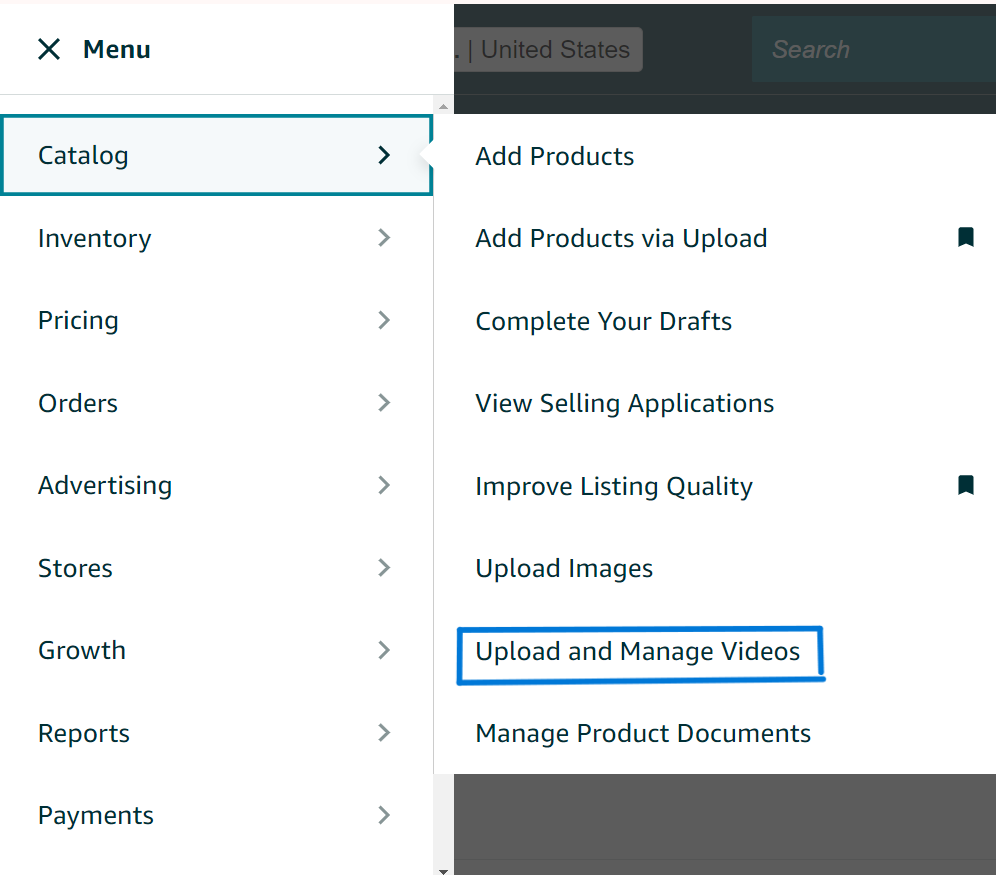
Start by logging into your Amazon Seller Central account. Once logged in, navigate to the Catalog tab at the top of the page. From the dropdown menu, select Upload and Manage Videos. This will take you to the video management section, where you can upload new videos or manage existing ones.
Step 2: Begin the Upload Process
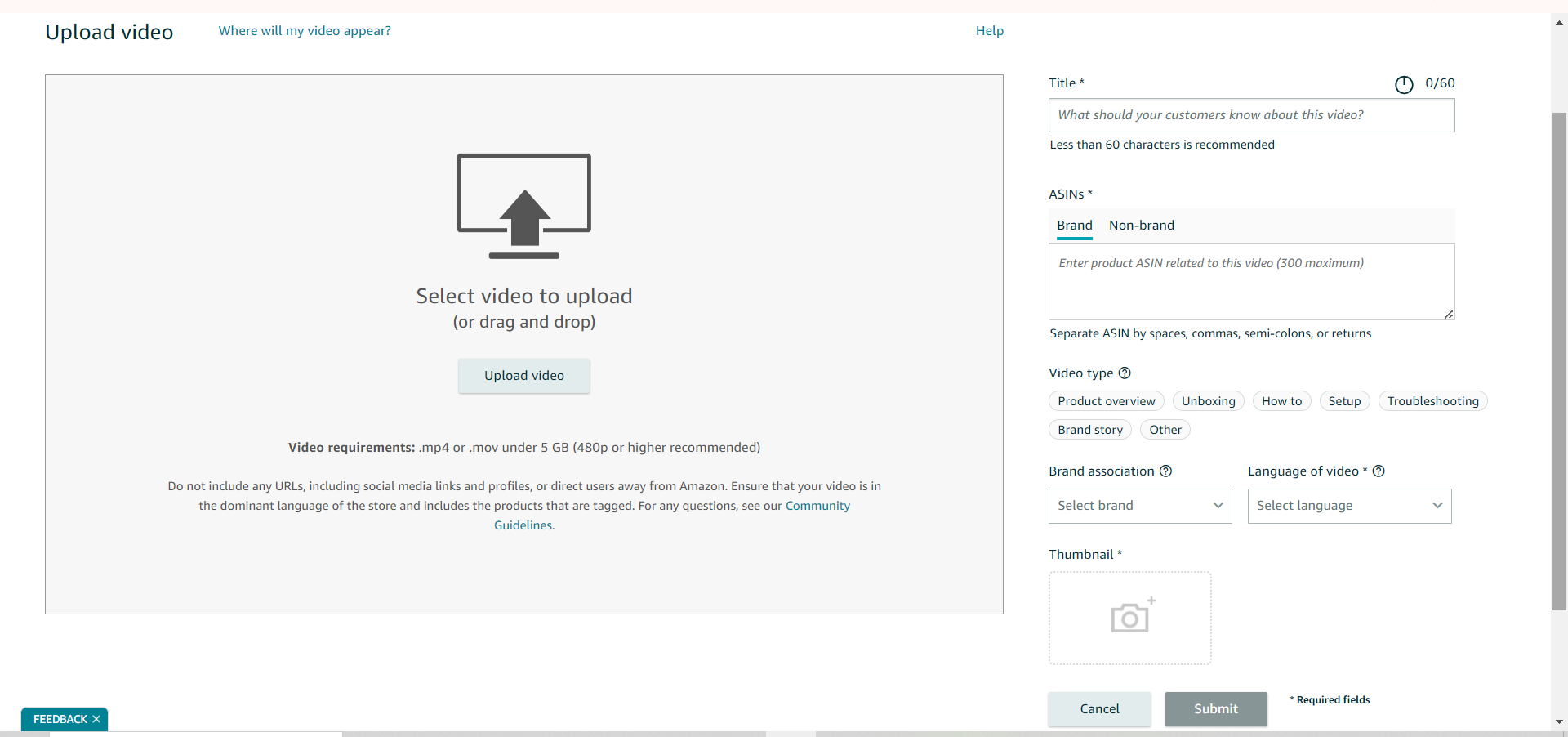
In the video management section, you’ll see a button labeled Upload Video. Click this button to start uploading your product video. This will open a new screen where you can provide details about your video and select the appropriate ASINs (Amazon Standard Identification Numbers) to associate with the video.
Step 3: Choose Brand or Non-Brand
Under the ASINs section, you will be prompted to choose between Brand or Non-brand:
– Brand Option: If your brand is enrolled in Amazon’s Brand Registry, select the Brand option. This allows you to enter up to 300 ASINs related to the product video. Associating multiple ASINs with your video can help you reach a broader audience if you sell variations of the same product.
– Non-brand Option: If your brand is not enrolled in the Brand Register, select the Non-brand option. In this case, you can associate your video with only one ASIN. Make sure to choose the most relevant ASIN to maximize the impact of your video.
Step 4: Finalize and Upload
After selecting the appropriate ASINs, fill in any additional information required for the video, such as the video title and description. Once everything is set, click Upload to add your video to the Amazon catalog. The video will undergo a review process before it goes live on your product listing, so be sure to check back to see when it’s approved.
Where Does an Amazon Product Video Appear on Your Amazon Listing?
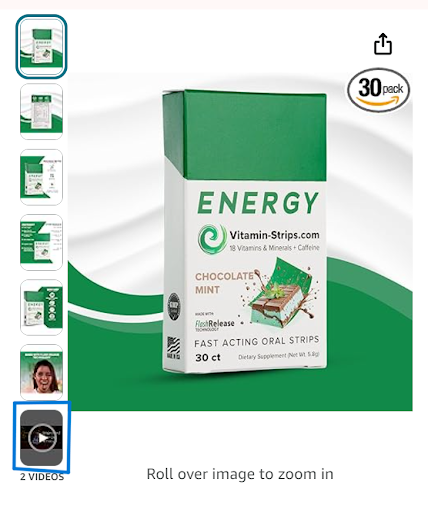
When you upload a video to your product listing, it will appear under the main product images section. Customers can easily find and view the video without having to scroll through your listing.
Get ahead of your competition with our Amazon Product video creation services:
It is mandatory for you to work harder to create Amazon brand development if you want to stay light years ahead of your competitors. Our video services will add a glimpse of life to your product, which results in unique content for the brand to show off proudly. Whether you are a Fortune 500 seller or a seasoned professional, or have just entered the vast world of the Amazon market, these gripping video shots from our side will convert cold visitors or window shoppers into mandatory and repeatable customers.
At u-commerce, our combined team of talents and creative minds is here to handle everything. Our Amazon experts will be the ones to cover creative scouting, post-production, and all the other features involved in making your video a huge success.
Some of the top Amazon brands already trust our video production services. So, the next time you are planning to venture into the new world of selling products on Amazon and need professional guidance, our services are just a single click away! Log online at our official website or ring us up for services you will love from the get-go!
We are Amazon consultants and experts in Amazon Product Video Services, Amazon Listing Videos, and Brand Registry Video Services. Hire our product video expert and upgrade your listings with e-commerce product videos.