From Checking Out To Check Out: What Makes Amazon Shoppers Buy?
Navigating Amazon’s competitive landscape requires a deep understanding of what drives shoppers from merely browsing to making a purchase. At U-commerce, we specialize in Amazon services designed to optimize your eCommerce business. Here’s a closer look at the key factors influencing Amazon shoppers to complete their purchases.
Who Shops on Amazon?
Amazon has become the go-to marketplace for millions of shoppers worldwide, but who is shopping on this platform? Understanding the demographics and behaviors of Amazon shoppers,
U-commerce can help tailor strategies to meet customer needs. Here’s a detailed look at the characteristics and habits of Amazon shoppers.
Discovering New Products and Brands
Amazon is not just a place to buy products; it’s also a discovery platform. Approximately 75% of shoppers use Amazon to explore new products or brands. This makes it a valuable space for introducing innovative products and gaining exposure to new brands.
Openness to New Products
Half of Amazon shoppers are open to buying new products. This willingness to experiment provides an excellent opportunity for businesses to introduce new offerings and expand their customer base.
Confidence in Return Policies
Amazon’s return policies play a significant role in buyer confidence. Shoppers feel secure knowing that they can easily return products if they don’t meet expectations. This assurance encourages more frequent purchases and reduces hesitation.
Monthly Spending Habits
Despite Amazon’s vast product selection, the average shopper spends less than $50 per month. This spending pattern suggests that while Amazon is a popular shopping destination, many purchases are for everyday items rather than high-ticket products.
Seeking the Best Deals
Amazon’s main audience consists of shoppers who are always on the lookout for the best deals. Competitive pricing and attractive discounts are key factors that draw buyers to the platform.
High Rate of Window Shopping
A significant 68% of shoppers on Amazon engage in window shopping. They browse products without immediate intent to buy, making it crucial for listings to be visually appealing and engaging to capture potential buyers’ attention.
Price Checking on Other Sites
About 72% of Amazon shoppers check prices on other sites before making a purchase. This behavior underscores the importance of competitive pricing and highlights the need for businesses to monitor and adjust their prices regularly.
Trust in Reviews
A large majority of shoppers—75%—either fully or somewhat trust reviews on Amazon. Positive reviews can significantly influence purchasing decisions, emphasizing the importance of maintaining a good reputation through excellent customer service and product quality.
High Buyer Intent
Visitors to Amazon often have a high buyer intent, driven by keyword research. Shoppers typically arrive on Amazon with a clear idea of what they want, making it essential for businesses to optimize their listings with relevant keywords to capture this intent.
Device Usage for Purchases
Amazon purchases are almost evenly split between desktop and mobile devices. This 50/50 distribution highlights the need for eCommerce businesses to ensure their product listings are optimized for both desktop and mobile viewing to provide a seamless shopping experience.
The Biggest Factors Buyers Consider When Making a Purchase on Amazon
Understanding what influences buyers on Amazon can significantly enhance your sales strategy. Here are the key factors that buyers consider when making a purchase:
1. Price – 41.1%
Price is the most critical factor for Amazon shoppers, with 41.1% prioritizing it in their purchasing decisions. Competitive pricing can make your product more attractive to potential buyers. Regularly monitor market trends and adjust your prices accordingly to stay competitive.
2. Number of Ratings and Reviews – 16.2%
The quantity and quality of ratings and reviews play a substantial role, influencing 16.2% of buyers. Positive reviews and high ratings build trust and credibility, encouraging more shoppers to choose your product. Actively encourage satisfied customers to leave reviews and promptly address any negative feedback to maintain a strong reputation.
3. Convincing Product Descriptions and Photos – 7.7%
Detailed product descriptions and high-quality photos are vital, impacting 7.7% of buyers. Clear, informative descriptions that highlight the benefits and features of your product, combined with professional images, help shoppers make informed decisions and reduce the likelihood of returns.
4. Convenience of Shopping (Prime Membership) – 22.7%
The convenience offered by Amazon Prime, including fast and free shipping, influences 22.7% of buyers. Products that are Prime-eligible are more likely to be purchased due to the added convenience. Enrolling in the Fulfillment by Amazon (FBA) program can help make your products Prime-eligible, boosting their appeal.
5. Prior Experience with the Product/Brand – 9.1%
Past experiences with a product or brand affect 9.1% of buyers. Repeat customers often base their purchasing decisions on previous positive experiences. Consistently delivering high-quality products and excellent customer service can foster loyalty and encourage repeat business.
Winning Shoppers on Amazon: A Strategic Guide to Beating the Competition
To succeed on Amazon, it’s crucial to understand the three stages of product disqualification and tailor your business strategy accordingly. Leveraging data on consumer behavior can help you outshine competitors and win over shoppers. Here’s a breakdown of how to optimize your approach.
STAGE 1 – Product Listing – Win the Search
When shoppers search for products on Amazon, their first impressions are crucial. Ensuring your product listing stands out is key to capturing their attention and avoiding disqualification. Here’s how to optimize each element of your product ad-
a) Main Image
Your main image is the first thing shoppers see, making it essential to create an eye-catching and professional appearance:
- High-Quality Photography: Use clear, high-resolution images.
- Image Fills the Square: Ensure the product fills the image frame.
- Transparent Background: Maintain a clean and professional look.
- Clear Text on Label and Packaging: Make sure all text is readable.
- No Additional Text Outside the Product: Avoid clutter and distractions.
b) Product Title
The product title needs to be clear, concise, and keyword-rich:
- Include High Search Volume Keywords Early: Position key terms at the beginning of the title.
- Correct Formatting: Ensure readability on both mobile and desktop.
- Split Testing: Regularly test different titles to find what works best.
c) Star Rating and Review Count
Shoppers trust reviews. Ensure your product has a high star rating and numerous reviews:
- Encourage Reviews: Ask satisfied customers to leave positive feedback.
- Address Negative Reviews: Show responsiveness and a commitment to customer satisfaction.
d) Price
While not always the lowest, your price should be competitive:
- Competitive Pricing: Regularly compare your prices with competitors.
- Value for Money: Highlight the quality and benefits to justify your pricing.
e) Shipping Speed
Fast shipping is a significant factor for buyers:
- Fulfillment by Amazon (FBA): Leverage FBA for quick 1-2 day shipping.
- Avoid Merchant Fulfillment (MFN): Unless you can match FBA’s speed, MFN is less attractive to buyers.
f) Coupons
Offering coupons can give you a slight edge:
- Coupons for Attention: Differentiate your product and attract deal-seekers.
- Higher Click-Through and Conversion Rates: Coupons can improve both metrics.
g) Seller Badges
Badges like “Best Seller” and “Amazon’s Choice” boost consumer confidence:
- Aim for Badges: Meeting the criteria for these badges can significantly increase sales.
- Badge Visibility: Highlight these badges in your product ad to draw attention.
Stage 2: Product Detail Page – Converting the Sale
After successfully winning the product ad selection in Stage 1, the focus shifts to Stage 2: converting that interest into a sale. The details on your product page must convince buyers of their need and desire for your product. Here’s how to optimize each element of your product detail page to maximize conversions:

Once the main product image has captured the buyer’s attention, the secondary image should:
- Explain Features and Benefits: Clearly highlight the unique features and advantages of your product.
- Showcase Superiority: Emphasize why your product is better than competitors, providing a compelling reason for purchase.
As buyers browse through the image gallery, ensure each image:
- Highlights Key Selling Points: Focus on the main benefits and differentiators from competing products.
- Combines Visuals with Information: Use images that not only look good but also provide informative content about the product’s benefits and solutions.
- Engages Quickly: With 70% of shoppers dropping off after the second image, make every image count by offering compelling reasons for purchase.
c) Bullet Points
Bullet points serve two crucial purposes: convincing buyers and improving keyword ranking.
- Highlight Keywords: Emphasize main selling points with relevant keywords that shoppers are likely to scan.
- Inform and Persuade: Use the rest of the text to detail the benefits and features, ensuring it is keyword-rich for better product ranking.
d) Products Related to This Item
Sponsored ads from competitors can divert traffic away from your page.
- Launch Own Campaigns: Create campaigns targeting your products to occupy this space and reduce the impact of competitor ads.
Overwhelming buyers with text can reduce conversion rates.
- Opt for Image-Rich Descriptions: Use visuals to highlight key selling points and showcase your brand effectively.
- Keep Text Concise: Make sure the text is clear, concise, and easy to read to avoid overwhelming potential buyers.
f) Videos for This Product
Videos significantly influence buyer decisions and reduce disqualification.
- Provide Live Visuals: Offer videos that give a live demonstration of your product in action.
- Utilize Influencers: Engage influencers to create comparison and unboxing videos, enhancing credibility and appeal.
g) Customer Questions and Answers
Building a robust FAQ section helps eliminate purchase doubts.
- Encourage Questions: Use your shopper account to post questions and answer them with your seller account.
- Show Social Proof: A high number of answered questions indicates product legitimacy and builds trust.
h) Reviews
Reviews are powerful tools for building social proof and trust.
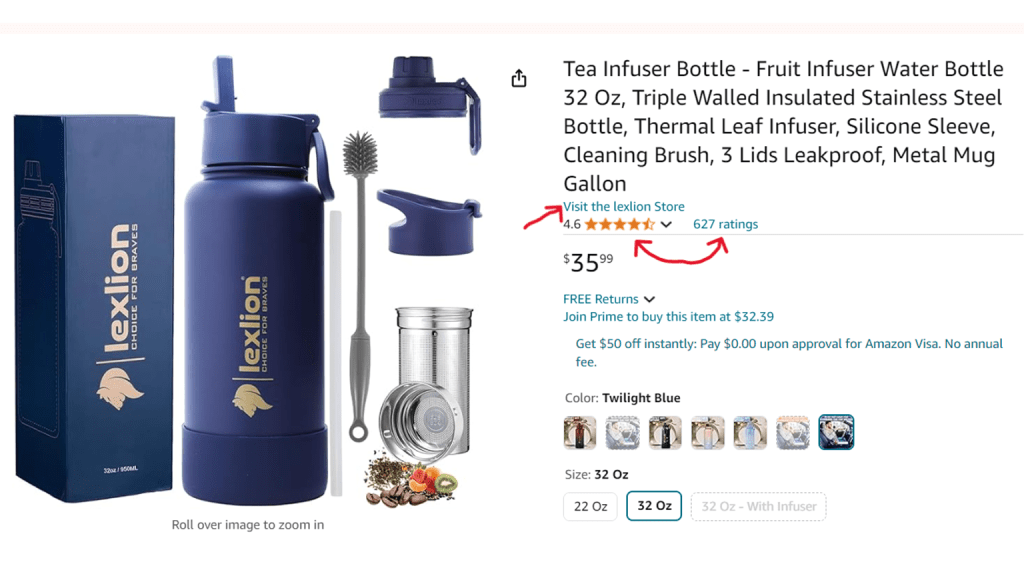
- Maintain High Ratings: Aim for a rating above 4 stars to avoid disqualification by buyers.
- Increase Review Count: Encourage satisfied customers to leave positive reviews to enhance credibility.
i) Visit the Store
Before making a final decision, buyers often check the brand’s store.
- Consistent Branding: Ensure the store name matches the product brand name to avoid confusion.
- Professional Storefront: Create an attractive and professional landing page to build buyer trust and enhance brand presentation.
Stage 3: Competitor Product Page – Securing the Conversion

Your product ad has successfully passed the initial buyer test in Stage 1 and captivated the buyer with an appealing product detail page in Stage 2. Now, the buyer is on the verge of making a purchase, but the final step involves the inevitable comparison with your competitors. To secure the conversion, ensuring that your product stands out even when buyers explore competing options is crucial.
Conclusion
Transforming Amazon shoppers from browsers to buyers involves a multifaceted approach. At u-commerce, we specialize in Amazon services that help your e-commerce businesses thrive. You can enhance your product listings and increase your conversion rates by focusing on product reviews, detailed descriptions, competitive pricing, Prime eligibility, exceptional customer service, keyword optimization, and strategic promotions. Contact us today to learn how we can help you succeed on Amazon.
Amazon Vs. Walmart: Who Wins The E-commerce Battle?
Amazon and Walmart are the two big names in the e-commerce industry. In this blog, you will learn about Amazon & Walmart in detail, as well as their comparative insights.
Amazon captures nearly 40% of all online sales in the US, while Walmart is gaining its position next to Amazon for sellers to sell their products on.
Amazon & Walmart may seem similar to eCommerce, but they have their unique pros, cons, requirements, and guidelines for sellers to keep in mind.

Amazon Overview
In the U.S. e-commerce market share, Amazon is leading the e-commerce industry. Data from eMarketer indicates that in 2023, Amazon accounted for 37.6% of US online retail spending. It also represents about two out of every five dollars spent on online shopping.
Amazon benefitted as internet spending surged due to the COVID-19 outbreak. Amazon saw a 13% increase in net sales from $127.10 billion to $143.08 billion in the third quarter of 2023.
With a 10.32% growth from the previous year, Amazon’s net revenues for the 12 months that ended on September 30, 2023, came to $554.028 billion. Furthermore, more than half of American households currently have an Amazon Prime subscription.
Online purchasing is therefore severely hurting physical stores that don’t have an online presence. Given these circumstances, Amazon is in a strong position to take the lead in US e-commerce in the years to come.

Walmart Overview
Walmart, the biggest retailer in the world, is an unexpected competitor that presents a serious threat to Amazon.
Walmart has become a formidable rival of Amazon in the online retail market. Now that it has established itself as America’s #2 online marketplace, the corporation has successfully found its footing in e-commerce.
By October 31, 2023, Amazon’s online sales had reached $638.785 billion, up 6.44% from the previous year.
Walmart increased its entire online sales share in the United States from 5.4% in 2019 to 6.4% in 2023.
Because Walmart’s delivery and pickup services are convenient for stay-at-home shoppers, a large portion of this surge is being driven by an increase in online grocery sales. Utilizing its vast physical presence to facilitate curbside pickup and delivery from more than 7,000 locations, Walmart also avoided the debilitating strains on fulfillment centers that Amazon faced.

Amazon VS Walmart
Both Walmart and Amazon provide membership-based services that grant subscribers access to a range of advantages. Amazon Prime was introduced in 2007 and now has over 200 million members globally (with 102 million in the United States alone). It is one of the most well-liked and prominent aspects of the Amazon platform.
In September 2020, Walmart introduced Walmart+, a membership service of its own. Walmart+ has far fewer members than its Amazon counterpart, with only 8.2 million. Walmart+’s limited data set makes it challenging to compare the two programs’ performance. From the perspective of the client, both operate almost in the same way and provide comparable advantages.
1. Selling Fees
Seller fees are a significant factor to take into account when comparing Walmart with Amazon. How much will selling products on each platform cost you? How similar are the fee schedules?
In general, Walmart is less expensive than Amazon because it sells more products at bigger quantities, but it also has higher commission and activity fees. But let’s examine the details in each of the two marketplaces:
Amazon: Higher Fees, But Volume Access
Unlike Walmart, Amazon charges monthly subscription fees to its vendors. The “Professional” seller plan is $39.99 per month, while the “Individual” plan starts at $0.99 per month for up to 40 orders each month.
For product sales, Amazon receives referral fees that range from 8 to 15% of the entire transaction price. Amazon Devices is one of the very high-volume categories that has a 20% referral fee. Furthermore, a per-item “variable closing fee” of around $1.80 per sale is mandated by certain media categories.
When selling through Fulfillment by Amazon (FBA), there are extra fees involved:
- Fees for FBA Pick and Pack: Apply per item, depending on size and weight
- FBA Weight Handling Fees: Based on weight, fees are assessed per unit.
- FBA storage fees are approximately $2.40 per cubic foot of space (more during Q4 peak, reaching up to $4.80/cubic foot if storing for more than two months).
- Fees for FBA Removal Orders: If stock needs to be deleted or returned because it doesn’t sell
Coupon generation, reverse logistics, and picture services are just a few of the many other programs and features that are available at an additional cost. Examine them thoroughly to prevent any unexpected fees.
Walmart: Reduced Volumes But A Sleeker Fee Structure
Walmart does not impose closing order fees or monthly seller subscription costs, in contrast to Amazon.
Rather, you simply have to pay Walmart:
- Per-sale referral fees: Depending on the product type, rates vary from 6 to 20%.
- Expenses for WFS storage and handling if you choose to use their fulfillment services
And that’s it! Walmart keeps things straightforward by only charging referral fees, whereas Amazon charges a variety of other costs.
Nevertheless, Walmart generates significantly lower sales quantities than Amazon. Though probably fewer sales, you’ll benefit from lower activity expenditures per transaction.
Therefore, you need to decide if the revenue potential of Amazon’s reach outweighs lower platform fees. Walmart has additional expenses that are specific to its UPC requirements.
2. Listing & Onboarding
How simple—or difficult—is it to begin selling on Amazon and Walmart? Now let’s contrast and compare:
Amazon: A Lot of Automation, but Often Changing Policies
Amazon provides a smooth onboarding process for new sellers because of extensive automation. You can begin listing products as soon as you pay $39.99 per month for a Professional seller account and link your bank and tax information. No protracted application or approval processes.
This “Bulk Upload” option also streamlines the process of creating new listings. To hasten the debut of new products, Amazon has now made it possible to “clone” already-existing listings.
Onboarding is quick, but there’s a high learning curve to comprehend and adjust to Amazon’s regulations, laws, and listing adjustments. For more than 100,000 product categories, requirements are constantly changing, which presents challenges for new vendors.
Walmart: Stricter Inspections But Greater Stability
Every new Walmart vendor needs to fill out an application that includes the following information:
- Documents proving the business (W9, EIN, business licenses)
- Prior experience and history in online sales
- Product List and Provider Information
- Capacity to fulfill a wide range of performance criteria
- Walmart carefully reviews every application, looking at seller stability, order accuracy potential, product quality, and other requirements.
- If an applicant doesn’t meet Walmart’s priority categories, they risk being rejected in large numbers.
- From the time an application is first submitted until it is finally approved, it may take six to eight weeks.
Following approval as a Marketplace Retailer, Walmart additionally places listing restrictions such as:
- Needing to list five to ten sample products upfront
- UPCs for each SKU
- More stringent shipping regulations, such as limitations on name-brand packaging
Thus, compared to Amazon, Walmart requires far more work for onboarding.
3. Pricing & Buy Box
For sellers on marketplaces, winning purchase boxes and price optimization are essential. In these regards, how do Walmart and Amazon compare?
Amazon: Harsh Competition but Effective Pricing Strategies
To put it simply, there is fierce competition on Amazon for Buy Boxes.
There is strong competition amongst over 2 million active merchants for the coveted “Add to Cart” button on every product page.
Although price is a major consideration in determining whether a product will be awarded a buy box, it is not the sole one. Experts in SellerApp say that the following components—in that order—are crucial to Buy Box dominance:
- Participation in Fulfilled By Amazon (FBA): About 80% of the time, FBA listings will outperform non-FBA offerings at the same costs.
- Total Cost + Shipping: If all other factors remain the same, the lower cost prevails.
- Seller History: Your order cancelation, delay in shipment, and defect performance metrics
- Product Availability: When prices are equal, in-stock deals outperform out-of-stock ones.
- Seller Feedback Score: Increased probability with 500+ favorable ratings
Even so, competitive pricing continues to have a significant impact, particularly when individual sellers are only able to regulate price. Repricing is therefore a useful tactic to maintain your Buy Box positioning.
Walmart: Stricter Regulations But Less Competition
There are advantages and disadvantages to Walmart’s pricing in comparison to Amazon.
The greatest advantage? significantly less rivalry among sellers. Currently, there are only 150,000 vendors on Walmart Marketplace, compared to almost 2.3 million on Amazon.
This increases the likelihood of achieving Buy Box, particularly for conscientious sellers who consistently maintain top-ranked pricing.
Walmart forbids the use of outside repricing software, which modifies offer pricing automatically, in contrast to Amazon.
Every day, any modifications to the seller must be made manually.
Repricing limitations reduce pricing volatility from hyper-aggressive bot repricers, but they also require more manpower.
The marketplace operations team at Walmart, however, keeps a close eye on seller pricing across all listings.
Additionally, they uphold stringent guidelines for pricing compliance:
- Price Parity Rule: The Walmart listing is deleted if a vendor offers a product for less money on another website.
- Price Leadership Policy: You will be required to match any competitive seller’s listing that offers an identical product at a significantly lower price on Walmart or another platform, or else your listing will be removed.
These harsh regulations surprise a lot of merchants. Even brief pricing differences result in instantaneous listing removals, compelling banned vendors to submit support queries requesting reactivation.
What’s the lesson learned? Walmart gives retailers no pricing flexibility but less head-to-head competition.
Astute vendors employ meticulously designed price structures to evade policy transgressions. Walmart offers an alluring return on investment if your margins can withstand extremely thin earnings.
4. Fulfillment & Shipping
One important factor in the marketplace is order fulfillment. Let’s examine how the shipping and fulfillment strategies used by Walmart and Amazon compare and contrast.
Amazon: Rules for Fulfilled By Amazon (FBA)
Considering that Amazon has over 150 million devoted Prime members, winning Buy Boxes basically means getting free two-day shipping.
Employing Fulfillment By Amazon is the only method sellers can consistently fulfill Prime purchases (without having to pay for Seller Fulfilled Prime qualifying).
Sellers transport large quantities of their inventory to Amazon warehouses under the FBA arrangement. Without involving the vendor, Amazon manages order selection, packaging, shipping, and returns/exchanges.
Sellers benefit from great logistical simplicity via FBA. It does, however, have some significant drawbacks, such as:
- lengthy lead periods for regular shipments of merchandise to FBA facilities
- High long-term storage costs for items that move slowly
- Unexpected category access cancellations or increased restrictions
For instance, Amazon prohibited the entry of any non-essential commodities into FBA facilities for several weeks during the initial COVID-19 issue. Non-essential sales could only be sustained by vendors with their own independent fulfillment routes.
However, the advantages exceed the hazards for high-volume vendors. Amazon’s U.S. shipping and logistics network has grown rapidly, and it currently consists of:
- 110+ Centers for Fulfillment
- More than 150 Package Sorting Locations
- 50+ Regional Air Hubs for Amazon Air
- a collection of semi-trucks with branding and cargo planes
Thus, in spite of sporadic glitches, Amazon continues to be the seller’s most dependable and effective fulfillment option.
Walmart: Option for First-Party and Alternative FBA Acquire momentum
Similar to Amazon’s marketplace, Walmart’s marketplace places a strong emphasis on independent sellers who manage their own fulfillment and shipping.
Nevertheless, acknowledging Amazon FBA’s growing popularity and subscription income,
Walmart announced Walmart Fulfillment Services (WFS) lately.
Pallet loads of merchandise are shipped by authorized merchants to Walmart warehouses under WFS. Similar to Amazon, Walmart picks, packs, and sends orders to customers in boxes bearing the Walmart logo.
Walmart also gives Fulfilled By Merchant sellers specific badges for items not managed under WFS, provided they can meet Two-Day shipping deadlines.
WFS is still rather limited in comparison to FBA, though.
Thankfully, Walmart Marketplace has accepted a number of substitute fulfillment partners, such as ShipHero, ShipBob, ShipHype, Rakuten Super Logistics, Simpl Fulfillment, ShipMonk, Easyship, and Shipwire, that new sellers can use to obtain Prime-like shipping without the need for WFS.
5. Performance Guidelines
Also, Amazon and Walmart evaluate vendors in various ways. Let’s look at their enforcement guidelines and key performance indicators.
Amazon: Customized KPIs for Merchants and Sellers
Three fundamental metrics are outlined by Amazon Marketplace for sellers:
- Order Defect Rate (ODR): 1 percent or less of all orders over 60 days that are defective overall
- Pre-shipment Cancellation Rate: Total orders canceled seven days or more / total pre-shipment cancellations (goal under 2.5%)
- Total shipments over seven and thirty days divided by the total number of late shipments (goal under 4%).
- “Defects” include chargebacks, A-to-Z guarantee claims, and unfavorable seller feedback, all of which can seriously impair profitability.
Your seller account may be suspended by Amazon following several infractions.
Walmart: Just Three Core Standards
Unlike Amazon, Walmart Marketplace only judges sellers on three numbers:
- Order Defect Rate (ODR): Total defects/total orders over the past 90 days (target under 2%)
- On-Time Shipment Rate: Total on-time shipments/total shipments (target over 99%)
- Valid Tracking Rate: Total valid tracking #s/total shipments (target over 99%)
If any of the above rates fail, Walmart issues warnings by email. Consistent failures to meet the requirements can lead to account suspension.
However, Walmart tends to work with sellers through issues instead of immediately suspending them.
Their policy team provides clear requirements around a “Plan of Action” to remedy defects over a probationary period. If the Plan of Action succeeds and metrics improve, you avoid sanctions.
This collaborative culture helps sellers manage seasonal peaks where meeting every SLA proves infeasible.
6. Expectations for Customer Service
Amazon
Because of the success of its Prime membership program, Amazon has had a significant impact on how modern consumers expect to purchase.
About 150 million people worldwide are Prime members, and they get privileges like free two-day shipping, discounts, and access to music and video streaming that were unheard of ten years ago when people started shopping online.
Because of this, modern Amazon customers want and expect extremely quick, frequently free delivery along with simple return and exchange policies. They also rely on Amazon’s well-known customer service team, which is reachable by phone or chat around the clock, to promptly address any problems. To fulfill these demands, Amazon has invested billions in its supply chain and logistical systems.
To provide excellent customer service, Amazon also has very high expectations for its Marketplace merchants.
Walmart
In contrast, Walmart customers frequently have a different perspective on customer service because of the company’s strong history of brick-and-mortar retail.
Conventionally, service views are shaped by walking retail floors and conversing with store associates: price is the most important factor, queries are addressed functionally, and management handles complex situations. Waiting times occur more frequently.
Longer shipping durations, delayed refunds for returns, and more patient customer service are all possible.
Customer service will be less tense as long as pricing remains fiercely competitive—a fundamental Walmart value.
Last Words
When comparing Amazon vs Walmart for selling, there isn’t a single optimal marketplace that suits all sellers. The ideal match is determined by what matters most to your company.
If your primary concerns are profit margin and sales volume, Amazon is probably a superior choice.
Walmart might be a better fit for you if having control over your brand experience is more important to you. Despite having fewer customers than it does now, Walmart offers vendors greater freedom. Adhere to Walmart’s pricing guidelines and make use of shipping partners such as Deliverr.
Even if you choose Walmart or Amazon, you can enroll with U-commerce to get the best solutions for your e-commerce needs.

6 Challenges Faced by Amazon Sellers in 2024 and How to Solve Them
Amazon is a behemoth in the thriving e-commerce industry, linking millions of businesses with a huge global buyer base. There is unquestionably tremendous competition on the market, with over 300 million customers annually and an astounding 2.5 million third-party businesses active. However, despite Amazon’s efficient system for connecting merchants with customers and streamlining order fulfillment, sellers continue to encounter numerous challenges and setbacks.
Challenge 1: Handling Intellectual Property and Counterfeiting Risks
Amazon sellers will face a more intense fight in 2024 to prevent counterfeiting and intellectual property (IP) infringement. The ubiquity of unapproved copies and knockoffs damages brand reputations, making it difficult for real vendors to maintain their position in the market.
Ways to Surmount Managing Intellectual Property and Counterfeiting Risks
In order to address this widespread problem, retailers need to implement proactive brand protection techniques. Protecting against counterfeit threats requires active marketplace monitoring, timely reporting of infringements, and registration in Amazon’s Brand Registry program.
Challenge 2: Intense Competition
The pervasive competition within Amazon’s marketplace poses a significant hurdle for sellers. With low barriers to entry and a multitude of sellers offering similar products, distinguishing oneself becomes increasingly challenging.
How to Overcome Intense Competition
To counteract this trend, sellers must establish exclusive sales channels, employ distinctive marketing strategies, and carve out a unique brand identity amidst the fierce competition.
Challenge 3: Difficulties with Inventory Management
For Amazon merchants, optimizing inventory levels is a major concern. Finding the ideal balance is essential since too much inventory might result in stockouts and too little inventory means expensive storage.
How to Get Past Obstacles in Inventory Management
Leveraging algorithmic forecasting tools and monitoring Amazon’s Inventory Performance Index (IPI) are crucial tactics for maintaining appropriate inventory levels and keeping competitive on the platform.

Challenge 4: Preventing Fraud and Safeguarding Account Security
In today’s digital economy, account security and fraud protection are Amazon sellers’ top priorities. Proactive security procedures and vigilantes are necessary to defend against dangers like phishing attempts, unauthorized access, and fraudulent transactions.
How to Surmount Safeguarding Account Information and Avoiding Fraud
Through vigilant monitoring of accounts for questionable activities, adoption of strong security protocols, and continual education about security dangers, sellers can minimize risks and safeguard their commercial interests on the Amazon platform.
Challenge 5: Reading Through Amazon Customer Reviews
In Amazon’s competitive market, handling customer feedback becomes essential for merchants. Negative reviews might discourage potential customers, while positive evaluations increase a product’s visibility and reputation.
How to Overcome the Maze of Customer Reviews on Amazon
It takes skill to distinguish between various forms of feedback and to follow Amazon’s guidelines for the removal of phony or incentive-based reviews in order to manage reviews effectively. Sellers can cultivate a devoted clientele and promote platform enhancement by emphasizing genuineness and consumer interaction.
Challenge 6: Difficulties with Cash Flow
For sellers, Amazon’s compensation mechanism presents serious difficulties, especially about managing cash flow. Long-term cash flow problems can impair company operations and financial stability when there is a delay between buying merchandise and getting paid.
How to Get Past Cash Flow Obstacles
One way to alleviate cash flow issues and obtain more control over financial operations is to diversify your sales channels and open an online store.

Strategies and Solutions to Get Through Difficulties
In response to these issues, many sellers are seeking alternate techniques to reclaim control over their operations and decrease expenses. Some prefer to handle sales channels independently, while others go with a hybrid model that combines FBA and FBM or the Fulfilled-by-Merchant approach. Taking control of the fulfillment process and enabling long-term benefits for expanding enterprises requires setting up specialized order fulfillment facilities, forming partnerships with shipping companies, and putting in place reliable Warehouse Management Systems (WMS).
In summary, although Amazon FBA provides merchants with unmatched accessibility and ease, navigating its terrain is not without its challenges. By implementing proactive methods, remaining updated about marketplace trends, and leveraging technical solutions, merchants can overcome hurdles and succeed in Amazon’s dynamic marketplace of 2024.
Amazon Advertising Reports You Should Keep In Mind
Did you know that Amazon Advertising provides you with detailed reports on how well your Amazon Ads are doing on the platform? In this blog, you will learn about Amazon Advertising Reports in detail.
We are going to dive deep into all types of Advertising Reports which will help Amazon sellers to see their progress and improve in the Amazon Advertising department.

What is Advertising Reports?
Amazon offers multiple PPC Advertising Reports to their Amazon sellers for different metrics to get details about different parts of Amazon Advertising such as Sponsored Displays, Sponsored Brand Videos, etc.
There are different types of Amazon Advertising Reports, which we will see down below as per different categories of Amazon Advertising.
Types of Amazon Advertising Reports:
Following are the different reports as per different advertising sections:
- Targeting Report
- Search Term Report
- Advertised Product Report
- Campaign Report
- Budget Report
- Placement Report
- Purchased Product Report
- Performance Over Time Report
- Gross & Invalid Traffic
- Search Term Impression Share Report
- Keyword Report
- Keyword Placement Report
- Campaign Report
- Campaign Placement Report
- Search Term Report
- Search Term Impression Share Report
- Category Benchmark Report
- Attributed Purchases
- Gross & Invalid Traffic
- Targeting Report
- Campaign Report
- Advertised Product Report
- Purchased Product Report
- Matched Target Report
- Gross & Invalid Traffic
How To Interpret Such Reports?
Below are a few reports that are more useful than above given all reports for the sellers. Most marketers refer to reports such as Search Term reports, Targeting reports, and Advertised Product Reports to optimize their PPC Campaigns.
Let’s discuss the most important advertising reports and see how we should use them:
Search Term Report
This type of report is mostly downloaded by PPC sellers to check the progress of their campaigns. This report focuses on the search term usage by customers and how well your added search terms are working for your campaigns and PPC.
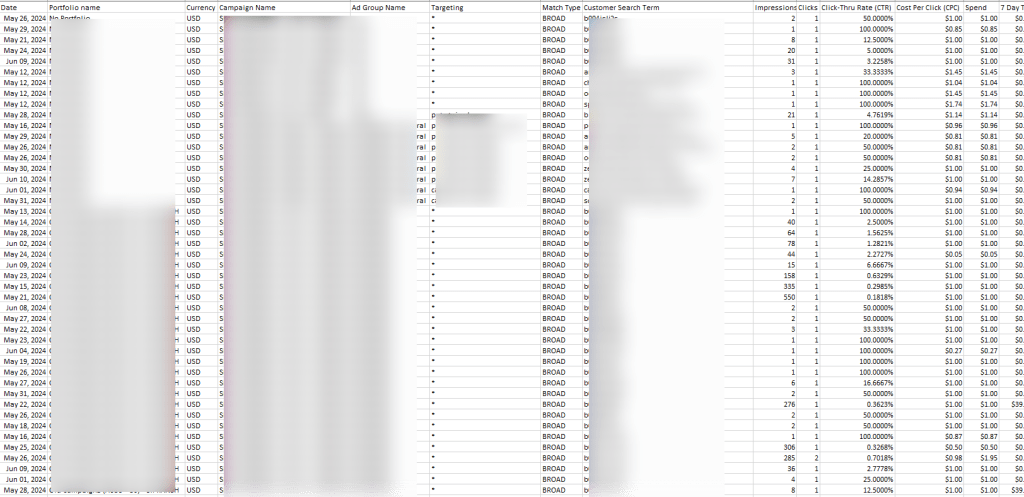
Following are the metrics that are found in search term reports:
- Campaign start and end dates
- Campaign name
- Ad group name
- Portfolio name
- Keyword targeted
- Customer search term
- Match type
- Impressions
- Spend
- Cost per click
- 7 days total sales
- Total advertising cost of sales
- Total return on advertising spend
- Clicks Thru rates
How to use Search Term Report?
You can use Search Reports to consider new keyword opportunities after 2 weeks of running multiple campaigns. These may help you improve those campaigns more efficiently with new and appropriate keywords.
You can simply filter the search term report with the help of ACoS to identify the keywords that are performing better and those that are not performing at all. To make this procedure easier for you, Amazon Seller provides a free Amazon PPC ACoS Calculator for filtering the same.
So using that you can simply divide you can simply divide your keywords between which are generating high ACoS and which are generating low ACoS. For the keywords that are generating low ACoS, you can simply move those keywords to phrase match. Again, if the phrase match keyword generates lower ACoS then you send those to exact match and then further refine them and reduce wasted ad spend.
Targeting Report:
The targeting report is for Sponsored Product Campaigns, it offers detailed information about versatile targeting options for your campaigns over the past 90 days.
This report shows every keyword, ASIN, and category that you are advertising on. It will also display the performance of all types of matches for auto-campaigns.
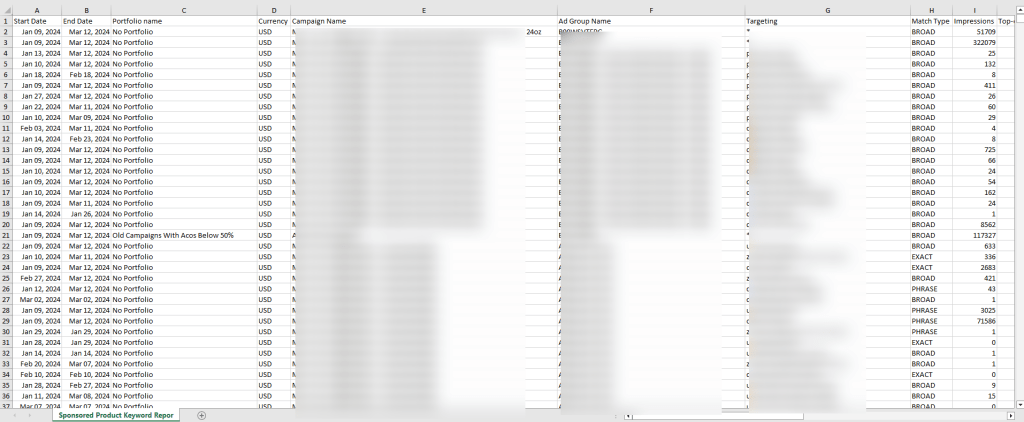
The following are the metrics that are found in targeting reports:
- Portfolio Name
- Date
- Campaign Name
- Ad Group Name
- Targeting
- Match Type
- Impressions
- Clicks
- Click-Thru Rate (CTR)
- Spend
- Cost Per Click (CPC)
- Total Advertising Cost of Sales (ACoS)
- Total Return on Advertising Spend (RoAS)
- 7-Day Total Orders
- 7-Day Total Sales etc.
How to use Targeting Report?
Targeting reports allow sellers to check how different product targets and different keywords perform over the period. With the help of this, you can easily adjust your bids, spot duplicate keywords, and maximize your ad budget.
For instance, if you see a keyword that has a high CTR with a low impression then it reflects the keyword has a potential though you are probably bidding too low for that target.
So in that case, you can increase the bid to reach more consumers and generate more sales. You can also identify products that have 0% ACoS which means these products are getting clicks but not any sales.
For that, you will need to optimize the product listing to improve the sales or move this keyword to negatives so your ad spend can simply focus on high-converting keywords.
Apart from all these, you can also identify the best-performing ASINs of the last 90 days.
Advertised Product Report:
This report provides comprehensive performance and sales metrics for all your advertised ASINs used in all campaigns that have received at least one impression.
This report also breaks down all the ASINs performance by ad groups, campaigns, and SKUs.

The following are the metrics that are found in the advertised product report:
- Start Date & End Date
- Portfolio Name
- Campaign Name
- Ad Group Name
- Advertised ASIN
- Advertised SKU
- Impressions
- Clicks
- Click-Thru Rate (CTR)
- Spend
- Cost Per Click (CPC)
- 7-Day Total Orders
- 7-Day Total Sales
- Total Advertising Cost of Sales (ACoS)
- Total Return on Advertising Spend (RoAS)
How to use an Advertised Product Report?
You can simply sort the report by 7-day Total Sales to identify the best-performing products.
For instance, if you are planning for a Prime Day marketing strategy and you want to add more ad budget to profitable products. Then with the help of the 7-Day Total Sales metric, you can easily identify the trending products and simply allocate your advertising budget to those products.
Placement Report:
According to your bid, Sponsored Product and Sponsored Brand ads can appear in different places like the top of the search, the rest of the search, etc.
The placement report will give you the performance metrics of your ads based on their locations. For instance, the placement report will help you figure out which campaign placement works best for you.
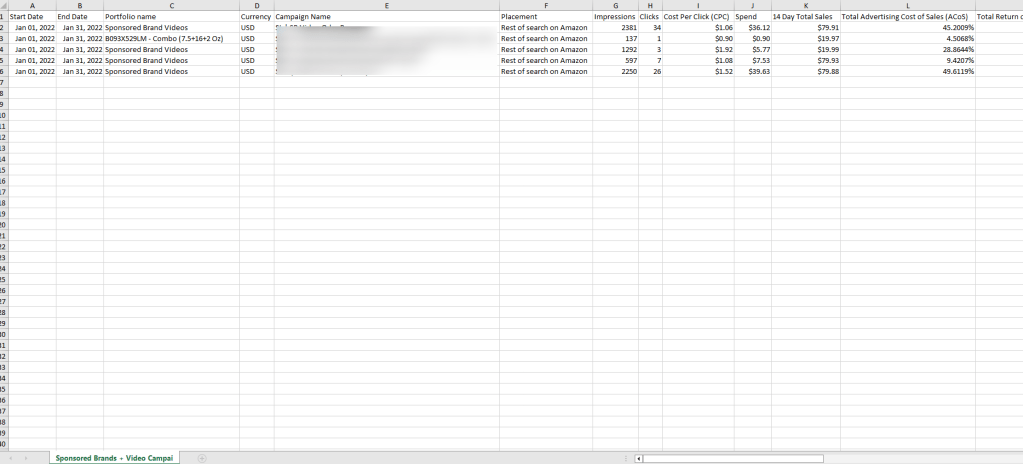
The following are the metrics that are found in the placement report:
- Date
- Currency
- Portfolio Name
- Campaign Name
- Placement
- Bidding Strategy
- Impressions
- Clicks
- Spend
- Cost Per Click (CPC)
- 7-Day Total Sales
- 7-Day Total Orders
- Total Return on Advertising Spend (ROAS)
- Total Advertising Cost of Sales (ACoS)
How to use a Placement Report?
For instance, from the placement report, you can easily track the performance of important metrics such as impressions, and sales to identify performance across the top of search, ACoS, or product details page placements.
You can use this knowledge to adjust your bids to optimize your campaign placements and generate more ROI.
Budget Report:
This report helps you manage your ad campaigns better. This will give you a better idea of future sales and revenue if your campaigns get out of budget. It also provides you with better recommendations to minimize the chance of running out of budget.
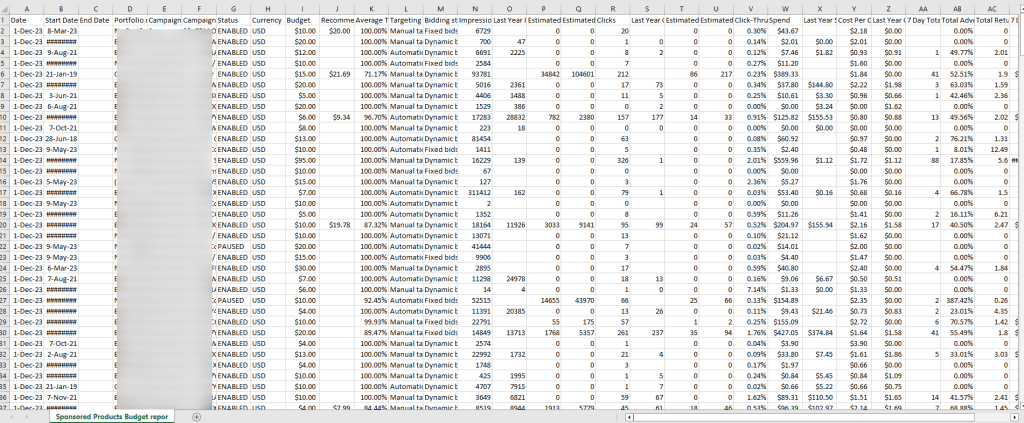
The following are the metrics that are found in the budget report:
- Clicks
- Budget
- End date
- Click-Thru Rate [CTR]
- Average Time in Budget
- Campaign Name
- Bidding strategy
- Cost Per Click [CPC]
- Currency
- 7 days total orders
- 7 days total sales
- Campaign Type
- Estimated Missed Clicks Range Max
- Estimated Missed Clicks Range Min
- Impressions
- Portfolio Name
- Estimated Missed Impressions Range Min
- Estimated Missed Impressions Range Max
- Spend
- Status
- Estimated Missed Sales Range Min
- Estimated Missed Sales Range Max
- Recommended budget
- Start date
- Total Advertising Cost Of Sales[ACOS]
- Total Return Pn Advertising Stipend[ROAS]
How to use a Budget Report?
You can use a budget report to check the average time of campaigns, estimated impressions, sales, clicks, etc. It also showcases sales you missed due to a limited daily ad budget for your campaigns.
Ideally, you can use this report to identify your high-performing campaigns with a percentage showcasing the average time in budget lower than 100% for your performance tracking.
Purchased Product Report
Often we notice that customers click on a sponsored ad or sponsored product ad display but they check out buying or purchasing some different product.
The purchased product report shows the details of the product that the customer purchased instead of the sponsored display product. This report eventually helps you recognize the cross-selling opportunities.

How to use a Purchased Product Report?
This report also helps in evaluating the advertising opportunities for the products whether it needs to be more advertised or not.
The following are the metrics that are found in the purchased product report:
- Start date
- End date
- Campaign name
- Currency
- Portfolio name
- Cost type
- Bid optimization
- Ad group name
- Purchased ASINS
- Advertised ASIN
- Advertised SKU
- 14-day brand halo ASIN order
- 14-day brand halo ASIN units
- 14-day brand halo ASIN sales
Gross and Invalid Traffic Report
Your listing must be capable of converting clicks into sales. Some issues like non-human, fraudulent, and bot traffic make it difficult to successfully check out to successful sales.
The gross and invalid traffic report shows the accumulated traffic or the customers of the website are organic or fraudulent.
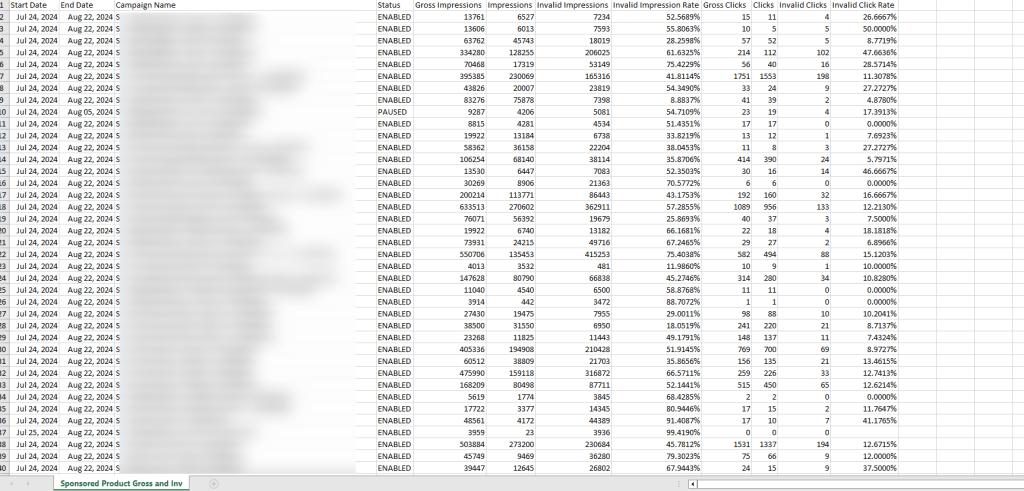
The following are the metrics that are found in the purchased product report:
- Campaign Name
- End Date
- Clicks
- Gross Clicks
- Impressions
- Gross Impressions
- Invalid Clicks
- Invalid Click Rate
- Invalid Impression Rate
- Invalid Impressions
- Status
- Start Date
How do you use Gross and Invalid Traffic Reports?
This report helps us understand the traffic metric for your campaign, such as gross impressions, invalid impressions, gross clicks, invalid clicks, etc.
It also includes traffic which can show the actual data like double clicks, duplicate visits, etc.
How To Download Amazon Advertising Reports from Amazon Seller Central?
Following is a step-by-step process for downloading the advertising reports from Amazon Seller Central:
- Log in to your Amazon Seller Central account.
- Then go to “Reports” from the left sidebar, and then select “Advertising Reports”.
- If you have created a few reports in the past, then you can simply download them directly from the page.
- If you have not created any reports in the past, then you need to click on the “ Create a report” button on the top corner.
- After, that you can simply select the configuration and reporting settings as per your needs.
- Then click on “ Run Report.”
- Now you can download the report once it is available.
If you’re looking to improve your Amazon advertising, why not go all in and do it right? Whether you’re starting with ads, consider bringing in our Amazon experts to help.
Advertising can make a difference in promoting and attracting an audience to your brand. That’s where our Amazon Advertising experts come in. We’ll brainstorm ideas, design engaging visuals, and write persuasive copy that grabs attention and keeps customers from scrolling. So, why settle for mediocre Advertising when you can have something truly outstanding?

Mastering Amazon Posts: A Comprehensive Guide To Connect With Your Customers
What is the Amazon Posts program?
The Amazon Posts program offers brand-registered sellers an innovative way to engage with customers by sharing lifestyle images and product-related content. Similar to social media platforms, this program features a “feed” where customers can scroll through visually appealing content and click directly to product detail pages. This setup not only demonstrates product usage but also encourages customers to explore and connect with your brand’s story.
This feature is available in the US Amazon store to registered Brand Owners, vendors, and agencies with a brand Store.

Why should I use Posts?
Posts enable you to nurture customer connections, keep your brand top of mind, and grow your brand following through the use of engaging product imagery, vertical videos, and captions in a mobile-optimized experience. Inspire and educate shoppers to discover your products, grow their interest in your brand’s story, and foster loyalty through repeat purchases.
Who is eligible for Amazon Posts?
Currently, the tool is only available for sellers who are either registered with Amazon’s Brand Registry or Vendors within the US. You also must have an Amazon Store for your brand to use Posts.
Benefits of Posts
- Drive brand visibility: Share your voice and drive the discovery of products in placements across the shopping journey.
- Free to use: Brands can post as little or as much as they want. Unlike PPC or other types of advertising, there is no associated cost per click.
- Experiment without the expense: Test out your marketing strategies on Amazon at no cost, assess ad performance, and use the “boost” feature to easily convert content into Sponsored brand ads.
- Increases product discoverability: As we mentioned above, some customers may not realize the extent of your product line — especially if they’re new to your brand. As a customer scrolls through your listing detail page on the Amazon app, they can discover more about your brand through Posts picturing your other products.
- Customers can “follow” your brand: Just like any other social media platform, users will be able to “follow” your brand on Amazon to stay up-to-date with your content.
- Encourage effortless shopping: Link products directly to Posts to help customers seamlessly transition from browsing to buying.
- Track metrics and insights: Measure impact by tracking clicks, impressions, reach, video metrics, and more from the insights dashboard.
Where do Amazon Posts appear?
Amazon makes the call on where your Posts show up, based on relevance and customer engagement. There are four places where your Posts may be displayed:
Brand feed

The brand feed is exactly what it sounds like — it’s your brand’s unique feed, where you can post content about your entire product line.
Product page carousel
A “carousel” is a series of posts that appear on a product detail page, which customers can scroll horizontally. Carousels appear on your product detail page and may contain your competitors’ Posts as well.
Related brands feed
Clicking on a Post within a product page carousel will bring you to the related brand feed, where customers can discover more of your products, as well as other brands.
Category-based feed
Amazon assigns relevant category tags to individual Posts. That way, customers can explore content for complementary items within a specific category. For example, customers scrolling through the “Wheel & Tire Accessories” category feed may see Posts about tire traction pads next to RV covers.
How Do I Create A Post?
Step 1:
Register for sponsored ads. If you are a seller, you will have to enroll your brand in the Amazon Brand Registry.
Step 2:
Sign in to your ads account.
Step 3:
Set up your brand profile and navigate to the posts section.
Step 4:
Upload your creative following the content guidelines and acceptance policies, write a caption, and add up to five ASINs.
Step 5:
Schedule your Posts within the desired time frame.
Step 6:
Review and submit your campaign.
Posts Guidelines
Following are the few products on which you cannot create any posts:
- Adult products
- Alcohol & beverages
- Tobacco products or related ones
- Tattoo products
- UV Tanning products
- Weapons & more
Posts Dimensions
For Image Posts:
If you are planning to post images as your Amazon post then you need to keep the following details in mind –
- File format: JPG or PNG
- Color format: RGB
- Display aspect ratio: 1×1, 16×9, 4×3
- Maximum file size: 100 MB
- Resolution: 640 x 640 pixels or larger
However, your image posts should not contain the following content:
- CTA likes Buy Now are not allowed.
- Combinations of logos or Brand Logos
- Any kind of animations
- Cluster of product highlights like collages
Tips:
- Go for clean and clear lifestyle images highlighting your product well and its features for your Amazon Posts to bring your audience to the correct products.
- Add captions that showcase your product or brand motives to connect with your audience.
- Use suitable languages and themes which are universally accepted and readable by your audience.
- Avoid captions that are too hard to understand or end up being irrelevant to the audience such as questions.
- Make sure your posts are often otherwise your audience won’t be getting your brand updates which may end up with fewer sales.
For Video Posts:
If you are planning to post videos as your Amazon post then you need to keep the following details in your mind –
- Resolution: A minimum of 540 x 960 px. 1080 x 1920 px or greater is recommended
- Video length: 6-45 seconds
- Aspect ratio: 9:16; Leave 15% of the top and bottom of your video free of key creative elements to ensure the main visual of your content is lined up within a 4:5 ratio area.
- File size: 500 MB or smaller
- File format: MP4, MOV
Detailed Specifications:
Video codec H.264 or H.265
Video profile Main or baseline
Frame rate 23.976. 23.98, 24,25, 29.97, 29.98, or 30 fps
Video bit rate Minimum 1Mbps (4 Mbps or higher recommended)
Video scan type Progressive
Audio codec PCM, AAC, or MP3
Audio format Stereo or mono
Audio bit rate Minimum 96 kbps
Audio sample rate Minimum 44.1 kHz
Tips:
- Do not end your video abruptly. Make sure you end your video well otherwise your audience will take it as an incomplete video.
- Make sure you optimize your video resolutions as per the given guidance for a seamless customer experience.
- Make sure you showcase product-related clips in your video rather than focusing on animations.
- Create videos that showcase the unwrapping of your product, highlight main uses, or showcase real-life uses etc.
Posts Components
The following are the five components that make Amazon Posts successful:
Profile Banner:
This displays your brand name and logo. So make sure you upload the correct brand name and logo that matches your Amazon product listings.
Custom Video:
These videos demonstrate product features so make sure your videos talk about how your product is necessary and useful to your customers.
Product Cards:
This provides details of the price and star rating of your products below Amazon posts. These product cards work as direct links to your Amazon product listings.
Captions:
Captions are an important component where you can connect with your customers using great captions and make sure you highlight your product uses in them.
Category tags:
Amazon auto-generates these tags for you.
Conclusion
So this was all about how to create Amazon Posts and enhance your brand awareness. You can go through more details from your seller central account regarding the same. Always keep your customers engaged with Posts.
Amazon Posts is a great tool to keep your customers updated with all your new listings or product announcements. Make full use of it. If you are facing any issues with Amazon Posts Management, then u-commerce is the perfect solution for you. We will not only just work on Amazon Posts Management but offer multiple other services like Amazon Account Management, SEO Services, E-commerce Services, etc.

Amazon Brand Registry Uncovered: Eligibility, Benefits, Limitations, and More
Selling on Amazon offers incredible opportunities for building a successful business and generating income. However, with these opportunities come increased competition and the need to protect your business from various risks.
According to the 2023 Jungle Scout study of over 2,600 Amazon sellers, 52% plan to expand their businesses this year. But alongside their growth ambitions, many sellers express concerns about several potential threats to their businesses:
- Supplier Competition: 20% of sellers worry about Chinese suppliers offering their products or similar ones at lower prices.
- Hijacking: 33% of sellers are concerned about hijackers or copycats taking over their listings.
- Account Status: 23% of sellers fear Amazon may limit or shut down their accounts or listings without warning or clear justification.
So, what’s the most effective way for sellers to protect themselves against these concerns? The answer lies in registering their brand trademark with Amazon’s Brand Registry.
This article will explore the features and benefits of the Amazon Brand Registry, guide you on how to get started, and discuss how trademarking and other strategies can safeguard your Amazon business.
What is Amazon Brand Registry?
Amazon Brand Registry is a complimentary resource designed to help brand owners safeguard their intellectual property (IP), manage product listing accuracy, and grow their businesses—whether or not they currently sell on Amazon. By enrolling in the Brand Registry, you can share detailed information about your brand, which allows Amazon to activate predictive protections and give you access to a variety of tools that support business growth.

Benefits of Amazon Brand Registry
Amazon Brand Registry offers numerous advantages for brands with a registered trademark. Here are some of the key benefits:
Enhanced Control: As a brand owner, you gain greater control over your product listing content, ensuring accuracy and consistency across the platform.
Brand Monitoring: The program includes tools that allow you to monitor your brand’s presence on Amazon, helping you identify and address potential issues like unauthorized sellers or inaccurate listings.
Dedicated Support: Brand Registry provides access to a specialized internal team that can assist with fixing and escalating incorrect listing contributions, handling variations, and submitting and managing IP infringement claims.
A+ Content: Brand owners can use Amazon A+ Content to enrich their product listings with enhanced images, detailed descriptions, and other engaging content that improves the customer experience.
Amazon Stores: The program allows you to create a multi-page Amazon Store, a customizable space where you can showcase and promote your brand.
Sponsored Ads: With access to advanced advertising strategies, including Sponsored Brand Ads and Sponsored Display Ads, you can increase your brand’s visibility and reach more potential customers.
Amazon Live: Brand Registry enables you to interact with customers in real time through live streaming on Amazon Live, providing a dynamic way to engage with your audience.
Amazon Vine: The program allows you to enroll in the Amazon Vine Program, where you can receive verified product reviews from trusted reviewers, boosting credibility and customer trust.
Limitations of Amazon Brand Registry
While the Amazon Brand Registry offers significant benefits, it’s important to understand its limitations:
Brand Gating: The program does not automatically gate your brand, meaning it won’t restrict other sellers from listing your products.
Seller Control: You cannot whitelist or blacklist specific sellers from selling your brand on Amazon.
Infringement Claims: Only the brand owner can submit IP infringement claims. The program does not allow third parties to file these claims on your behalf.
Eligibility for Amazon Brand Registry
To enroll in Amazon Brand Registry, you must have a fully registered or pending trademark. To register, your brand needs an active, registered trademark—either text-based or image-based—in every country where you plan to enroll and sell. Brand Registry may also accept brands with pending registrations under specific trademark offices, so it’s essential to check the country-specific requirements before applying.
Trademark Requirement for Amazon Brand Registry
To enroll in Amazon’s Brand Registry, your brand must have a registered trademark. In the United States, this means that your trademark must be officially registered with the United States Patent and Trademark Office (USPTO). This requirement ensures that only legitimate brand owners can access the protections and benefits of the program.
How to Get a Trademark for Amazon Brand Registry
Obtaining a trademark is a crucial step for protecting your brand on Amazon and enrolling in the Amazon Brand Registry. Here’s a guide to help you through the process:
- Conduct Thorough Research: Before you finalize a name or logo, ensure it is unique and does not conflict with existing trademarks. Use the United States Patent and Trademark Office (USPTO) website to search their official database and verify that no other registered trademarks exist with the same name.
- Choose the Right Class for Your Trademark: Similar to selecting a product category on Amazon, you’ll need to file your trademark within a specific class that defines the types of products or services your brand will cover. The cost of filing your trademark will depend on the class you choose.
Trademark Registration Timeline
Typically, it takes at least one year to receive a decision from the USPTO after submitting a trademark application. However, you don’t need to wait for a year to get your brand approved on Amazon.
Amazon offers a service called IP Accelerator, which connects Amazon business owners with curated Intellectual Property (IP) attorneys who assist with the trademarking process. If you use an IP specialist recommended by Amazon, your brand can be approved for the Brand Registry even before your trademark application is fully accepted.
Amazon Brand Registry Approval Process
If you already have a registered trademark or are using the IP Accelerator program, the approval process for the Amazon Brand Registry should take approximately two weeks. To ensure a smooth process, make sure you submit all the necessary information to Amazon at the outset. Additionally, be sure to review all eligibility requirements carefully—your brand must have an active registered trademark in each country where you wish to enroll.
Benefits of Amazon Brand Registry
Enrolling in the Amazon Brand Registry gives you access to a variety of tools designed to protect and grow your brand:
Automated Protections: Amazon’s machine learning technology uses the data you provide about your brand, products, and intellectual property to prevent unauthorized or inaccurate listings before they even appear on the platform.
Report a Violation: You can search Amazon’s catalog for potential violations of your trademark, copyright, patent, or design rights, identify infringements, and report them directly through the Brand Registry.
Brand Registry Support: You gain access to specialists who can assist with resolving technical issues, listing inaccuracies, policy violations, and more.
Neutral Patent Evaluation: For patent disputes, Amazon offers a faster and less costly alternative to court proceedings. Neutral third-party evaluators will determine whether a utility patent has been infringed, and their decisions will be enforced within the U.S. Amazon store.
Impact Dashboard: This tool provides insights into how Amazon uses your brand information to protect your brand and remove potentially harmful listings.
Tools and Features Available Through Amazon Brand Registry
Brand Registry unlocks a range of resources to help you succeed in the Amazon marketplace:
- Grow Your Audience:
Amazon Vine: Generate reviews from Amazon Vine Voices to kickstart new or slow-moving products.
Amazon Live: Engage with potential customers through live streaming, answer questions in real-time, and create a community around your brand.
Advertising: Utilize digital ads like Sponsored Products, Sponsored Displays, and Sponsored Brands to increase visibility and engagement.
- Increase Sales:
A+ Content: Enhance product listings with rich text, images, and detailed descriptions to help products stand out.
Amazon Stores Builder: Create a branded, multi-page online storefront within Amazon, offering a complete shopping experience for customers.
Virtual Bundles: Improve the shopping experience by bundling products together into value-added combo deals.
Manage Your Experiments: Use A/B testing to optimize detail page content and improve conversion rates.
- Build Brand Loyalty:
Subscribe & Save: Offer customers discounts on regular shipments of frequently ordered items to boost brand loyalty.
Manage Customer Engagement: Develop relationships with Amazon customers by sending emails directly to high-spend, recent, and repeat customers. Highlight new products and seasonal promotions.
- Inform Your Strategy:
Brand Analytics: Access powerful data reports to analyze sales, search performance, and customer behavior.
Brand Referral Bonus: Earn bonuses on sales from traffic you drive to Amazon.
Amazon Attribution: Measure the impact of marketing efforts across channels like email and social media.
Brand Metrics: Gain insights into customer engagement and track performance at each stage of the purchase funnel.

Conclusion
Enrolling in the Amazon Brand Registry is a crucial step for any business looking to protect its brand, enhance product listings, and drive growth on Amazon. By securing a trademark and leveraging the powerful tools and resources offered through the Brand Registry, you can gain greater control over your brand’s presence on the platform, increase visibility, and build lasting customer loyalty.
At u-commerce, we understand the importance of protecting your brand and optimizing your Amazon strategy. Whether you’re just starting the trademark process or looking to maximize the benefits of the Amazon Brand Registry, our team is here to support you every step of the way. Let us help you navigate the complexities of Amazon’s ecosystem and ensure your business thrives in a competitive marketplace

Types of Amazon Badges, How To Earn Them And Boost Your Sales?
When browsing through Amazon, you might wonder which product to click on. Consider two products: the Morento Air Purifier and the Alfoia Air Purifier. The Alfoia Air Purifier has only 621 ratings and no other attributes, while the Morento Air Purifier boasts a Limited Time Deal badge and 4,338 ratings. Naturally, the Morento Air Purifier appears more attractive to potential buyers. But how can sellers earn these valuable Amazon badges?
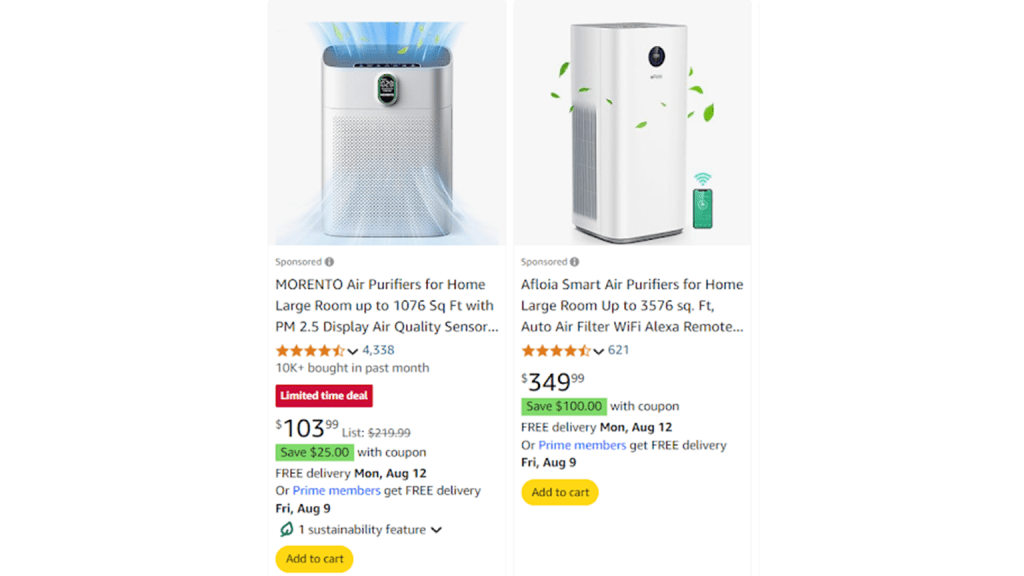
Naturally, the Morento Air Purifier appears more attractive to potential buyers. But how can sellers earn these valuable Amazon badges?
The answer lies in a combination of factors such as optimized content, an effective Amazon advertising strategy, and achieving high sales volume.
Let’s dive into the different Amazon badges available for sellers and the criteria to earn them.
- Amazon Best-Seller Badge
- Amazon Choice Badge
- Amazon New Release Badge
- Amazon Climate Pledge Friendly Badge
- Amazon Prime Badge
- Limited-Time Deal or Deal of the Day Badge
- Extra Savings, Coupons, and Discounts
Let’s have a look at them now.
Amazon Best-Seller Badge
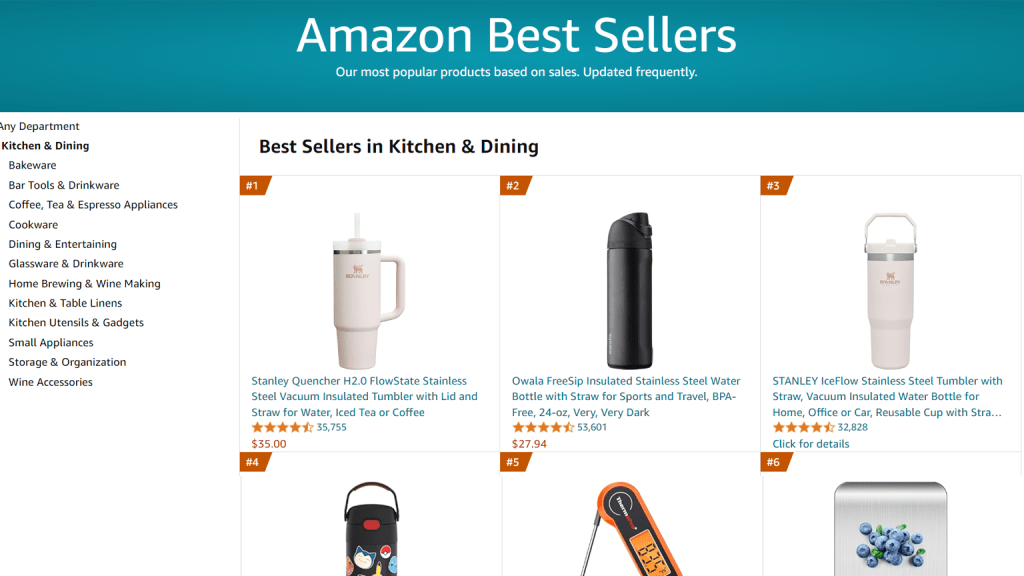
The Amazon Best-Seller Badge is a prestigious and well-recognized orange badge awarded to the top 100 best-selling products in any given category or subcategory. This badge serves as a powerful visual indicator that can significantly enhance customer trust in your product on both category pages and product detail pages.
Understanding the Best-Seller Badge
The criteria for the Best-Seller Badge vary across Amazon’s different marketplaces. For instance, the best-selling toys on Amazon US might not be the same as those on Amazon UK. The list of best-sellers is updated hourly based purely on sales data, meaning you have 24 chances each day to earn or lose the badge. Interestingly, your eligibility for the badge is unaffected by product and seller reviews, making it possible to obtain it even without realizing it.
How to earn the Amazon Best Seller Badge?
Securing the Amazon Best-Seller Badge involves several strategic actions aimed at boosting your organic sales and optimizing your product listings. Here are key steps to help you earn this coveted badge:
Optimize Your Product Listing:
- SEO: Ensure your product titles, descriptions, and bullet points are optimized with relevant keywords.
- Product Category Relevance: Place your product in the most accurate category to reach the right audience.
- Product Details: Provide clear, detailed, and accurate information about your product.
- Images and Videos: Use high-quality images and videos to showcase your product effectively.
Pricing Strategy:
- Regularly review and adjust your pricing to remain competitive while maintaining profitability.
Leverage Tools for Optimization:
- Consider using tools like SellerApp’s Amazon Listing Quality tool to enhance the quality and relevance of your listings.
Effective Marketing Efforts:
- PPC Campaigns: Run targeted Pay-Per-Click campaigns to increase visibility and drive sales.
- Conversion Rate: Focus on improving your product’s conversion rate by enhancing the customer experience and providing compelling offers.
Maintain Consistent Sales:
- Build a strong sales history by continually promoting your product and ensuring steady sales. This consistency is crucial for maintaining the Best-Seller Badge.
Amazon Choice Badge
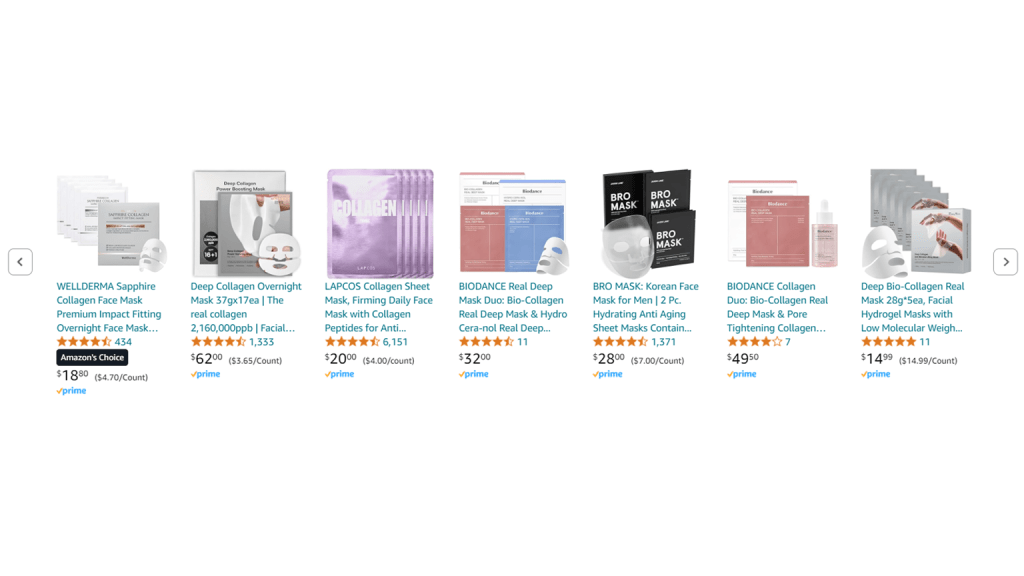
The Amazon Choice Badge is a badge that is given to Amazon products that shows the best match for the keywords that the customers are using. The badge has prominent recognition on category pages and product detail pages. This badge is keyword-specific, thus your listing can display the Amazon’s Choice badge simultaneously for several keywords.
Understanding the Amazon Climate Pledge Friendly Badge
For instance, if you search for a “lotion” and for “vegan lotion” The Amazon Choice badge is given to these two keywords because those are the keywords that customers frequently use. This product also needs to have a strong BSR and include relevant yet popular keywords in the listing.
When the company released Alexa in 2015, more customers began using the voice shopping capability to look for product recommendations on Amazon’s platform. However, the problem was that voice search made it difficult to scan through the product lists and discover the best option.
Later that year, the Choice Badge was made available to customers as a means to simplify voice search and assist them in finding what they’re looking for. It’s a much quicker and more practical method to shop, improving the user experience and increasing profitability for Amazon.
This Amazon Choice Badge can be seen in the upper left corner of the product’s feature image and is also visible just below the product’s title, on the listing page.
How to earn the Amazon Choice Badge
Earning the Amazon Choice Badge is a goal for many sellers, as it enhances product credibility, increases sales, and boosts profitability. Here are the key factors to focus on:
High Customer Ratings:
- Ensure your product maintains a high average rating from customers. Excellent reviews are crucial for earning this badge.
Keyword Optimization:
- Optimize your product listing for frequently searched keywords. Include relevant and popular keywords in your titles, descriptions, and bullet points.
High Conversion Rate:
- Aim for a high conversion rate by providing a compelling product page, attractive offers, and exceptional customer service.
Amazon Prime Eligibility:
- Make sure your product qualifies for Amazon Prime, ensuring quick and reliable delivery for customers.
Amazon New Release Badge
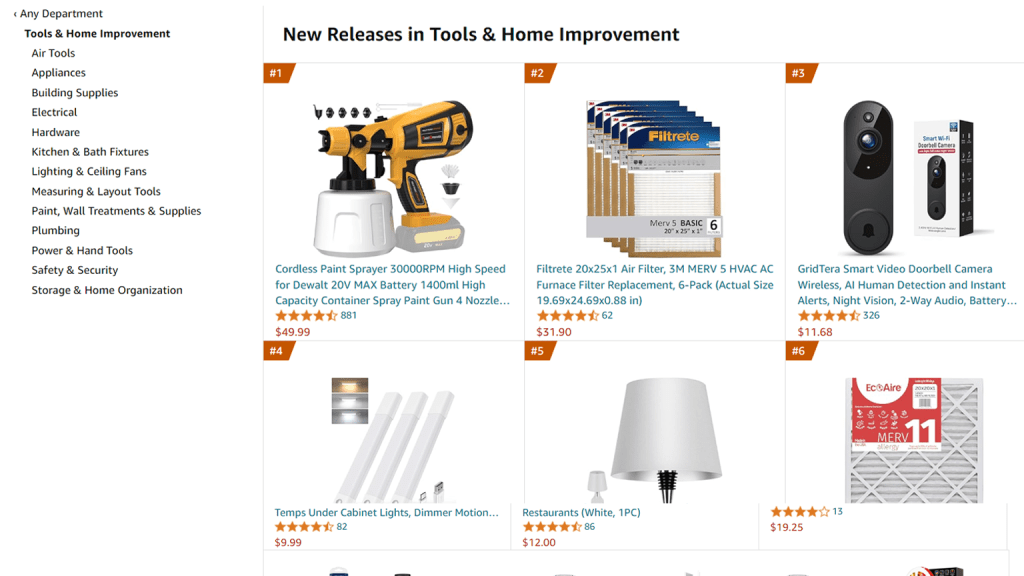
The Amazon New Release Badge is awarded to newly listed products that achieve a high sales velocity in the initial days of their launch. This badge is available for the first 90 days after the product is listed, highlighting it as a trending and noteworthy item for potential buyers.
Understanding the Amazon Climate Pledge Friendly Badge
The New Release Badge helps new products gain visibility and credibility by showcasing their popularity right from the start. To leverage this badge, it’s essential to ensure that your product stands out and captures significant attention quickly.
How to earn the New Release Badge on Amazon
To secure the Amazon New Release Badge, follow these strategies:
Optimize Your Product Listing:
- Detailed Product Information: Ensure that your new product listing includes comprehensive and accurate details. Look at any of your existing listings that have achieved Best Seller status and replicate the level of detail in your new listing.
- Primary Keyword Ranking: Aim to rank on the first page for your primary keyword. This increases visibility and helps attract more potential buyers.
Increase Organic Sales:
- Optimize your product listing to attract organic traffic. This includes using relevant keywords, high-quality images, and compelling product descriptions.
Build Momentum with Marketing:
- PPC Advertisements: Run targeted pay-per-click (PPC) campaigns to boost visibility and drive sales.
- Social Media Promotion: Leverage your social media channels to create buzz around your new product.
- Email Marketing: Use email campaigns to inform your customer base about the new release.
- Other Marketing Techniques: Utilize various marketing strategies to increase traffic to your product listing and boost sales.
Achieve High Sales Velocity:
- Your primary goal is to outsell competitors and generate rapid sales. Effective marketing and an optimized listing are key to building the necessary sales momentum.
Maintain Front-Page Visibility:
- After launching, strive to keep your product on the first page of search results. This sustained visibility helps in continuously attracting visitors and potential buyers.
Amazon Climate Pledge Friendly Badge
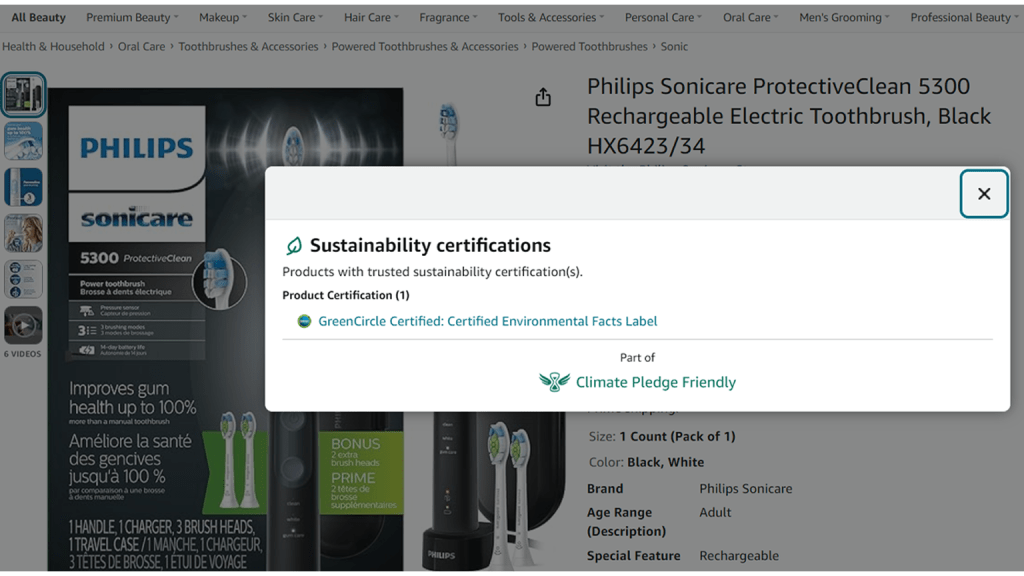
The Amazon Climate Pledge Friendly Badge is a mark of environmental sustainability, awarded to products that meet specific eco-friendly standards. This badge reflects Amazon’s commitment to promoting environmentally responsible products and connects eco-conscious customers with businesses that share these values.
Understanding the Amazon Climate Pledge Friendly Badge
The Climate Pledge Friendly Badge signifies that a product has been certified to meet rigorous sustainability standards. Customers can click on the badge to view the certifications and learn how the product contributes to environmental preservation. Additionally, these products are featured in a separate list and can be filtered by shoppers specifically looking for Climate Pledge Friendly items.

How to earn the Amazon Climate Pledge Friendly Badge
To earn the Amazon Climate Pledge Friendly Badge, follow these steps:
Obtain Sustainability Certifications:
- Products must be certified by one or more of Amazon’s 18 sustainability certification partners. These partners include well-known organizations like Energy Star, Fair Trade, and the Forest Stewardship Council (FSC).
- Once your product is certified by any of these partners, Amazon will automatically display the Climate Pledge Friendly Badge on the product listing.
Apply for the Badge (if necessary):
- If your product meets the certification criteria but does not display the badge, you can request its addition by opening a case in Seller Central or Vendor Central.
Amazon’s “Compact by Design” Certification:
- In addition to third-party certifications, Amazon offers its own “Compact by Design” certification. This certification focuses on unit efficiency and promotes environmentally friendly and compact packaging.
- Products that achieve this certification are also eligible for the Climate Pledge Friendly Badge.
Ensure Compliance and Visibility:
- Make sure your product listings are updated with all necessary certification details to ensure compliance and visibility of the badge.
Amazon Prime Badge
The Amazon Prime badge is a highly recognizable icon indicating a product’s eligibility for Amazon Prime’s fast and free two-day shipping. This exclusive service has transformed online shopping, offering unparalleled convenience and speed. With over 150 million Prime members worldwide, the Prime badge is a powerful tool for sellers to attract and retain customers.
Understanding the Amazon Prime Badge
When a product displays the Prime badge, it assures customers that their purchase will be delivered quickly and efficiently. In today’s fast-paced world, consumers highly value convenience and instant gratification. The Prime badge not only enhances the product’s appeal but also taps into the vast customer base of Prime members, significantly increasing the chances of making sales.
How to earn the Amazon Prime Badge
To earn the Amazon Prime Badge, follow these steps:
Qualify for Seller Fulfilled Prime (SFP):
- Apply for the Seller Fulfilled Prime program, which allows sellers to fulfill orders directly from their warehouses while still offering the benefits of Prime shipping.
Complete the Trial Period:
- Successfully complete a trial period during which you must demonstrate your ability to meet Amazon’s stringent Prime fulfillment requirements, including fast shipping, reliable delivery, and excellent customer service.
- During this trial period, your performance will be closely monitored to ensure you can consistently meet the high standards expected of Prime sellers.
Maintain Prime Fulfillment Excellence:
- After completing the trial period, you will be automatically registered in Seller Fulfilled Prime.
- Your registered ASINs (Amazon Standard Identification Numbers) will then display the Prime badge to customers, signifying that your products are eligible for Prime benefits.
Limited-Time Deal or Deal of the Day Badge
The Limited-Time Deal and Deal of the Day badges are special indicators that highlight exclusive offers available for a short period. These deals are prominently featured on Amazon’s highly trafficked Today’s Deals page, attracting significant customer attention.
Understanding the Badges
- Limited-Time Deal Badge: This badge appears as a red banner with the text “Limited Time Deal” between the product’s star rating and price. It is typically associated with limited-stock deals that run for up to 7 days.
- Deal of the Day Badge: Displayed as an orange badge above the item’s price, this badge is reserved for the best daily offers. Products with this badge are featured on Amazon’s Today’s Deals page, making them highly visible to shoppers.

How to earn a Limited-Time Deal or Deal of the Day Badge
To secure either the Limited-Time Deal or Deal of the Day badge, follow these steps:
Ensure Eligibility for Deals Campaigns:
- Verify that your products meet the criteria for participating in a Deals campaign. Key requirements include:
- The product must be Prime eligible.
- It must have a minimum of a three-star rating.
- The product should be in brand-new condition.
Create a 7-Day Deal:
- A 7-day deal activates the Limited-Time Deal ribbon on your product listing, making it stand out to potential buyers. This deal typically runs for up to 7 days, allowing you to attract customers over a longer period.
Consider Amazon Lightning Deals:
- An Amazon Lightning Deal is a flash sale that usually lasts for four to six hours. These deals are also featured on the Amazon Deals page and can be an effective way to boost sales quickly.
Achieve Deal of the Day Status:
- The Deal of the Day badge is awarded to the best offers of the day. To earn this badge, ensure that your deal is compelling and offers significant value to customers. Amazon selects the Deal of the Day based on what it considers the best offer for its customers.
Set Up Deals in Seller Central:
- Log in to Amazon Seller Central and navigate to the Advertising section. Here, you can create and manage your deals. Remember, you can schedule both a 7-day deal and a Lightning Deal for the same product, as long as they are planned for different days.
Extra Savings, Coupons, and Discounts
Amazon offers a variety of badges to highlight discounted products, making them more attractive to potential buyers. When you offer a discount on your product, it will display with a special badge—typically an orange ribbon that reads “Discount” or, if the customer is a Prime member, a green ribbon.
Understanding Extra Savings, Coupons, and Discounts Badges
These badges are designed to catch the eye of shoppers looking for deals. They signal that a product is available at a reduced price, encouraging customers to take advantage of the offer.
- Extra Savings Badge: Appears when you offer additional savings on a product, such as through a sale or special promotion.
- Coupons Badge: Displays when you provide a coupon that customers can apply at checkout for a percentage-off or money-off discount.
- Discount Badge: Highlights general discounts or price reductions on your products.
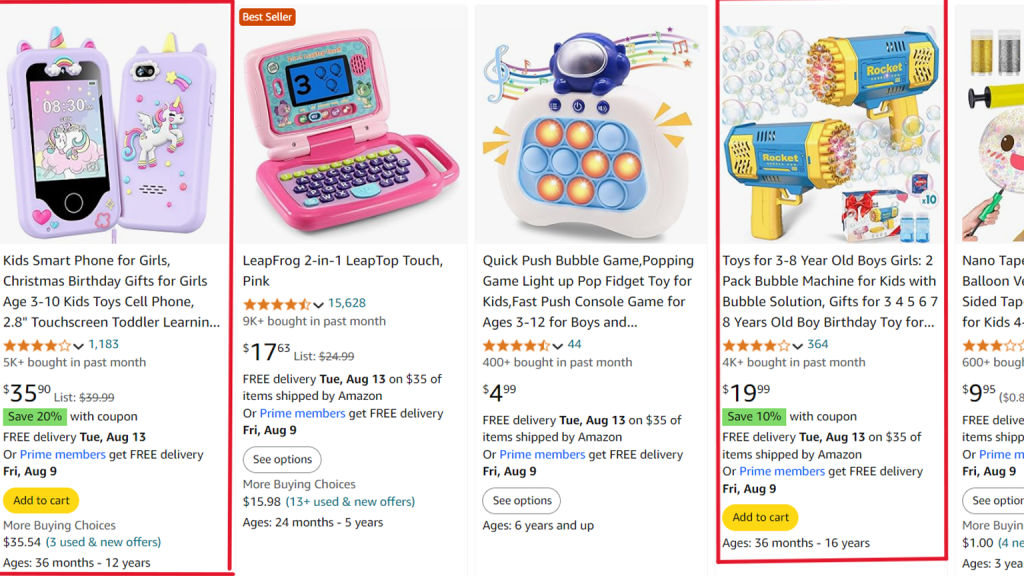
How to Earn Extra Savings, Coupons, and Discounts Badges
To add these badges to your product listings, follow these steps:
Set Up Coupons and Discounts in Seller Central:
- Log in to Amazon Seller Central, and under the Advertising section, you can create and manage coupons and discounts.
- You can choose to offer either a percentage-off or a money-off discount. While money-off coupons are often easier for customers to understand, percentage-off coupons can sometimes seem to offer better value.
Manage Fees:
- Keep in mind that coupons are a paid advertising feature. Amazon will charge a fee each time a customer redeems your coupon. Plan your discount strategy accordingly to ensure it aligns with your overall marketing budget.
Combine Multiple Savings Opportunities:
- To maximize appeal, you can stack savings by offering multiple discounts simultaneously. For example, you can add a Coupon Badge, Extra Savings Badge, and Deals Badge to your listing at the same time. This encourages customers to combine savings, making your product even more enticing.
Monitor and Optimize:
- Regularly monitor the performance of your coupons and discounts through Seller Central. Adjust your offers as needed to ensure they remain competitive and effective in driving sales.
Understanding and leveraging Amazon badges is essential for any eCommerce business looking to succeed on the platform. These badges not only enhance your product’s visibility but also build trust and credibility with potential buyers. From the coveted Amazon Best-Seller Badge to the eco-conscious Climate Pledge Friendly Badge, each badge serves as a powerful tool to differentiate your products and drive sales. By optimizing your listings, meeting the necessary criteria, and strategically using badges like Limited-Time Deals, Prime, and Coupons, you can significantly boost your brand’s presence on Amazon.
We at u-commerce specialize in Amazon-related services and help businesses navigate these complexities, ensuring your products are well-positioned to earn these valuable badges. Whether it’s optimizing your product listings, managing promotions, or enhancing customer satisfaction, we are here to guide you through every step of the process. By partnering with us, you can unlock the full potential of Amazon badges, driving greater success and profitability for your business.