

Mastering Amazon Keyword Research: A Comprehensive Guide On Amazon Keyword Research
Amazon Keyword research is a vital step in launching a successful Amazon product. By dedicating time to thoroughly analyze and identify the most relevant keywords in your niche, you can significantly boost your product’s visibility and maximize your revenue potential. The right keywords can position your product as a top-ranked item in valuable search queries, driving more sales.
Understanding Amazon’s Algorithm and Keyword Usage
If you’ve ever encountered an Amazon product listing with an excessively long, keyword-stuffed title, you might wonder how effective such titles are. It’s a fair question, as long titles with numerous keywords can seem unnatural and hard to read. However, Amazon’s algorithm prioritizes these keyword-rich titles, recognizing their potential to match various search queries.
While humans may not naturally gravitate toward long, complex sentences, Amazon’s algorithm does. The algorithm finds value in these detailed titles because they increase the chances of your product appearing in search results for multiple relevant keywords.

Understanding this balance between human readability and algorithmic preference is key to effective Amazon keyword research.
Key Considerations for Amazon Keyword Research
There are many aspects to Amazon keyword research, but by mastering these, you can enhance your product’s discoverability and sales. Here’s what you need to know:
1) Amazon as a Search Engine
Amazon is one of the largest search engines for e-commerce, with 66% of U.S. consumers beginning their product searches there. This makes Amazon users highly purchase-focused. They search for specific items with the intent to buy, so it’s crucial to target keywords that align with their search behavior for maximum efficiency.
2) Leveraging Amazon’s Advertising System (Amazon PPC)
Amazon operates its internal advertising system called Amazon Pay-Per-Click (PPC). Through Amazon PPC, sellers can promote their products by bidding on clicks for their listings. If your bid is higher than your competitors, your product appears higher in the search results with a “sponsored product” label.
Even if your product doesn’t rank at the top organically, investing in Amazon PPC can help you secure a prime spot in the search results, boosting your visibility and sales.
Why Amazon Keyword Research is Important?
Imagine Amazon as a friend you turn to whenever you need a product recommendation. They’re pretty reliable, but they always seem to lack confidence. After recommending something, they often ask if what they suggested is exactly what you were looking for. In many ways, this is how search engines work.
Search engines are excellent at guessing what you need but aren’t always sure right away. It takes the input of thousands of users confirming that a recommendation is correct before search engines gain confidence in the results they provide. Until then, they rely on the descriptive terms given to them, known as keywords.
When launching a product on Amazon, keyword research should be your top priority. Amazon’s algorithm determines the relevance of your keywords to a particular search query, and this relevance affects where your product appears in the search results. This placement is known as your ranking.
The Importance of Ranking on Amazon
Ranking on Amazon is crucial for visibility and sales. According to a study, 73% of shoppers click on the top listing in search results, 14% click on the second listing, and 5% click on the third. This means that 92% of all clicks are concentrated on the top three listings, leaving only 8% of clicks for the rest of the product listings. Ranking high on Amazon’s search results can significantly impact your product’s success.
Tracking Keyword Rankings
After launching your product and Amazon Listing Optimization, it’s essential to track your keyword rankings and SEO performance. This helps you gauge the effectiveness of your strategy. If you notice that your product isn’t ranking well for your target keywords, you can adjust your listings to improve your rankings.

How to Use Your Target Keywords
Amazon ranks products based on how likely they are to sell. The platform wants to maximize sales, so it ranks products that best match the searcher’s intent for each query. To signal that your product is a good match, you need to strategically place your target keywords throughout your listings. Here’s where to add them:
1) Title: Including keywords in your product title helps Amazon understand that your product is relevant to the search query. Since you can only fit a couple of keywords in the title, prioritize the most important ones for your business.
2) Description: The product description is where you explain the benefits of your product. Adding keywords here is crucial, as Amazon scans this section to comprehend the nature of your product.
3) Bullet Points: Bullet points, located under the price and specifications, are often more important than the description in communicating the benefits of your product. Adding keywords here increases your chances of ranking for those terms.
Additionally, use your target keywords in your Amazon Pay-Per-Click (PPC) campaigns. When creating a paid ad campaign, Amazon allows you to select the search terms to target with your ads. Including your keywords ensures that your product appears on the results pages for those searches. While you’ll pay for each click, this approach can drive targeted traffic to your listings while you wait to rank organically.
Tips to Enhance Your Amazon Keyword Strategy
To increase your product’s search visibility and conversions on Amazon, consider these tips:
1) Understand Amazon’s Search Algorithm: Amazon’s algorithm differs from Google’s. It has specific criteria for filtering product listings for every search. Understanding the A9 algorithm is crucial for optimizing your keyword strategy.
2) Know Your Audience: Different audiences use different search terms. By thinking like your potential customers, you can select keywords that align more closely with their search behavior.
3) Utilize a Keyword Research Tool: Modern tools help you shortlist the best keywords relevant to your product, based on various filters. These tools also allow you to track the performance of your keywords.
4) Focus on Long-Tail Keywords: Long-tail keywords are less competitive and often more profitable. They can help your product rank higher in Amazon searches and boost overall sales. Consider using Amazon’s auto-suggested keywords, as they tend to have higher search volumes.
5) Analyze Competitor Keywords: Studying the keywords your competitors use can provide valuable insights. Understanding why competitor products outrank yours can help you refine your keyword strategy.
6) Optimize Backend Search Terms: Backend Amazon search terms are keywords that don’t appear in your product listing but still help improve your product’s searchability. Use the full 1,000-character limit but focus on the first 250 words, as Amazon indexes only those.
7) Track Keyword Performance: Continuous keyword tracking is essential for understanding and improving your search rank. Regularly monitor and adjust your keywords to maintain or improve your ranking.
 By following these strategies, you can enhance your Amazon keyword research, improve your product rankings, and ultimately increase your sales.
In conclusion, mastering Amazon keyword research is pivotal for achieving success in the highly competitive e-commerce landscape. By identifying and targeting the best keywords, you can ensure your Amazon Listing Optimisation. Utilizing specialized Amazon research tools can simplify this process, providing you with valuable insights and the ability to track your keyword rankings effectively. With these strategies in place, you can enhance your product visibility and drive better sales results. For more expert tips and services to elevate your Amazon business, visit our website at U-commerce.

A Guide On How To Sell On Amazon Without Holding Inventory
Introduction
Selling on Amazon has long been associated with purchasing and managing inventory, but there are alternative ways to tap into Amazon’s vast marketplace without investing in physical stock. Whether you’re just starting or looking to avoid the complexities of managing inventory, options like dropshipping, Kindle Direct Publishing, Merch by Amazon, and affiliate marketing allow you to generate income with little to no upfront costs. These methods offer flexibility and can serve as a gateway to building a profitable business on Amazon.
How To Make Money On Amazon Without Inventory- 4 Proven Methods

While selling on Amazon traditionally involves purchasing inventory, you can earn money on the platform in several ways without investing in upfront stock. These methods provide an alternative path to generate income through Amazon’s vast marketplace without the hassle of managing physical products. Below are four effective ways to sell on Amazon without holding inventory.
1. Dropshipping
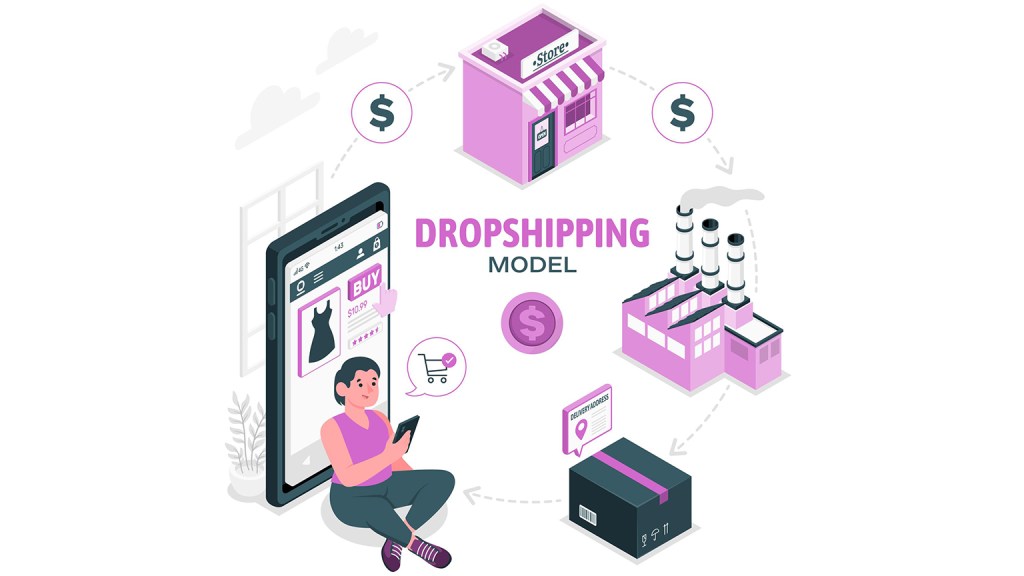
Dropshipping allows sellers to list products on Amazon without ever stocking them. In this model, when a customer orders a product, you purchase it from a supplier at a lower cost, and the supplier ships it directly to the customer. This saves you from managing logistics and inventory while still earning a profit.
Benefits of Dropshipping:
– Low initial investment.
– No need to handle shipping or storage.
– You can sell across multiple channels and even internationally.
Challenges of Dropshipping:
– Limited control over product quality.
– Dependent on suppliers for stock and fulfillment.
– Lower profit margins compared to private labeling.
Though dropshipping can be highly competitive, focusing on exceptional customer service can set you apart from other sellers.
2. Kindle Direct Publishing (KDP)

If you’re a writer or have creative content to share, Kindle Direct Publishing (KDP) offers a way to sell digital products on Amazon. This model lets you publish e-books, paperbacks, and audiobooks without physical inventory.
Pros of KDP:
– No inventory required.
– Potential to reach a global audience through Amazon’s Kindle store.
– Royalties on every sale of your book or content.
Challenges of KDP:
– You’ll need to invest time in writing and promoting your work.
– Competition can be high, but niche content or strong marketing can help your book stand out.
This method provides a great opportunity for authors to generate passive income and share their stories or expertise worldwide.
3. Merch by Amazon (Print on Demand)

Merch by Amazon, or print on demand (POD), allows sellers to create and sell custom-designed products without holding stock. Once you upload your design, Amazon prints it on apparel, accessories, or home goods only when an order is placed. The platform handles the production, shipping, and customer service, leaving you to focus on creating unique designs.
Pros of Merch by Amazon:
– No upfront investment is needed.
– Amazon handles printing and fulfillment.
– Direct access to Amazon’s customer base.
Cons of Merch by Amazon:
– Limited product categories.
– Require an invitation to join the program.
Merch on Demand can be a great option for graphic designers, artists, or creators who want to monetize their designs without dealing with inventory or logistics.
4. Amazon Associates Program (Affiliate Marketing)
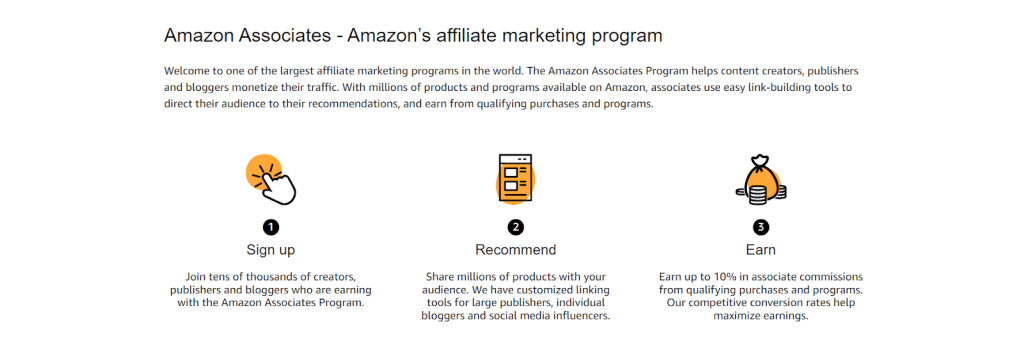
The Amazon Associates Program lets you earn commissions by promoting other brands’ products on Amazon. If you have a blog, YouTube channel, or large social media following, you can recommend products and include affiliate links. When someone purchases through your link, you earn a commission.
Advantages of Affiliate Marketing:
– No need to hold or manage inventory.
– Can be applied across various platforms like blogs, social media, or YouTube.
– A flexible way to monetize your content.
Challenges of Affiliate Marketing:
– Earnings depend on the volume of traffic and sales generated through your affiliate links.
This method works particularly well for content creators who regularly review or recommend products to their audience, allowing them to generate passive income.
Advantages Of Selling On Amazon Without Inventory

Selling on Amazon without the need to manage physical inventory offers several key advantages that appeal to entrepreneurs seeking to minimize risk and lower startup costs. Unlike traditional selling methods such as private labeling, wholesale, or retail arbitrage, these no-inventory models allow sellers to benefit from Amazon’s massive reach without the overhead of managing stock. Below are some of the primary benefits of selling on Amazon without inventory.
1. Low Startup Costs
One of the most significant benefits is the reduced startup costs. Since there’s no need to purchase inventory upfront, you can launch your business with minimal capital. This opens the door for new sellers to enter the Amazon marketplace without requiring large amounts of money for initial stock, making it accessible for entrepreneurs at any stage.
2. No Inventory Risk
Traditional sellers face the challenge of potentially being stuck with unsold products. When selling without inventory, however, you only order products or use services like print on demand after a sale is made. This eliminates the risk of overstocking or holding unsellable goods, significantly lowering the chances of financial loss.
3. No Storage Space Required
Managing physical stock requires storage space, which can be expensive, especially when using services like Fulfillment by Amazon (FBA). Without the need for inventory, you avoid storage fees and can allocate more of your budget to other aspects of your business, such as marketing or product development.
4. Flexibility in Product Offerings
A no-inventory model allows for greater flexibility when it comes to your product range. You can test a wide variety of products without worrying about upfront investments. This gives you the freedom to quickly pivot and adapt to changing market trends, consumer demands, or seasonal products, enhancing your ability to stay competitive.
5. Easier Scalability
Scaling a business that doesn’t involve managing physical stock is typically more straightforward. Without the logistical headaches of inventory management, you can focus on increasing sales and expanding your reach. This makes it easier to grow your business without the complications of sourcing, storing, and shipping products in bulk.
6. Global Reach
Selling on Amazon without inventory, especially through models like Kindle Direct Publishing (KDP) or Merch on Demand, allows you to tap into Amazon’s global customer base. You can list and sell your products in international marketplaces, giving you the opportunity to expand your business beyond local borders without the complexities of shipping or customs management.
7. Faster Time to Market
Without needing to manufacture or source products upfront, you can quickly launch new items on Amazon. This enables you to take advantage of market opportunities and trends almost instantly, giving you a competitive edge by being one of the first to offer a product.
8. Minimal Financial Risk
Perhaps the most attractive aspect of selling on Amazon without inventory is the reduced financial risk. By eliminating the need for upfront product purchases, storage costs, and the potential for unsold stock, entrepreneurs can experiment with Amazon’s selling models with minimal risk. This allows sellers to focus on growing their business while keeping their financial exposure low.
Conclusion
Amazon’s platform provides diverse opportunities for sellers, even for those who prefer not to manage physical inventory. You can choose a model that suits your skills and resources from dropshipping to digital publishing and affiliate marketing. Whether you’re looking to start small or diversify your income streams, these inventory-free methods make it possible to earn money on Amazon with ease. With the right approach, you can tap into Amazon’s global audience and grow your business without the traditional inventory challenges.
Ready To Transform Your Amazon Business With Custom Products?
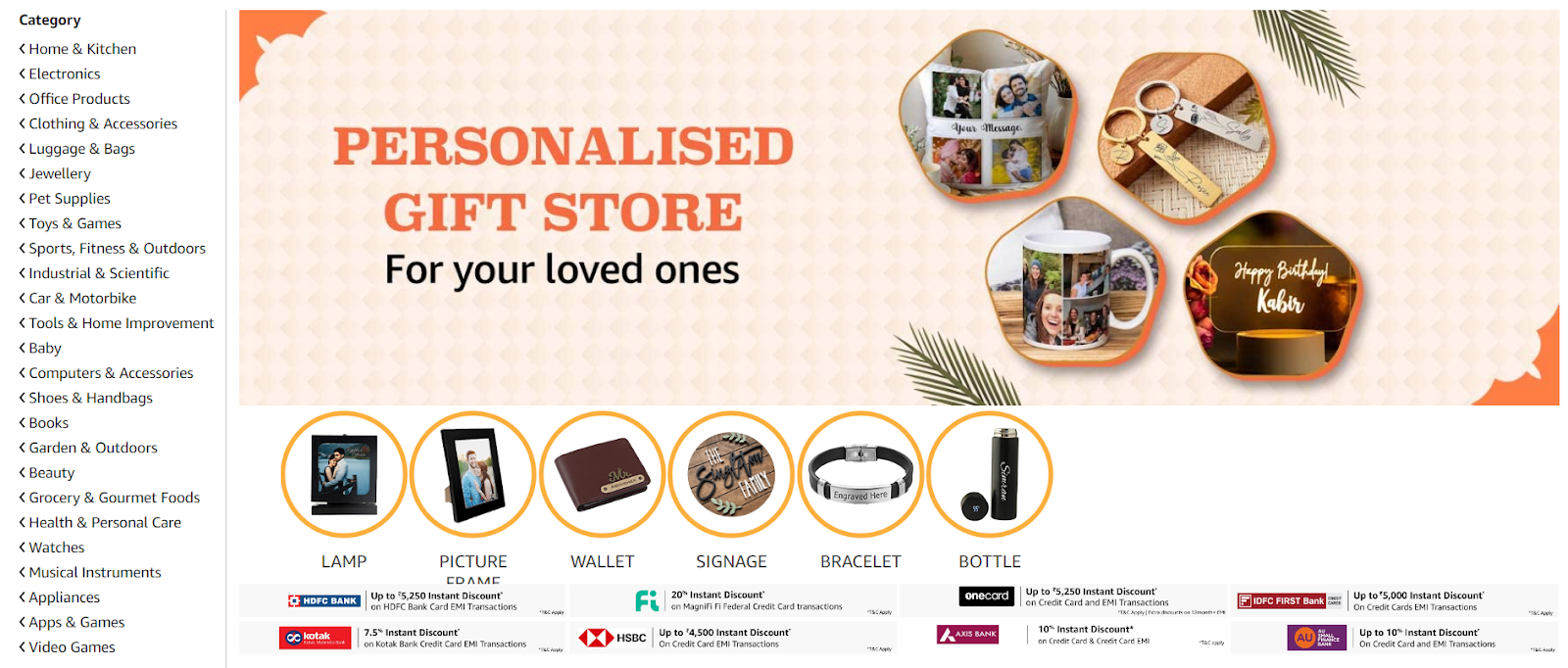
Amazon Custom is a specialized storefront on Amazon that allows Professional Sellers to offer customizable products. Shoppers can personalize these products by adding text, images, logos, or other options provided by the seller. This feature is perfect for businesses looking to offer unique, made-to-order items.
Requirements to Join Amazon Custom
To participate in the Amazon Custom program, you must meet the following criteria:
- Professional Selling Plan: You need to be subscribed to the Professional selling plan.
- Seller-Fulfilled Orders: You, the seller, must fulfill all orders. The program does not support items Fulfillment by Amazon (FBA).
- New Condition Only: All custom products must be listed in new condition. Used items are not permitted. Refer to Amazon’s condition guidelines for more details.
- Compliant Product Images: Your listings must feature product images that comply with Amazon’s image requirements. For additional information, review the Product Image Requirements.
- Exclusive Custom Listings: For customization to be available, you must be the only seller offering the product. If other sellers have the same product on Amazon, you must create a new listing specifically for your customized version.
- Return Policies: You must adhere to Amazon’s return policies for custom products. Review Amazon’s Custom Products Returns Policies for details.
How the Amazon Custom Products Program Works
- Register for Amazon Custom: Professional Sellers can register for Amazon Custom to gain access to customization features. If you have an Individual Seller account, you’ll need to upgrade to a Professional Seller account before registering.
- Enable Customization: Once registered, you can enable customization options for your product listings in Seller Central.
- Configure Your Customization Options: Use the listing tool in Seller Central to set up and configure the customization options for your products.
- Start Selling: After setting up your custom listings, they will be live on Amazon and ready for customers to purchase.
Types of Custom Products You Can Sell on Amazon
Amazon Custom supports a wide variety of product categories. However, certain products are ineligible for customization, including media, personal computers, laptops, computer towers, tablets, and video game consoles.
Customization Options for Amazon Custom Products
With Amazon Custom, you can offer a range of customization options:
- Text-Based Customization: Allow customers to add their text to products. You can specify the color, font, and placement of the text. This is ideal for engraving, embroidery, printing, or painting. For example:
– Personalize a mug or t-shirt with a name or initials.
– Add a special message, like a birthday greeting or wedding sentiment.
– Customize a product with a company logo or sports team emblem.
- Image-Based Customization: Customers can upload their images to your products and even add text to the image. This option is perfect for custom photo gifts, apparel, or home decor. Examples include:
– A custom t-shirt featuring a customer’s photo.
– A custom banner with a company logo.
– A personalized pillow with a pet’s photo.
- Product Variations Customization: Offer customers the ability to select options like size, color, or material. You can set different prices for each variation. This option enhances the perceived value of your product and gives customers more control. Examples include:
– Offering different sizes, colors, or materials for a product.
– Adding extra features, such as a nameplate or logo.
– Allowing customers to personalize with their text or image.
- Data Input or Notes Customization: Provide text fields for customers to enter information that doesn’t affect the product’s visual preview. This is useful for customizing or collecting notes from the customer. For instance:
– Collecting customer details, such as name, address, or phone number.
– Gathering custom sizing information for garments or jewelry.
– Accepting special instructions or messages from the customer.
How to Create a Listing for Amazon Custom
To start selling custom products on Amazon, follow these steps:
Register for Amazon Custom: Begin by registering for Amazon Custom. Once approved, you’ll receive an email with a link to get started.
1. Create a New Product in Seller Central: Log in to Amazon Seller Central, go to the “Inventory” menu, and select “Add a Product.” Choose “I’m adding a product not sold on Amazon” and classify your product by selecting the appropriate category. Ensure your product is correctly classified to avoid being filtered out in search results.
2. Add Customization Information: In the “Manage Inventory” dashboard, find your custom product, click the dropdown menu, and select “Add/Edit Customization Information.” Complete the details and save your settings.
3. View Your Custom Product on Amazon: After setting up your customization options, view your product’s listing to ensure everything is correct. Test the customization features by clicking “Customize Now” on the listing page.

Setting Up Pricing for Custom Products
When pricing your custom products, consider the following factors:
- Cost of Production: Include the costs of materials, labor, and additional resources needed for customization.
- Value of Customization: Reflect the added value of personalization in your pricing.
- Market Rate: Research similar custom products on Amazon to stay competitive.
- Brand Positioning: Align your pricing with your brand’s market position, whether premium or budget-friendly.
- Profit Margin: Ensure your pricing allows for a reasonable profit after accounting for Amazon’s referral fees and other costs.
- Price Elasticity: Understand how price-sensitive your customers are.
- Customer Willingness to Pay: Estimate what your target customers are willing to pay for the customization options.
Communicating with Customers
Effective communication with customers is crucial for managing custom orders:
- Initial Confirmation: Send a confirmation message with order details and an estimated completion date.
- Clarification: If needed, contact the customer to clarify any custom requests.
- Updates: Keep customers informed about the progress of their orders, especially if there are delays.
- Shipping Notification: Provide tracking information once the order ships.
- Follow-Up: After delivery, follow up to ensure customer satisfaction and address any concerns.
Handling Returns and Refunds
Handling returns for custom products can be challenging due to their personalized nature:
- Review Amazon’s Policy: Customized items are typically not eligible for returns unless they are faulty or damaged.
- Communicate with the Customer: If a return request is made, discuss the issue with the customer to understand their concerns.
- Assess the Product: Upon receiving the returned item, assess it for defects.
- Issue Refunds or Replacements: If a manufacturing error is confirmed, process a refund or replacement promptly.
- Learn from the Experience: Use feedback from returns to improve your products and services.
In Conclusion
Selling custom products on Amazon is a powerful way to differentiate your brand and offer customers unique, personalized experiences. By following the steps outlined in this guide, you can effectively navigate Amazon Custom, optimize your listings, and communicate clearly with your customers to ensure satisfaction. At U-Commerce, we help sellers maximize their Amazon presence. Whether you’re just starting with Amazon Custom or looking to refine your strategy, our expert services can help you boost visibility, enhance your listings, and drive sales. Let us partner with you to turn your custom product offerings into a thriving business on Amazon.

Common Pitfalls That Lead To Amazon Product Listing Suspensions
Getting an ASIN suspension feels a lot like falling into a black hole of confusion. It can be incredibly frustrating, especially since Amazon is often very vague about why a listing gets suspended. Often, when an account or ASIN gets suspended, a seller has to sift through their listings and scramble to find the cause of the suspension. It’s not ideal and a big mess. The best way to avoid this is to make sure an ASIN doesn’t get suspended in the first place.
Amazon product listings can be suspended for a variety of reasons, often related to policy violations or performance issues. Understanding these reasons is crucial for maintaining a successful e-commerce business on Amazon.
Common Reasons For ASIN Suspensions:
Inaccurate Product Descriptions: Whether you twisted the truth or genuinely made a mistake, inaccurate descriptions about brand, size, exact color, etc., are a major no-no in Amazon’s books. They can lead to higher return rates and an unsatisfactory customer experience, which the marketplace would rather avoid. Amazon will protect its interests with account suspension. For example, if customers consistently report a product is a different color than they were expecting, that could result in an Amazon seller suspension.
Example: A seller lists a dress as “red,” but customers receive a dress that appears orange. Consistent complaints about this discrepancy could result in Amazon suspending the ASIN for inaccurate descriptions.

Pesticides: Amazon is very strict regarding pesticides, even banning words sellers usually wouldn’t associate with pesticides such as antimicrobial, antifungal, antibacterial, and anti-mold.
Example: A seller lists a cleaning spray as “antibacterial,” despite it not being registered as a pesticide. Amazon could suspend the ASIN for using a restricted term without proper approval.

Trademarks: There are some words many Amazon sellers don’t realize are trademarked, including the names of colleges and universities, sports teams, Velcro, Xerox, and Bluetooth. Sellers can use these terms only if they’ve been approved by the original owner or if their product uses the same brand as the term.
Example: A seller lists phone accessories using the term “Bluetooth” without proper licensing. Since “Bluetooth” is a trademark, the ASIN could be suspended unless the seller obtains permission from the trademark owner.

Copyright Infringement: Using copyrighted material such as text or images without permission can result in suspension. Sellers should either use all original content or obtain approval from the rights owner.
Example: A seller uses a popular movie character’s image on their merchandise without obtaining rights from the copyright holder. This could lead to the ASIN being suspended for copyright infringement.

Restricted Products: Amazon can suspend a seller’s ASIN or account without notice if they’re caught selling prohibited items. Amazon’s Fulfilled by Amazon (FBA) program won’t ship certain products that would be eligible otherwise.
Example: A seller lists a type of knife that is classified as a restricted weapon on Amazon. This violation of the restricted products policy can lead to immediate suspension of the ASIN.

Poor Seller Performance: Amazon cares a lot about its customers. If too many customers are dissatisfied with the seller, Amazon can suspend—or even terminate their agreement—with the seller. To maintain good seller performance, sellers need to be wary of their order defect rate, pre-fulfillment cancel rate, and late shipment rate.
Example: A seller consistently ships products late, resulting in a high late shipment rate. This poor performance metric could trigger Amazon to suspend their ASINs to protect customer experience.

Breaching Terms of Service: Violating Amazon’s Terms of Service (ToS), even unintentionally, can lead to suspensions.
Example: A seller tries to manipulate reviews by offering incentives for positive feedback. Amazon’s algorithms detect this activity, leading to suspension for breaching ToS.

Manipulating Review System: Sellers are prohibited from lobbying for positive reviews or manipulating feedback.
Example: A seller asks friends to purchase their product and leave positive reviews, leading to the ASIN being suspended for review manipulation.

High Negative Feedback Rate: Keeping negative feedback below 1% is crucial for maintaining account health.
Example: A seller’s product has a high rate of dissatisfaction due to quality issues, resulting in a negative feedback rate above 1%. This can prompt Amazon to suspend the ASIN.

High Cancellation or Late Shipment Rate: Amazon expects sellers to manage orders efficiently, keeping cancellation and late shipment rates below 1%.
Example: A seller frequently cancels orders due to inventory mismanagement, leading to a pre-fulfillment cancel rate above 1%. This performance issue can result in ASIN suspension.

Improving seller performance can be challenging, but working with U-Commerce experts restricts you from getting a suspension. They offer hands-on experience in boosting profitability and maintaining compliance with Amazon’s standards. For personalized assistance, consider requesting us.
By understanding and addressing these common causes of ASIN suspensions, U-Commerce can maintain your listings and avoid the frustration of unexpected suspensions.

How To Maintain Your Amazon Account Health
Are you annoyed with a red warning on your Seller Central account dashboard and cannot figure out how to solve it? You are in the right place, this blog will let you know exactly how to solve all your account health problems to turn it green from red.
Let’s start by covering all the basics and needful information regarding Amazon Account Health.
What is Amazon Account Health?
Amazon Account Health is an in-built system designed by Amazon for their Amazon Sellers. It helps to evaluate the seller’s compliance and customer reception as per Amazon’s selling policies.
It has the following metrics for sellers to use Policy Violations, Order Defect Rate (ODR), Shipping Performance, and Invoice Defect Rate (IDR) for Amazon Business customers. These metrics will help sellers to keep a note of their performance on the Amazon platform.
Where to find your Amazon Account Health?

You can have access to your account health dashboard easily by logging in to your Amazon seller account. Go to the performance tab and select Account Health in that dropdown menu to start with Amazon Account Health.
You will get a detailed view of Customer service performance, Policy compliance performance, shipping performance, and product compliance requests altogether.
Amazon Account Health Metrics To Know
To maintain a healthy seller account you must look into 3 criteria for satisfying the customer experience and those 3 criteria are:

1) Customer service performance
It depends on the 2 major criteria namely Order Defect Rate and Invoice Defect Rate. ODR -Order Defect Rate takes into consideration the feedback given by your customers, claims such as chargeback claims and A to Z guarantee claims which upon consideration gives you an overview of the seller’s customer service experience. Whereas IDR-Invoice Defect Rate takes into consideration the Amazon orders invoice without the tax consideration is being uploaded within one business day of shipping.
2) Policy compliance
It talks about rules that must be followed and that no violations are accepted. Your business account should keep in check with the Amazon guidelines around intellectual property issues, authenticity concerns, product conditions, and other policy violations.
3) Shipping performance
Shipping performance helps you measure all the shipping-related rates such as – Late Shipment Rate, Valid Tracking Rate, Pre-Fulfillment Cancelation Rate, and Return Dissatisfaction Rate.
What is Amazon Account Health Rating (AHR)?
The Account Health Rating (AHR) system is a very important aspect for your seller account overall health indication. It has indications such as Healthy, At Risk or Unhealthy signs to let sellers know their performance status.
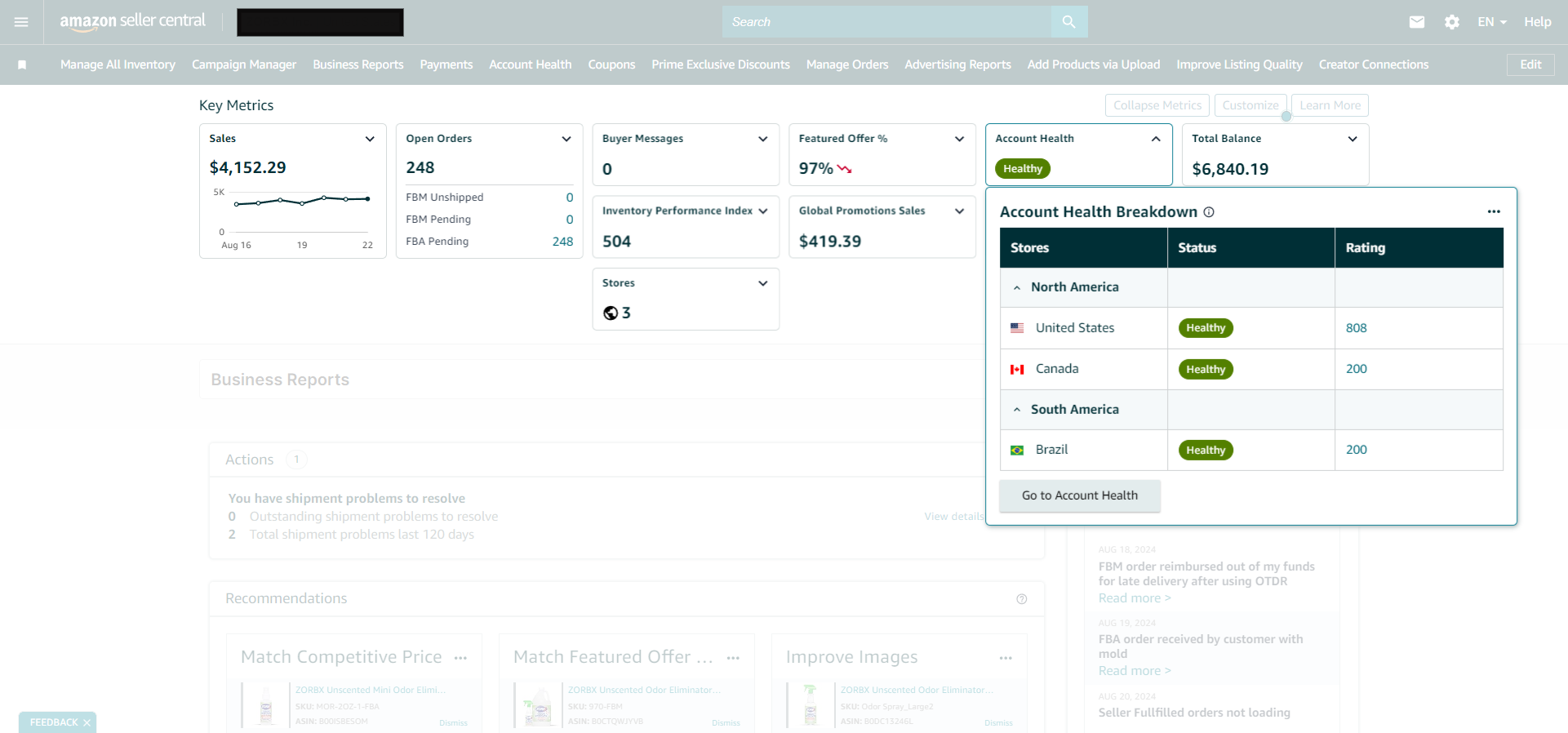
AHR is measured with the help of 3 different colors with respect to health scores from 0 to 1000:
- The Green Color indicates a score from 200 to 100 points which suggests your account is healthy.
- The The Orange Color indicates the score from 100 to 199 points which suggests your account is at risk.
- Red Color indicates a score of 99 or lower points which suggests your account is at huge risk.
This score updated is in real-time so you can see the immediate impact on your account health on any policy violations that take place. Amazon also has four levels of severity related to policy violations: critical, high, medium, and low.
- Critical is for anti-counterfeiting policy violation
- High is for brand name policy violation
- Medium is listing policy violation
- Low is product detail page rules violation
How to improve your Amazon Account Health?
Here are a few given strategies to improve your Amazon Account Health:
1) Stick To Amazon Guidelines
We need to stick to the Amazon guidelines to not get any violations. Amazon has strict policies and every seller should follow them and try to check out all restrictions.
2) Make Sure You Deliver On-Time
Amazon FBA deliveries are covered by Amazon so no hassle with that. But for Fulfilment By Merchant (FBM) Sellers, you need to maintain your shipping quantities. If you are facing difficulties with maintaining deadlines, then you can enroll yourself in Amazon’s Buy Shipping services or other carriers to improve your shipping performance.
3) Make Use of Trackable Shipping Methods & Adequate Packaging
You need to make sure you use the highest quality shipping services which are easily trackable. Also, make sure, the packaging is well-done and well-processed because it will help you reduce bad reviews and will make your shipping performance better.
4) Make Sure Your Products Stand Out Accurately
Sellers need to watch out for how their products stand out from per customer’s point of view. Use proper images enhanced content, and videos to make sure your customers understand your product accurately. Never mislead them, because if they are misled then probably you will get negative feedback with returns which may affect your Amazon account health.
5) Timely Reply To Your Customers
Try to always promptly reply to your customers. Quick communication within 24 hours will make sure customer gets their issues resolved which will lead to no negative feedback or returns eventually.
6) Proper Inventory Management
Avoid Cancellations or out-of-stock orders on your products, especially FBM Sellers.
7) Review Your Product Listings Regularly
Try to always check up on your active listings, notifications, and alerts from Amazon Seller to make sure your account health is always good. Moreover, pay high attention to product reviews and try to improvise your product based on that.
What happens if your Amazon Account Health decreases?
Following are the repercussions when your Amazon Account Health is deteriorating:
1) Warning & Account Suspension
A decline in your health can bring you warnings from Amazon, account suspension, or direct removal from the platform as well.
2) Request For A Plan-Of-Action
Amazon may ask sellers out for a Plan Of Action within 48 hours of the timeline if your performance is below target. This step will allow sellers to prove their commitment to improvising and restoring their Amazon account health.
3) Withhold of Funds or Restricted Selling Practices
If sellers fail to provide a Plan of Action to Amazon within the adhered timeline, then Amazon may withhold their funds or restrict their selling practices for a temporary period.
4) Deactivation of Account
Deactivation won’t happen without critical violations. It will happen only if the seller fails to improve Amazon account health metrics even after multiple warnings.
5) Reinstating Your Account
If the seller successfully addresses violations and demonstrates a clear willingness to improve and work on the same, then reinstating of seller’s account is possible if Amazon agrees.
If you require further assistance managing your Amazon Seller or Vendor Central account, feel free to reach out to the Amazon experts at U-Commerce
Grow Sales With Amazon’s Subscribe & Save
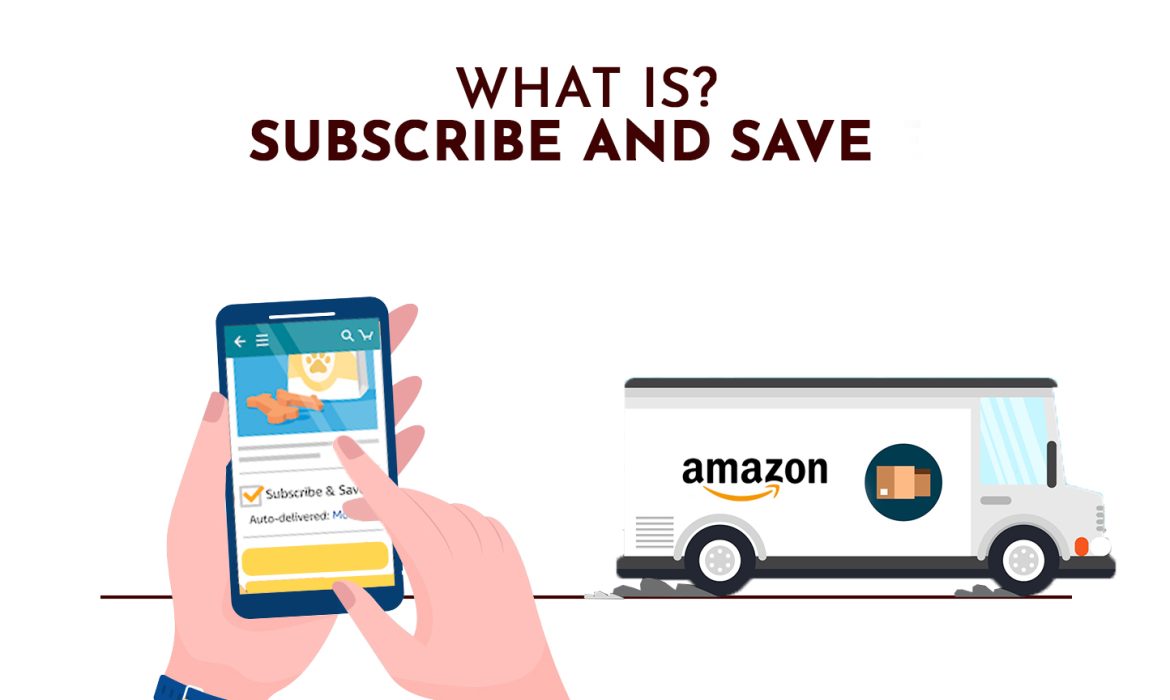
Are you a brand aiming to drive repeat purchases and build strong brand awareness among highly engaged customers? Amazon’s Subscribe & Save program is here to help you achieve just that.
What is Subscribe & Save?
Subscribe & Save is a convenient and cost-effective way to ensure your customers never run out of their favorite products. With just a few simple steps, they can set up recurring deliveries, saving both time and money. Here’s how it works:
1) Shop from Thousands of Products: Customers can browse and choose from a wide range of products.
2) Select Quantity & Schedule: They can select the quantity and set a delivery schedule that suits them—anywhere from weekly to every six months, with the flexibility to change it anytime.
3) Create Your Subscription: Once the subscription is created, it’s all set. There are no fees involved, and customers can cancel or adjust their subscriptions whenever they like.

Benefits of Subscribe & Save
- Consistent Repeat Sales: Encourage repeat purchases with ease.
- Customer Loyalty: Build a loyal customer base that keeps coming back.
- Brand Awareness: Strengthen your brand’s presence among a dedicated customer segment
ASIN Eligibility Criteria
Products are automatically considered for Subscribe & Save based on:
- Fulfillment history and in-stock rate
- Sales performance
- Product category
- Average selling price
How Does Subscribe & Save Work for Sellers?
Automatic Enrollment: Eligible FBA sellers can have their products automatically enrolled in the program with a 0% base discount. Amazon will fund a 5% tier discount for a limited time.
Funding the Discount: Sellers fund a flat base discount for each enrolled item, while Amazon temporarily adds an additional 5% discount for tiered shipments. The discount applies to the product’s price on the day of the order, along with any other promotions.
Subscribers sign up for regularly scheduled deliveries of frequently used products, benefiting from time and cost savings. As the largest loyalty program on Amazon, Subscribe & Save promotes repeat purchases and long-term customer engagement.
Key Features
Customizable Delivery Frequency: Subscribers can receive their products at intervals ranging from one to six months. To ensure seamless service, maintain an inventory level of at least 85% by monitoring the Manage Products page.
FBA Fulfillment: Amazon handles the picking, packing, and shipping of your Subscribe & Save orders, with standard FBA fees applying.
Performance Monitoring: Use the Subscribe & Save dashboard to track your performance and make informed decisions to optimize your business strategy.

Managing Subscriptions
Customers can easily manage their subscriptions. Amazon sends a reminder email before each delivery, detailing the products, price, and applicable discounts. Subscribers can skip deliveries, cancel, or modify their subscription settings anytime via the Manage Your Subscriptions page.
Subscribe & Save is an invaluable tool for brands looking to enhance customer loyalty and secure consistent sales. By automating the purchasing process, this program provides a win-win for sellers and customers. Contact U-Commerce for further details.

What Is Brand Positioning On And Off Amazon?
Brand positioning is establishing your company’s perception among your target audience. Company positioning is a tactic intended to set your company apart from the competition, not just a catchphrase or elaborate logo.
Customers can distinguish between products and services using the online retail model from their mobile device or desktop computer. A buyer’s decision is influenced by social media sites, word-of-mouth referrals, and online retailers like Amazon.
What is Brand Positioning?

When a brand is successfully positioned, consumers view it as reliable, useful, and favorable. When all three of these elements are combined, your brand becomes unique, and as a result, your customers remember you.
Being “different” from the competition is insufficient to outperform the market, which makes it crucial. Only when you accomplish something exceptional can you position your brand. All other information is merely comparative.
What Makes Brand Positioning Vital?
Whether you like it or not, you have a reputation. To take charge of your reputation and brand image, you can develop a brand positioning model.
A company can differentiate itself from the competition by using its brand. A business can increase brand recognition, communicate value, and defend price with this kind of distinction, all of which have an impact on the bottom line.
All brand positioning plans, however, are unique and have different objectives. Positioning and message will differ depending on your business domain and type of service.
Which Types of Brand Positioning Strategies Are There?
 You have a variety of choices when it comes to positioning your brand in the marketplace. To highlight the advantages of your product over the competition and draw attention to its shortcomings, you should modify your approach.
We’ll go over a few more well-liked positioning techniques that you can use to distinguish your company in the marketplace.
1) Customer Service Positioning Technique
You have probably made at least one decision on a restaurant, store, or other service provider based on their customer service.
Brands in industries where negligent customer service is a stigma are won over by highlighting their compassionate customer care. To attract new customers, businesses offering especially sophisticated goods could draw attention to their extensive support networks.
The biggest benefit of this approach is that providing superior customer service could enable you to charge more. For example, although Apple products are pricey, their customer service is amiable and prompt.
These service encounters are also crucial components of the flywheel because, if a client has a favorable experience, they may convert from an initially unsatisfied customer to a promoter.
2) Convenience-Centered Positioning Technique
A convenience-based positioning strategy highlights the reasons a brand’s product or service is more user-friendly than those of its rivals. Numerous variables, including locations, ease of use, accessibility, and omnichannel support, influence how convenient something is.
Putting your products or services in the most convenient location can draw in busy clients. It might also be able to defend the greater cost, similar to the earlier tactic.
On the other hand, providing convenience could be costly in some circumstances. For instance, to deliver on a promise as a B2B SaaS provider offering your product across many operating systems, you would probably need a strong, round-the-clock development team. For this technique to work, these developers would need to stay in contact to resolve bugs and other issues, and their support costs can become unmanageable.
Verifying that your products are indeed simple to use is the last thing you should do. In addition, you might provide subscription or auto-refill services to satisfy the convenience needs of your customers.
3) Pricing-Based Positioning Technique
A business uses price positioning to present its goods or services as the most affordable choice. Since no one likes to spend more money than is required, you can build a large customer base by positioning your product as the most economical on the market. A surefire method to get potential customers to convert is to provide the lowest pricing.
This tactic is not without risk, though, as it may give prospective buyers the idea that the products are of lower quality.
Financial issues could also arise and further impede the positioning of your brand. A pricing war may also be sparked by price positioning, albeit this is more common in specific sectors like aviation.
4) Quality-First Positioning Technique
Companies use this tactic to draw attention to the high caliber of their products, which are usually expensive.
Extraordinary craftsmanship, small batch production, premium materials, and even more expensive production due to sustainable procedures are examples of the product’s excellence. High ROI, positive client feedback, and successful outcomes are indicators of high-quality services.
Customers on a tight budget may choose to avoid your business in favor of a less expensive alternative. But that’s the point at which buyer personas are useful. If emphasizing quality is the right strategy for your brand, it will depend on the income brackets and purchasing patterns of your target market.
5) Differentiation Technique
A differentiation positioning strategy is predicated on a product’s remarkable attributes and distinctiveness from established competitors. Tesla is a prime illustration.
Customers who appreciate innovation will be drawn to your company or product if you employ this tactic. A potential drawback could be that the absence of usage history could confuse the general audience. Make sure you conduct the necessary testing and research if your product is new. Innovation-driven consumers frequently want to know how a new product or technology works.
6) Social Media Positioning Technique
This positioning strategy stands out since it concentrates on multiple channels rather than just one. Furthermore, your brand’s platforms have just as much influence as your messaging.
It may surprise you to learn that not all platforms require your brand to be visible. The secret to using this method effectively is choosing the platforms your target market finds most valuable. When choosing a social media platform for your brand strategy, keep the following in mind:
Where do potential customers spend their leisure time?
For what purposes do they use their money?
Where do they look up guidance and information online?
These three categories are probably found on one social media platform, although they might also be dispersed over several. Once you’ve established the optimal placement for your brand, you can refine your messaging to meet consumers where they are.
7) Alternative Techniques for Positioning
These go beyond simple tactics. You might present your brand as the industry pioneer, the most well-known, or the leader. Additionally, you can market your products as a fix for an urgent problem.
Comparing your brand to those of your rivals is an additional strategy. By employing this tactic, you can make direct criticism of your rivals in your marketing efforts and highlight the advantages of your offering over theirs.
How Do You Create a Strategy for Brand Positioning?

Developing a brand positioning plan entails researching your brand in-depth and identifying your advantages over competitors. The stages that follow will help you create a brand positioning strategy that is exclusive to your company.
1) Identify the Current Position of Your Brand
Identifying the members of your target audience should be your first step. Next, state your goals, core principles, and what makes you different from other significant competitors in the industry. Summarize your value proposition, existing brand image, and brand voice in the conclusion.
2) Assemble a Brand Essence Diagram
Once you’ve established your brand’s place in the market, it’s time to find out more about what your brand means to customers. Concise and understandable summaries of those concepts can be achieved with the use of a brand essence chart.
There are seven parts to the brand essence chart. Features, benefits, personality, authority and support source, what it says about the client, how it makes the client feel, and brand positioning are some examples.
3) Determine Who Your Rivals Are
After analyzing oneself, it’s critical to conduct a competition analysis of your rivals. You should be aware of who you are dealing with, and this study will assist you in learning how to enhance your approach to obtain the upper hand.
4) Conduct Research on Your Rivals
It is best to conduct extensive research on your competition after you have identified who they are. To compete, you must examine how your rivals are presenting their brands. In short, what you should look for in your investigation is:
What products or services they offer; what their advantages and disadvantages are; what effective marketing techniques they are implementing; and where they stand in the industry.
5) Establish Your Specialized Value Proposition
When you conduct competition research, you’ll probably start to see trends. You’ll also notice a few brands that share advantages and disadvantages. If you contrast their products or services with yours, you might find that one of their drawbacks is also one of yours.
6) Construct a Framework for Brand Positioning
This framework follows a top-down methodology, starting with a broad concept and concluding with sample touchpoints that can be used in advertising copy, blog post headers, and social media captions.
7) Make a statement about your position
A positioning statement is a succinct statement that highlights to your customers how your company differs from the top competitors in the market. Before crafting a positioning statement, you must respond to the following four inquiries:
- Who is the intended audience for you?
- Which category do you offer your products or services in?
- What is the main benefit that your products or services offer?
- What proof is there for this advantage?
- You can then develop a straightforward yet compelling positioning statement.
8) Determine How Effective Your Positioning Statement Is
Just getting started with positioning your business to appeal to a particular customer requires time and effort. It’s important to test, experiment, and gather feedback from your clients to determine whether your positioning statement is serving its intended function as soon as you’ve finished crafting it.
9) Create an Emotional Bond with Potential Customers
Before starting a push sales campaign, establish a human connection with your potential customers. This will foster trust and improve their perception of your company. For example, your sales representatives should dedicate enough time in the beginning to familiarize themselves with the problems that your solution would address for potential clients.
10) Provide Something of Value
Your main goal should be to assist the prospective client in resolving their conflict or overcoming an obstacle. The ideal scenario would be if your brand offered a partial solution.
11) Ensure that the Customer Service Representatives Represent Your Brand
Your company’s most valuable assets are its customer service employees. Prospective clients ought to enjoy an experience that embodies the essential principles of your brand and is consistent with the image of your business. Consider using language that reflects your lighthearted and enjoyable branding strategy, for example, in sales calls. A severe tone is inconsistent with the image of your business.
Examples of Effective Brand Positioning
A number of the most well-known brand positioning cases have also produced well-known advertising campaigns.
1) Hertz vs. AVIS
For fifty years, Avis lived by the motto, “We try harder.” Being a challenger brand was fun for them, so they gave it their all. Despite having the second-largest automobile rental business, Avis was able to rise thanks to this positioning. Thanks to strategic brand placement and collaborations, the brand stood out in the marketplace.
2) Burger King versus McDonald’s
A great illustration of two different brand positioning strategies is the rivalry between Burger King and McDonald’s.
With a brazen tone of speech and subtly deceptive tactics targeted at McDonald’s and its offerings, Burger King is a brand competitor. Globally, their messages have gained them accolades, admirers, and business.
As the industry leader in its field, McDonald’s declined to reply to Burger King because, once acknowledged, they do not set themselves apart from rivals.
Last Remark
You should undoubtedly redefine your brand, whether you are doing it to improve customer perception, update your product line, or develop a new product. From staff to consumers, a well-positioned brand may affect every facet of your company.
Take advantage of every chance you get, find out what interests your clients, present your brand, and differentiate yourself from the competitors. Please get in touch with us if you need assistance with A/B testing, winning over clients, or incorporating Amazon into your whole marketing strategy.

Is Your Brand Story Truly Connecting With Customers?
Leveraging Amazon Brand Story to Enhance Your Product Listings
With millions of products and countless sellers on Amazon, standing out in such a crowded marketplace can be quite challenging, especially when many sellers offer similar products. However, Amazon provides a powerful marketing tool called the Amazon Brand Story, which can help sellers create engaging and informative content on their product detail pages. The Amazon Brand Story feature allows sellers to share their brand’s unique narrative through a combination of text and images. This content appears directly above the A+ Content on the product detail pages of eligible sellers, providing an opportunity to connect with potential customers on a deeper level.
Eligibility for the Amazon Brand Story
This feature is available to:
– Sellers registered in the Amazon Brand Registry
– Participants in Amazon Vendor Central
– Sellers enrolled in various Amazon selling programs
The Impact of an Amazon Brand Story
Utilizing the Amazon Brand Story can significantly enhance your product listings by showcasing your brand’s values, mission, and uniqueness. This personal touch can help differentiate your brand from competitors, fostering trust and loyalty among customers.
Read on, to discover how to craft an effective Amazon Brand Story that can elevate your brand presence on Amazon.
Understanding Amazon’s Brand Story
Amazon’s Brand Story feature is a powerful tool designed to help you convey your brand’s narrative on your Amazon product detail pages. It allows you to share your brand values, history, and important product features through a combination of text and images. Positioned directly above the A+ Content, this feature is an excellent way to engage customers and build trust.
What is the Amazon Brand Story?
The Amazon Brand Story consists of text and images that tell your brand’s story. It is used to highlight your brand’s history, values, and key product features, helping to establish an emotional connection with customers.
Why Add or Update Your Amazon Brand Story?
- Opportunities for Cross-Selling and Upselling: Highlight related products to encourage additional purchases.
- Reduces Bounce Rate and Returns: Engaging content can keep customers on your page longer and provide better product understanding, reducing returns.
- Builds Trust and Connection: Sharing your story helps humanize your brand, fostering customer loyalty.
- Search Engine Optimization (SEO): Well-crafted content can improve your search rankings on Amazon.
- Drives Positive Review: A compelling brand story can influence customer satisfaction and reviews.
- Highlights Unique Selling Points: Showcase what makes your brand different from competitors.
- Creates Brand Awareness: A strong narrative can increase recognition and recall.
- Distinguishes from Competitors: Stand out in a crowded marketplace with a unique story.
How to Create an Amazon Brand Story
Identify Your Brand Identity:
- Define your brand’s mission and values.
- Articulate the story behind your brand’s inception.
- List emotions and adjectives that describe your brand.
- Determine colors, images, and design elements that represent your brand.
Use This Information Across Platforms: Leverage your brand identity to create cohesive content for your website, social media, marketing materials, packaging, and more.
Step-by-Step Guide to Creating Your Brand Story
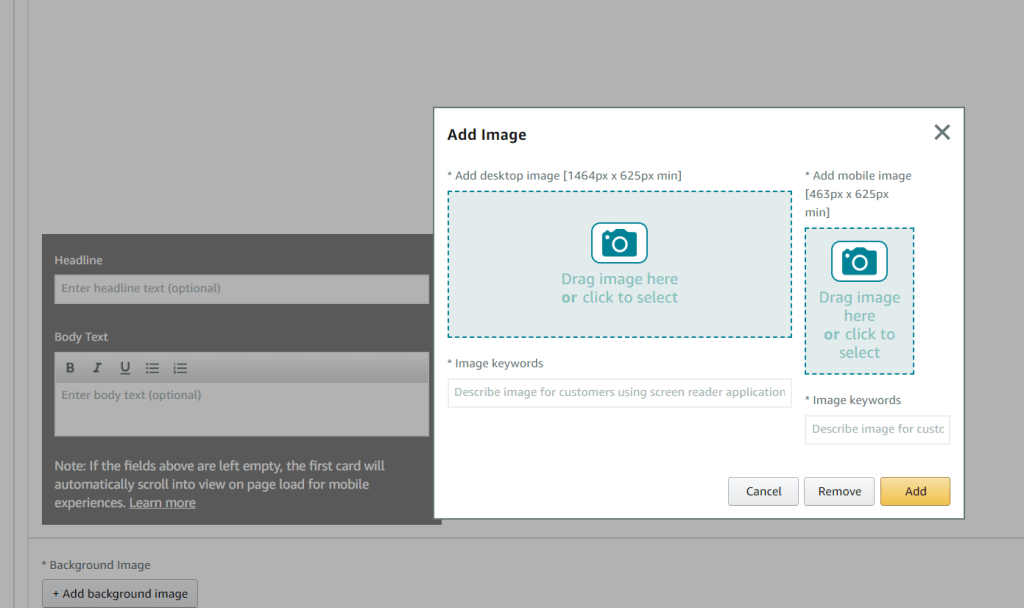
Step 1: Add a Background Image
- The first module in your brand story is the Brand Carousel Background, which includes two images: one for desktop (1646 x 625 px) and one for mobile (463 x 625 px).
- You can add text and a header, but letting the background image be the focus is often effective.
- Ensure the background images remain static, allowing customers to scroll through the additional modules you add.
- Follow Amazon’s specifications and image size requirements for the best results.
By following these steps and utilizing Amazon’s Brand Story feature, you can create a compelling narrative that enhances your brand’s presence on Amazon.
Step2: Brand ASIN & Store Showcase
- Showcase Up to Four ASINs: This module allows you to feature up to four products (ASINs).
- Image Requirements: Each ASIN should be accompanied by a supporting image of 166 x 182 px.
- Optimize with Keywords: Include relevant image keywords to enhance content optimization across platforms.

Step3: Brand Focus Image
- Background Image: Add a background image with a dimension of 362 x 453 px.
- Image Selection: Use a lifestyle image or an infographic that aligns with your brand.
- Optional Header and Text: You can add a header and text box, infographic and lifestyle images are also an option.

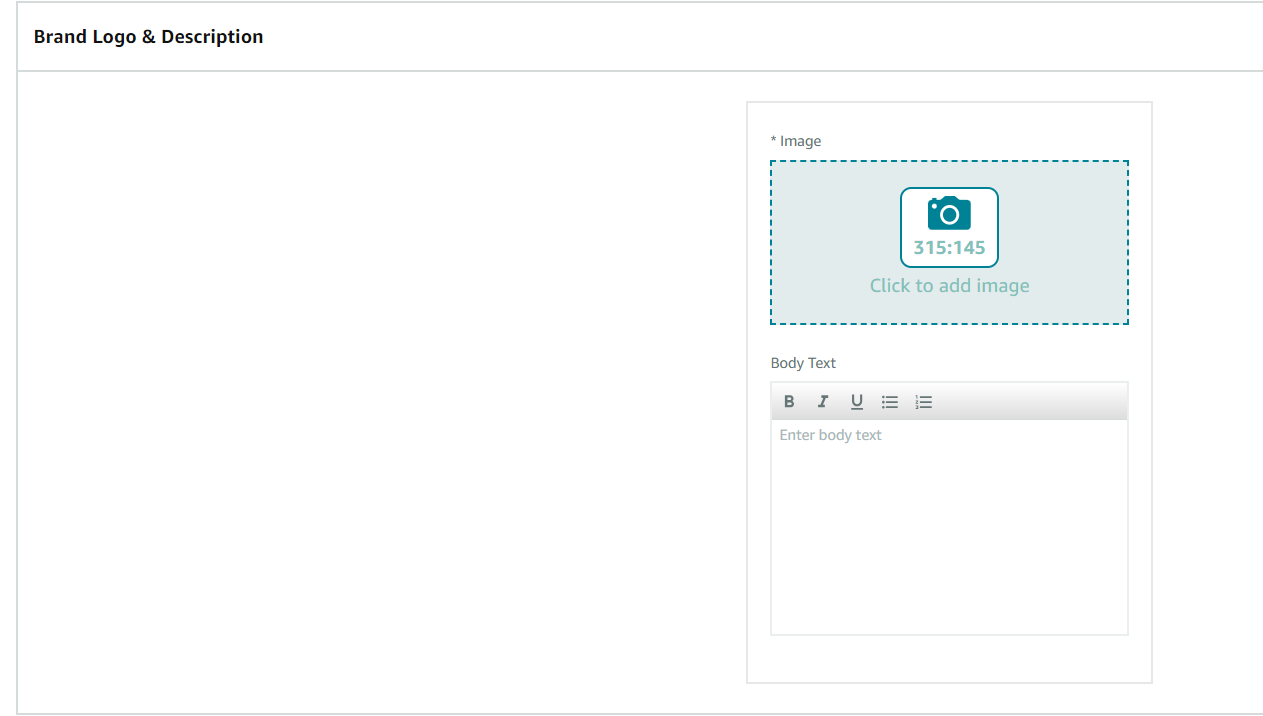
Step4: Brand Logo and Description
- Logo Image: Add an image sized at 315 x 145 px.
- Optional Text: This is an ideal place to display your brand’s logo and provide information about your brand’s history, such as its founding story or details about the founders.
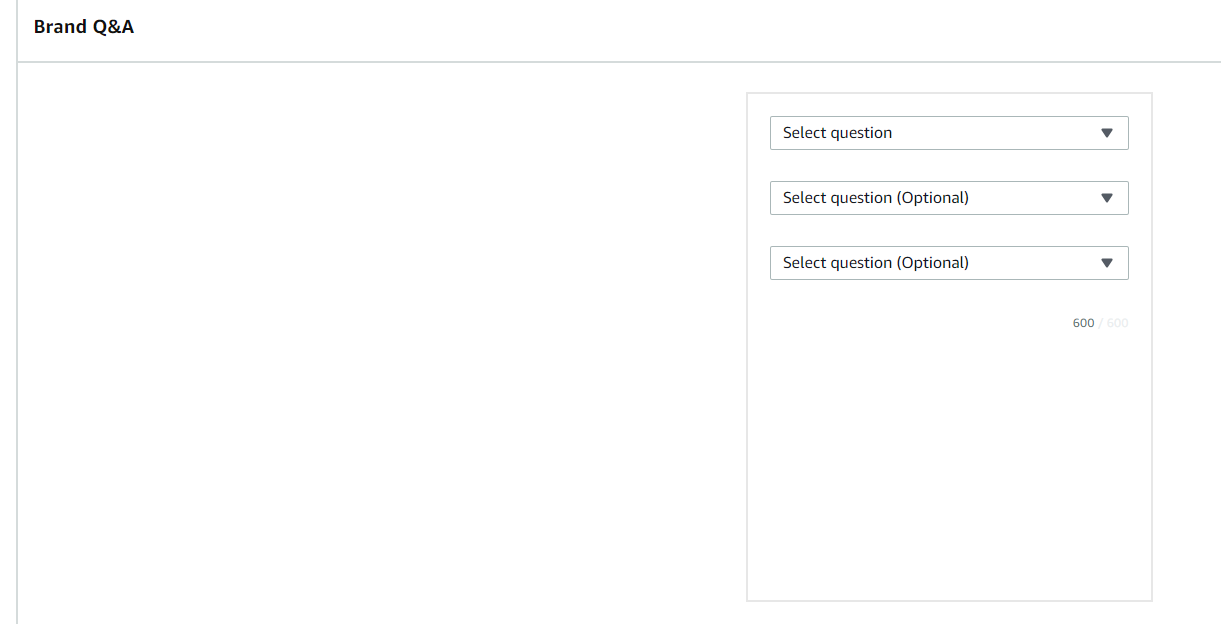
Step5: Brand Q&A
Pre-Populated Questions: Choose from questions like:
- How did we get our start?
- What makes our products unique?
- Why do we love what we do?
- What problem are we solving?
Custom Questions: You can also create your own questions based on what your customers frequently ask.
Key Amazon Brand Story Features
Advantages of Using the Amazon Brand Story Feature
- Customizable Continuous Scrolling Carousel: Create a seamless user experience with a continuous scrolling format featuring customizable modules.
- Highlight Your Brand Mission and Origin Story: Share your brand’s mission and origin story to connect more deeply with customers.
- Visual Appeal with Background Images: Add relevant background images to enhance the visual impact of your brand story.
- Showcase Popular Products: Feature your top ASINs and related products to encourage upselling and cross-selling.
- FAQ Modules for Customer Queries: Address common customer questions with FAQ modules, providing valuable information and reducing buyer hesitation.
- Stand Out from Competitors: Highlight what makes your brand unique to build a strong reputation and differentiate yourself from competitors.
- Improve Product Page Aesthetics: Enhance the overall appearance of your product pages, making them more attractive to potential customers.
- Increase Customer Engagement: Engage customers with compelling stories and visuals, encouraging them to spend more time on your pages.
- Build Brand Awareness and Credibility: Establish and enhance your brand’s awareness and credibility through consistent and impactful storytelling.
By leveraging these features, you can effectively use the Amazon Brand Story to create a compelling narrative that boosts customer engagement and strengthens your brand presence.
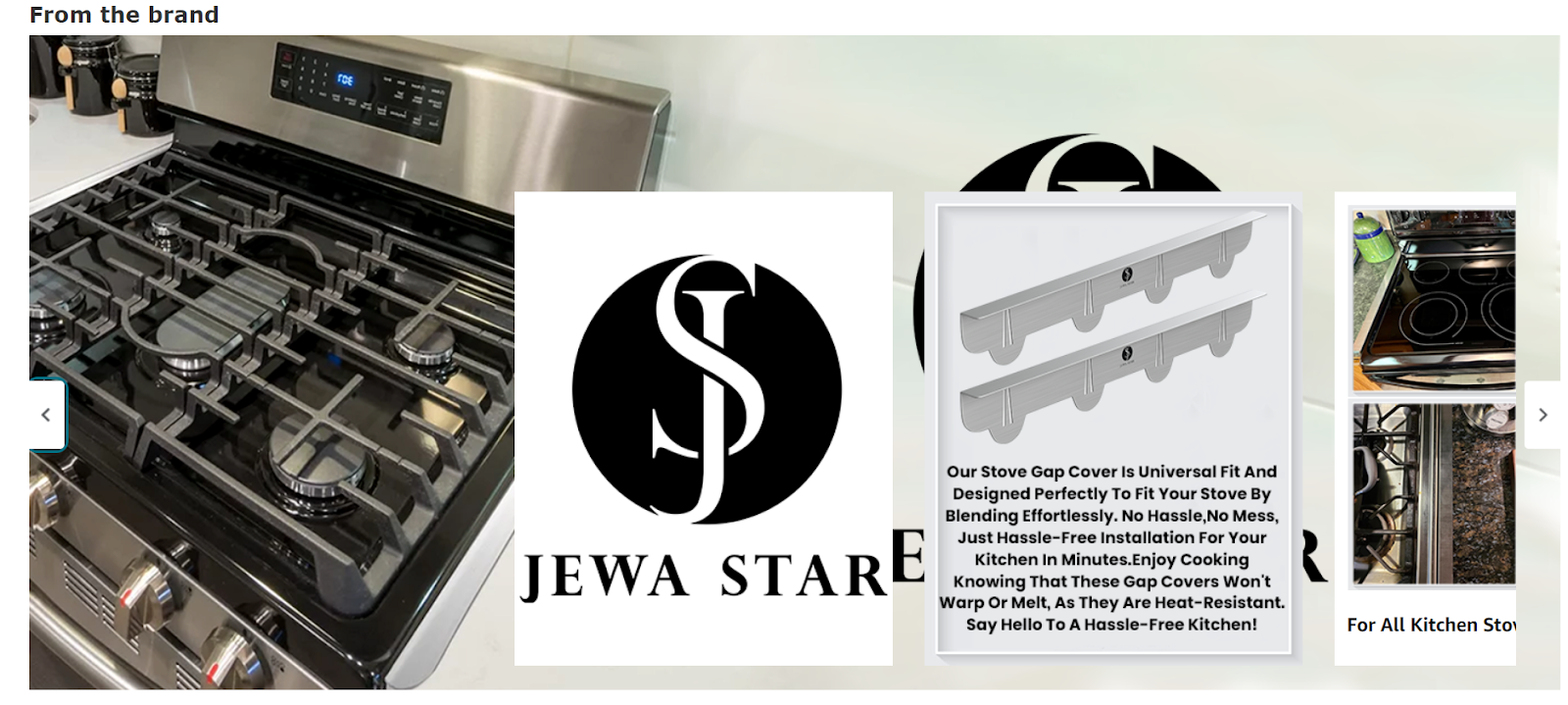
A few of the many examples are-

How Should You Make Your Brand Story Stand Out?
Creating compelling brand stories with high-quality images, text, and products can be challenging. Our Amazon Brand Story design experts are here to help you stand out from the competition and achieve remarkable results. U-commerce will handle the complexities for you, allowing you to present an engaging brand story effortlessly. With our assistance, you can deliver a captivating brand narrative in just a few simple steps.

The Effective Role Of Keywords In Modern SEO: Know The Insights Of Effective Keyword Research (2025)
Modern SEO refers to marketing optimization techniques to increase a brand’s online presence and engagement. While referring to modern SEO, Keyword Research must be noticed.
Keyword research is detailed research regarding those keywords that help you gain more target audiences on multiple platforms. It is the process of choosing the right keywords to drive maximum traffic on your website store or any page.
Hence, knowing the effectiveness of keyword research is a very crucial step to leveling up your modern SEO game. Let’s dive into the article to learn in detail about how effective keyword research is for gaining maximum modern SEO benefits for your business.
WHAT ARE KEYWORDS?

Keywords are those words that help you rank top among your competitors. Keywords are words that users use mostly to get solutions to their queries. Finding effective keywords and using them in our content allows us to target the appropriate audience on our business website or store.
Keywords are of two types: short-tail keywords and long-tail keywords. Short-tail keywords are head keywords that users type to search content for. Such keywords can be “music,” “gift,” etc.
Whereas, Longtail keywords are the phrases that users enter to search for something specific such as “Amazon Prime Day 2024”, “Valentine Gift for Women”, “Black Denim Jeans” etc.
Hence both types of keywords play a vital role in bringing your targeted audience to your website or business store when used correctly.
WHY ARE KEYWORDS NECESSARY FOR SEO?

Keywords play a crucial part in SEO since they build up the audience and online presence. Having a successful keyword strategy is essential for improving your ranking.
Keywords Strategy refers to the plan curated to reach your ranking goal among websites, brands, or competitors on search engines or other platforms. Keyword research gives you data to process whereas keyword strategy gives you a path to walk to gain maximum benefits or success.
We will now dive deeply into the benefits gained from Effective Keyword Research & Strategy for Modern SEO.
BENEFITS OF EFFECTIVE KEYWORD RESEARCH
Following are the benefits you gain from keyword research:
1. Insights on Marketing Trends
You will get to know a lot more in detail about ongoing marketing insights if you conduct effective keyword research, you will get to know which keywords are a high priority in your business and which are not towards your business growth.
2. Traffic – Audience Growth
If your keyword research is correct then it will result in audience or traffic growth for your product page, website, or domain. Without accurate keyword research you won’t be able to get a target audience to your website through having traffic here and there.
3. Acquiring Customers
If you are a business providing products or services that other business professionals are looking for. Then with the help of effective research, you will be able to get more clients as you start using effective keyword research.
Hence these are the simplest benefits you can get from just doing effective keyword research and applying the same to your website or store content.
Now we have our answer to why organic keyword research is necessary but now we will look into how to carry out effective keyword research for modern SEO.
STRATEGIES FOR EFFECTIVE KEYWORD RESEARCH
Following are the strategies that you can follow to conduct effective keyword research to gain all benefits from the same:
1. Analysing Seed Keywords
The keyword research process starts with the seed keyword. The seed keyword is usually the keyword that generates an idea in your mind. In short, the very first idea or word that pops up in your head is a seed keyword.
Now you need to be careful to select an appropriate seed keyword and move ahead with the resting content necessary for it. The seed keyword will be a parent keyword to get another shorttail and longtail keywords to assist in targeting your audience on your website.
So simply jot all the necessary seed keywords down and move ahead to find short-tail and longtail keywords on that base.
2. Using Tools To Find Keywords
Thanks to technology, we have many websites and SEO Tools that provide us with all the relevant keywords with the help of seed keywords. You just simply need to enter the seed keyword and the tools will come up with 200 to 1000+ keywords related to the same.
Those tools also provide other insights such as how useful that particular keywords are, such as their values and relevancy, or how many times it is used by other competitors to target the same audience as yours.
Some of those SEO keyword tools are Helium 10, Jungle Scout, MerchantWords, SEMrush, Ahrefs, Moz Keyword Explorer, etc for extensive keyword research. If you are a beginner then you will find the necessary or relevant keywords from your competitors by looking up repetitive words or by simply using Google Keywords.
3. Using Keyword Everywhere Extension
Keyword Everywhere is an extension available for Chrome, Firefox & Edge. You can install that to your extension for searching the keywords that are used most by users.
It has a reasonable pricing for the same but the best part about this tool is that it showcases the keyword’s position in current trends, volume, CPC & CMP of each keyword showcased.
This tool will help you choose the best volume keywords with trend effectiveness.
4. Using Rank Tracker
Now when you have so many seed keywords and sheets of keyword research, you will need to choose the best among those. Hence we would suggest using Rank Tracker which helps you cut off all the unnecessary keywords and will show the successful keywords with their SEO Rankings, Keyword Difficulty Level & Phrases Used which will make it easy for you to create content accordingly.
5. Use a User-Centric Approach
When you are finding keywords and selecting among them, always use a user-centric approach in your research. The user-centric approach is the approach where you place yourself as a customer and now you will try to figure how what words you will use to come up with your product or website as a solution.
In short, you need to imagine yourself as a customer and think about which keywords you will use if you want to find the solution to a particular query. These will help you find keywords more effectively.
6. Note Down Monthly Search Volume of Keywords
Monthly Search Volume is a very important aspect of effective keyword research. MSVs are the result of digits that show the usage of particular keywords and their effectiveness.
Tools such as Merchant Words, Helium 10, SearchVolume.io, etc will help you out figure the accurate monthly search volume for your keywords. On that basis then you can select the keywords that are relevant, effective, and useful to bring traffic to your website or detail page.
This way you will find the effective keywords from seed keywords to the relevant keywords per monthly search volume ratings. Overall this keyword research will help you reach the target audience goals for your Search Engine Optimization.
WHERE SHOULD THESE KEYWORDS BE USED FOR MORE EFFECTIVENESS?

These keywords can be used as below given points to make your keyword research and usage effective:
- Add the high-priority keywords to your “title”. This will make you rank top most in terms of organic search optimization.
- You can add your other keywords in the “meta-description” to make effective off-page SEO techniques.
- You can try to use those keywords in your H2 & H3 for repetitive yet organic keyword placements.
- You can also use your primary and secondary keywords in URL or Alt Text for images as on-page SEO techniques.
- Or, you can hire an SEO Agency for Organic Search optimization.
If you are finding it difficult to rank your website among your competitors. Then we are here to help you out. Our SEO Agency will help you figure out Organic search optimization, White-hat SEO techniques, and Technical SEO audits. We at U-commerce offer SEO Services such as On-page SEO Services, Off-page SEO Services, Keyword Research Services, SEO analysis Services, link-building services & SEO Consulting Services.

Are You Picking The Right Wholesale Products To Thrive On Amazon?
Selecting the right wholesale products to sell on Amazon is a critical aspect of building a profitable online business. Among the various methods available, direct sourcing has emerged as the preferred approach for many wholesale sellers. This strategy involves working closely with suppliers to identify products that have strong sales potential on Amazon, ensuring a steady flow of popular and profitable items to resell.
How To Select Wholesale Products To Sell On Amazon
One of the key advantages of direct sourcing is its straightforwardness. The process begins by obtaining a list of products from your supplier. Next, you match these products with existing listings on Amazon, focusing on those that are both popular and profitable. This method is widely used by sellers because suppliers often provide significant discounts and favorable deal conditions, allowing for a profitable resale margin.
When selecting products, it’s essential to target items that can yield a profit margin of 15% or more after considering Amazon fees, shipping costs, and other expenses. This margin ensures that your business remains sustainable and profitable over time.
If you do not have an existing supplier, your first step should be to find one that offers a range of products with strong sales potential. Look for suppliers whose products are already performing well but could benefit from increased visibility and better marketing on Amazon. Once you identify a supplier that aligns with your business goals, approach them to negotiate terms for becoming their wholesale reseller.
In summary, direct sourcing provides a reliable pathway to identifying and selecting profitable wholesale products to sell on Amazon. By working with the right suppliers and carefully choosing products with solid profit margins, you can build a successful and sustainable Amazon business.

What Makes A Good Wholesale Product?
When selecting wholesale products to sell on Amazon, it’s essential to evaluate several key factors to ensure success.
Strong Resale Value
A good wholesale product should have consistent and ongoing demand. Products with strong resale value are more likely to sell quickly, minimizing the risk of excess inventory. By choosing items with steady sales, you increase your chances of maintaining profitability.
Manageable Competition
While high demand is important, it’s equally crucial to consider the level of competition. Products that face intense competition with numerous sellers can lead to price wars, ultimately reducing your profits. Aim to select products with manageable competition, which will give you a better chance of achieving higher sales and maintaining healthy profit margins.
Competitive Pricing
The price point of your chosen products should strike a balance between being attractive to customers and allowing for a reasonable profit margin. Ensure that you can offer competitive pricing that draws in customers while still enabling you to turn a profit.
Restrictions and Eligibility
It’s important to be aware of any restrictions or eligibility requirements for selling certain products on Amazon. Some product categories may be restricted, requiring Amazon’s approval before you can list them. Make sure to check for any limitations on your seller account or product restrictions before making any purchasing decisions to avoid being stuck with inventory that you’re not authorized to sell.
Profitability
Finally, the products you select must be profitable. To assess profitability, subtract all associated costs—such as the Cost of Goods (what you pay your supplier), shipping, Amazon fees, and applicable taxes—from the selling price. This will help you determine whether a product can generate a sufficient profit margin.
How To Wholesale On Amazon
Step 1: Find a Supplier
To start wholesaling on Amazon, you first need to identify a supplier. This could be a brand, manufacturer, or large distributor offering the products you wish to sell. You can locate potential suppliers through online directories, trade shows, or by reaching out to manufacturers directly.
Step 2: Negotiate with the Supplier
Contact suppliers to request quotes and compare their prices, terms, and minimum order quantities (MOQs). Engage in negotiations to secure a price that ensures a healthy profit margin for you. Discuss payment methods, credit terms, and potential discounts for bulk orders, and highlight your value as a seller to strengthen your negotiating position.
Step 3: Research and Select High-Profit Products
Obtain a product list from your supplier and use product research tools to evaluate sales data, potential issues, and profitability. Focus on products with strong demand, low competition, attractive profit margins, and positive reviews. Validate your findings to ensure that these products will meet your profit and return on investment (ROI) expectations.
Step 4: Purchase Inventory
After selecting and validating your products, proceed to purchase inventory from your supplier. The MOQ can vary based on the supplier and product, but it often ranges from hundreds to thousands of units.
Step 5: List Your Products on Amazon
With your inventory ready, you can list your products on Amazon. Typically, you will add your offers to existing product listings that already exist in the Amazon catalog. Ensure that your products match the listings precisely to avoid any discrepancies.
Step 6: Fulfill Orders
When customers place orders for your products, you need to fulfill them. You have the option to handle fulfillment yourself or use Amazon’s Fulfillment by Amazon (FBA) service. If you choose FBA, you will send your inventory to Amazon’s fulfillment centers, where Amazon will manage picking, packing, shipping, and customer service for your orders.

Conclusion
In the competitive landscape of Amazon selling, selecting the right wholesale products is crucial to your success. By focusing on products with strong resale value, manageable competition, competitive pricing, and ensuring compliance with Amazon’s restrictions and eligibility requirements, you can build a profitable and sustainable business. At U-Commerce, we are dedicated to helping sellers optimize their Amazon listings and navigate the complexities of the marketplace. By leveraging our expertise, you can make informed decisions about your product selection, maximizing your potential for success and driving your e-commerce business forward.